<?xml version="1.0" encoding="UTF-8"?>
<?xml-stylesheet href="/vendor/feed/atom.xsl" type="text/xsl"?>
<feed xmlns="http://www.w3.org/2005/Atom" xml:lang="en-US">
                        <id>https://freek.dev/feed</id>
                                <link href="https://freek.dev/feed" rel="self"></link>
                                <title><![CDATA[freek.dev - all blogposts]]></title>
                    
                                <subtitle>All blogposts on freek.dev</subtitle>
                                                    <updated>2026-10-13T12:31:12+02:00</updated>
                        <entry>
            <title><![CDATA[Why I think we should write our own PR descriptions]]></title>
            <link rel="alternate" href="https://freek.dev/3205-why-i-think-we-should-write-our-own-pr-descriptions" />
            <id>https://freek.dev/3205</id>
            <author>
                <name><![CDATA[Freek Van der Herten]]></name>
                <email><![CDATA[freek@spatie.be]]></email>

            </author>
            <summary type="html">
                <![CDATA[<p>Ryan Chandler makes a strong case for keeping PR descriptions human-written, even when agents handle most of the implementation. The piece focuses on ownership, review context, and why a concise explanation from the person driving the change is more useful than a long AI-generated summary.</p>


<a href='https://laravel.com/blog/why-i-think-we-should-write-our-own-pr-descriptions'>Read more</a>]]>
            </summary>
                                    <updated>2026-10-13T12:31:12+02:00</updated>
        </entry>
            <entry>
            <title><![CDATA[Readonly Property Defaults in PHP 8.6: A Four-Year-Old Restriction Finally Lifts]]></title>
            <link rel="alternate" href="https://freek.dev/3204-readonly-property-defaults-in-php-86-a-four-year-old-restriction-finally-lifts" />
            <id>https://freek.dev/3204</id>
            <author>
                <name><![CDATA[Freek Van der Herten]]></name>
                <email><![CDATA[freek@spatie.be]]></email>

            </author>
            <summary type="html">
                <![CDATA[<p>A clear overview of PHP 8.6's readonly property defaults RFC, why the old restriction existed, and why interface properties made it worth revisiting. It also covers the practical edge cases, so you know where the new syntax helps and where it still does not.</p>


<a href='https://shocm.me/posts/2026-08-30-php-86-readonly-property-defaults/'>Read more</a>]]>
            </summary>
                                    <updated>2026-10-12T12:30:50+02:00</updated>
        </entry>
            <entry>
            <title><![CDATA[Laravel Context: The Hidden Information That Follows Your Code]]></title>
            <link rel="alternate" href="https://freek.dev/3203-laravel-context-the-hidden-information-that-follows-your-code" />
            <id>https://freek.dev/3203</id>
            <author>
                <name><![CDATA[Freek Van der Herten]]></name>
                <email><![CDATA[freek@spatie.be]]></email>

            </author>
            <summary type="html">
                <![CDATA[<p>A clear walkthrough of Laravel's Context feature and how it lets execution-scoped information travel through your app. It also explains why that matters for logging, queued jobs, and keeping trace data available without threading it through every method call.</p>


<a href='https://dev.to/othmane_nemli/laravel-context-the-hidden-information-that-follows-your-code-1mo8'>Read more</a>]]>
            </summary>
                                    <updated>2026-10-11T12:31:02+02:00</updated>
        </entry>
            <entry>
            <title><![CDATA[Migrating Pinkary from Laravel Forge to Laravel Cloud]]></title>
            <link rel="alternate" href="https://freek.dev/3202-migrating-pinkary-from-laravel-forge-to-laravel-cloud" />
            <id>https://freek.dev/3202</id>
            <author>
                <name><![CDATA[Freek Van der Herten]]></name>
                <email><![CDATA[freek@spatie.be]]></email>

            </author>
            <summary type="html">
                <![CDATA[<p>A practical engineering write-up on moving Pinkary from Laravel Forge to Laravel Cloud. It walks through the real migration issues they hit, including SQLite to MySQL differences, query rewrites, and storage assumptions in the codebase.</p>


<a href='https://laravel.com/blog/migrating-pinkary-from-laravel-forge-to-laravel-cloud'>Read more</a>]]>
            </summary>
                                    <updated>2026-10-10T12:30:41+02:00</updated>
        </entry>
            <entry>
            <title><![CDATA[★ Typed routes from Laravel to React with Wayfinder]]></title>
            <link rel="alternate" href="https://freek.dev/3088-typed-routes-from-laravel-to-react-with-wayfinder" />
            <id>https://freek.dev/3088</id>
            <author>
                <name><![CDATA[Freek Van der Herten]]></name>
                <email><![CDATA[freek@spatie.be]]></email>

            </author>
            <summary type="html">
                <![CDATA[<p>I've been writing about <a href="https://there-there.app">There There</a> a lot lately. It's a helpdesk we're building at Spatie, born from two decades of running our own customer support for our open source work and SaaS apps. After all that time being the customer of other helpdesks, we finally started on the one we actually wanted to use.</p>
<p>Our take on AI here is to aim it at the support agent, not the customer. The human owns the conversation. The model makes the reply a little cleaner and a little faster. There There is in private beta, and you can apply for early access at <a href="https://there-there.app">there-there.app</a>.</p>
<p>We're building There There with Laravel and Inertia. One package we've come to rely on is <a href="https://github.com/laravel/wayfinder">Laravel Wayfinder</a>. It generates typed TypeScript functions for every route and controller in your Laravel app, so the frontend talks to the backend without a single hardcoded URL. This post is about why that matters.</p>
<h2 id="using-wayfinder">Using Wayfinder</h2>
<p>A React codebase quickly fills up with URL strings. Every <code>fetch</code>, every form action, every link points to a route by way of a template literal. Then you rename a route in Laravel, or add a required parameter, and nothing breaks at compile time. You find out in production, or when a teammate clicks the wrong thing.</p>
<p>Wayfinder fixes this by generating a function per named route. You import it and call <code>.url()</code> to build the URL.</p>
<p>Here's a snippet from our team membership toggle.</p>
<pre data-lang="js" class="notranslate"><span class="hl-keyword">import</span> {
    add <span class="hl-keyword">as</span> addTeamMember,
    remove <span class="hl-keyword">as</span> removeTeamMember,
} <span class="hl-keyword">from</span> <span class="hl-value">'@/routes/app/settings/workspace/teams/members'</span>;

removeTeamMember.<span class="hl-property">url</span>({ <span class="hl-property">team</span>: team.<span class="hl-property">ulid</span>, <span class="hl-property">user</span>: member.<span class="hl-property">ulid</span> });
addTeamMember.<span class="hl-property">url</span>({ <span class="hl-property">team</span>: team.<span class="hl-property">ulid</span>, <span class="hl-property">user</span>: member.<span class="hl-property">ulid</span> });
</pre>
<p>Two things are worth pointing out. First, the parameters are type-checked. If you rename the <code>user</code> route parameter to <code>member</code>, TypeScript catches every caller. Second, the route names map cleanly to import paths, so finding them is just autocomplete.</p>
<p>Wayfinder also generates a typed function per controller. We use that when we talk to an endpoint via plain <code>fetch</code>, outside of an Inertia visit. Here's the retry action for a failed outbound message.</p>
<pre data-lang="js" class="notranslate"><span class="hl-keyword">import</span> MessageRetryController <span class="hl-keyword">from</span> <span class="hl-value">'@/actions/App/Http/Controllers/Tickets/MessageRetryController'</span>;

<span class="hl-keyword">await</span> <span class="hl-property">fetch</span>(
    <span class="hl-type">MessageRetryController</span>.<span class="hl-property">url</span>({ <span class="hl-property">ticket</span>: current.<span class="hl-property">ulid</span>, <span class="hl-property">message</span>: message.<span class="hl-property">ulid</span> }),
    { <span class="hl-property">method</span>: <span class="hl-value">'POST'</span> },
);
</pre>
<p>Same deal. The URL is type-safe, the parameters are checked, and renaming the controller in PHP breaks the TypeScript build rather than production.</p>
<p>To make all of this work, we hook Wayfinder into Vite. Here's the relevant bit of our <code>vite.config.js</code>.</p>
<pre data-lang="js" class="notranslate"><span class="hl-keyword">import</span> { wayfinder } <span class="hl-keyword">from</span> <span class="hl-value">&quot;@laravel/vite-plugin-wayfinder&quot;</span>;

<span class="hl-keyword">export</span> <span class="hl-keyword">default</span> <span class="hl-property">defineConfig</span>({
    <span class="hl-property">plugins</span>: [
        <span class="hl-comment">// ...</span>
        <span class="hl-property">wayfinder</span>(),
    ],
});
</pre>
<p>The plugin watches your Laravel routes and controllers during development, and regenerates the typed functions whenever something changes. Imports stay in sync with your backend without any manual step.</p>
<p><img src="https://freek.dev/admin-uploads/wayfinder-typed-route-parameters-v2.png" alt="Illustration of TypeScript flagging a missing user parameter in a Wayfinder route" /></p>
<h2 id="in-closing">In closing</h2>
<p>Wayfinder has shaved a whole category of bug off our work. No more grep-the-codebase when a route changes, no more &quot;why is this fetch returning 404&quot;, no more arguing about trailing slashes. You write the route in Laravel, import it in TypeScript, and the two stay honest with each other.</p>
<p>You can read more about it in <a href="https://github.com/laravel/wayfinder">the Wayfinder repo on GitHub</a>. And if you'd like to try There There yourself, we're in private beta right now and you can apply for early access at <a href="https://there-there.app">there-there.app</a>.</p>
]]>
            </summary>
                                    <updated>2026-10-09T14:04:12+02:00</updated>
        </entry>
            <entry>
            <title><![CDATA[★ Laravel AI SDK in practice: the agent behind There There]]></title>
            <link rel="alternate" href="https://freek.dev/3089-laravel-ai-sdk-in-practice-the-agent-behind-there-there" />
            <id>https://freek.dev/3089</id>
            <author>
                <name><![CDATA[Freek Van der Herten]]></name>
                <email><![CDATA[freek@spatie.be]]></email>

            </author>
            <summary type="html">
                <![CDATA[<p>Over the past few weeks I've posted a couple of times about <a href="https://there-there.app">There There</a>, the helpdesk we're building at Spatie. After two decades of running our own customer support, we decided to stop compromising on tools and build the one we actually want to use.</p>
<p>A lot of the fun is on the AI side. We're not using it to replace support agents, we're using it to make them faster. The human reads the ticket, thinks, and clicks a button. The model pulls up relevant history, drafts a reply, tags the ticket, closes a duplicate. There There is in private beta right now, and you can apply for early access at <a href="https://there-there.app">there-there.app</a>.</p>
<p>The whole AI layer is built on the new <a href="https://github.com/laravel/ai">Laravel AI SDK</a>. It's been a joy to work with, and I'd like to walk through how we use it.</p>
<h2 id="using-the-laravel-ai-sdk">Using the Laravel AI SDK</h2>
<p>Everything starts with an agent class. Ours is called <code>ThereThereAgent</code>. It declares which model to use, what the system prompt looks like, which tools the model can call, and what conversation history to replay.</p>
<p>Here's a trimmed version.</p>
<pre data-lang="php" class="notranslate"><span class="hl-keyword">use</span> <span class="hl-type">Laravel\Ai\Attributes\MaxSteps</span>;
<span class="hl-keyword">use</span> <span class="hl-type">Laravel\Ai\Attributes\Temperature</span>;
<span class="hl-keyword">use</span> <span class="hl-type">Laravel\Ai\Contracts\Agent</span>;
<span class="hl-keyword">use</span> <span class="hl-type">Laravel\Ai\Contracts\Conversational</span>;
<span class="hl-keyword">use</span> <span class="hl-type">Laravel\Ai\Contracts\HasTools</span>;
<span class="hl-keyword">use</span> <span class="hl-type">Laravel\Ai\Promptable</span>;

<span class="hl-injection"><span class="hl-attribute">#[<span class="hl-type">Temperature</span>(0.3)]</span></span>
<span class="hl-injection"><span class="hl-attribute">#[<span class="hl-type">MaxSteps</span>(10)]</span></span>
<span class="hl-keyword">class</span> <span class="hl-type">ThereThereAgent</span> <span class="hl-keyword">implements</span><span class="hl-type"> Agent, Conversational, HasTools
</span>{
    <span class="hl-keyword">use</span> <span class="hl-type">Promptable</span>;

    <span class="hl-keyword">public</span> <span class="hl-keyword">function</span> <span class="hl-property">__construct</span>(<span class="hl-injection">
        <span class="hl-keyword">protected</span> <span class="hl-type">Workspace</span> <span class="hl-property">$workspace</span>,
        <span class="hl-keyword">protected</span> <span class="hl-type">User</span> <span class="hl-property">$user</span>,
        <span class="hl-keyword">protected</span> <span class="hl-type">?Ticket</span> <span class="hl-property">$contextTicket</span> = <span class="hl-keyword">null</span>,
        <span class="hl-keyword">protected</span> <span class="hl-type">array</span> <span class="hl-property">$conversationHistory</span> = [],
    </span>) {}

    <span class="hl-keyword">public</span> <span class="hl-keyword">function</span> <span class="hl-property">model</span>(): <span class="hl-type">string</span>
    {
        <span class="hl-keyword">return</span> <span class="hl-property">config</span>(<span class="hl-value">'ai-pricing.default.name'</span>);
    }

    <span class="hl-keyword">public</span> <span class="hl-keyword">function</span> <span class="hl-property">instructions</span>(): <span class="hl-type">string</span>
    {
        <span class="hl-keyword">return</span> <span class="hl-property">view</span>(<span class="hl-value">'prompts.ai.there-there-agent-system'</span>, [
            <span class="hl-value">'workspace'</span> =&gt; <span class="hl-variable">$this</span>-&gt;<span class="hl-property">workspace</span>,
            <span class="hl-value">'user'</span> =&gt; <span class="hl-variable">$this</span>-&gt;<span class="hl-property">user</span>,
            <span class="hl-value">'contextTicket'</span> =&gt; <span class="hl-variable">$this</span>-&gt;<span class="hl-property">contextTicket</span>,
        ])-&gt;<span class="hl-property">render</span>();
    }

    <span class="hl-keyword">public</span> <span class="hl-keyword">function</span> <span class="hl-property">tools</span>(): <span class="hl-type">iterable</span>
    {
        <span class="hl-keyword">return</span> [
            <span class="hl-keyword">new</span> <span class="hl-type">ChangeTicketStatusTool</span>(<span class="hl-variable">$this</span>-&gt;<span class="hl-property">workspace</span>),
            <span class="hl-keyword">new</span> <span class="hl-type">AssignTicketTool</span>(<span class="hl-variable">$this</span>-&gt;<span class="hl-property">workspace</span>),
            <span class="hl-keyword">new</span> <span class="hl-type">AddNoteToTicketTool</span>(<span class="hl-variable">$this</span>-&gt;<span class="hl-property">workspace</span>),
            <span class="hl-keyword">new</span> <span class="hl-type">ManageTicketTagsTool</span>(<span class="hl-variable">$this</span>-&gt;<span class="hl-property">workspace</span>),
        ];
    }
}
</pre>
<p>A few things I like here. The <code>#[Temperature]</code> and <code>#[MaxSteps]</code> attributes are declarative. No wiring through constructor parameters, no config file. The <code>instructions()</code> method renders a Blade view, which means our system prompt is a regular template with includes and partials. And <code>tools()</code> returns an iterable, so we can turn tools on and off depending on context.</p>
<p>Tools are where it gets fun. Each one is a class the model can decide to call, with a typed JSON schema so arguments are validated before they hit our code. Here's the tool that changes a ticket's status.</p>
<pre data-lang="php" class="notranslate"><span class="hl-keyword">class</span> <span class="hl-type">ChangeTicketStatusTool</span> <span class="hl-keyword">implements</span><span class="hl-type"> Tool
</span>{
    <span class="hl-keyword">use</span> <span class="hl-type">FindsTicketsInWorkspace</span>;

    <span class="hl-keyword">public</span> <span class="hl-keyword">function</span> <span class="hl-property">__construct</span>(<span class="hl-injection"><span class="hl-keyword">protected</span> <span class="hl-type">Workspace</span> <span class="hl-property">$workspace</span></span>) {}

    <span class="hl-keyword">public</span> <span class="hl-keyword">function</span> <span class="hl-property">description</span>(): <span class="hl-type">string</span>
    {
        <span class="hl-keyword">return</span> <span class="hl-value">'Change the status of a ticket. Use this when the agent asks to close, reopen, or mark a ticket as spam.'</span>;
    }

    <span class="hl-keyword">public</span> <span class="hl-keyword">function</span> <span class="hl-property">schema</span>(<span class="hl-injection"><span class="hl-type">JsonSchema</span> $schema</span>): <span class="hl-type">array</span>
    {
        <span class="hl-keyword">return</span> [
            <span class="hl-value">'ticket_subject'</span> =&gt; <span class="hl-variable">$schema</span>-&gt;<span class="hl-property">string</span>()-&gt;<span class="hl-property">description</span>(<span class="hl-value">'The subject, title, or ULID of the ticket.'</span>)-&gt;<span class="hl-property">required</span>(),
            <span class="hl-value">'contact_email'</span> =&gt; <span class="hl-variable">$schema</span>-&gt;<span class="hl-property">string</span>()-&gt;<span class="hl-property">description</span>(<span class="hl-value">'The contact email on the ticket.'</span>)-&gt;<span class="hl-property">required</span>(),
            <span class="hl-value">'new_status'</span> =&gt; <span class="hl-variable">$schema</span>-&gt;<span class="hl-property">string</span>()-&gt;<span class="hl-property">description</span>(<span class="hl-value">'The new status: open, closed, or spam.'</span>)-&gt;<span class="hl-property">required</span>(),
        ];
    }

    <span class="hl-keyword">public</span> <span class="hl-keyword">function</span> <span class="hl-property">handle</span>(<span class="hl-injection"><span class="hl-type">Request</span> $request</span>): <span class="hl-type">string</span>
    {
        <span class="hl-variable">$status</span> = <span class="hl-type">TicketStatus</span>::<span class="hl-property">tryFrom</span>(<span class="hl-variable">$request</span>[<span class="hl-value">'new_status'</span>] ?? <span class="hl-value">''</span>);

        <span class="hl-keyword">if</span> (! <span class="hl-variable">$status</span>) {
            <span class="hl-keyword">return</span> <span class="hl-value">'Invalid status. Must be one of: open, closed, spam.'</span>;
        }

        <span class="hl-variable">$ticket</span> = <span class="hl-variable">$this</span>-&gt;<span class="hl-property">findTicket</span>(<span class="hl-variable">$request</span>[<span class="hl-value">'ticket_subject'</span>], <span class="hl-variable">$request</span>[<span class="hl-value">'contact_email'</span>]);

        <span class="hl-keyword">if</span> (! <span class="hl-variable">$ticket</span>) {
            <span class="hl-keyword">return</span> <span class="hl-value">'Could not find a matching ticket.'</span>;
        }

        <span class="hl-property">app</span>(<span class="hl-type">ChangeTicketStatusAction</span>::<span class="hl-keyword">class</span>)-&gt;<span class="hl-property">execute</span>(<span class="hl-variable">$ticket</span>, <span class="hl-variable">$status</span>);

        <span class="hl-keyword">return</span> <span class="hl-property">json_encode</span>([
            <span class="hl-value">'result'</span> =&gt; <span class="hl-value">'success'</span>,
            <span class="hl-value">'ticket'</span> =&gt; <span class="hl-variable">$ticket</span>-&gt;<span class="hl-property">displayTitle</span>(),
            <span class="hl-value">'new_status'</span> =&gt; <span class="hl-variable">$status</span>-&gt;<span class="hl-property">label</span>(),
        ]);
    }
}
</pre>
<p><code>description()</code> is what the model reads when deciding whether to call this tool. <code>schema()</code> returns the typed JSON schema the model has to match. <code>handle()</code> runs the tool and returns a string that goes back into the model's context. We return JSON on success so the model has structured data to refer to when it writes its final reply.</p>
<p>Notice we don't do heavy lifting inside the tool. The actual work is delegated to <code>ChangeTicketStatusAction</code>, a regular domain action. The tool is just an AI-facing adapter over code we already had.</p>
<p>Calling the agent from an action is a couple of lines.</p>
<pre data-lang="php" class="notranslate"><span class="hl-variable">$agent</span> = <span class="hl-keyword">new</span> <span class="hl-type">ThereThereAgent</span>(
    <span class="hl-property">workspace</span>: <span class="hl-variable">$workspace</span>,
    <span class="hl-property">user</span>: <span class="hl-variable">$user</span>,
    <span class="hl-property">contextTicket</span>: <span class="hl-variable">$agentChat</span>-&gt;<span class="hl-property">contextTicket</span>,
    <span class="hl-property">conversationHistory</span>: <span class="hl-variable">$agentChat</span>-&gt;<span class="hl-property">getConversationHistoryExcludingLatest</span>(),
);

<span class="hl-keyword">return</span> <span class="hl-variable">$this</span>-&gt;<span class="hl-property">streamingService</span>-&gt;<span class="hl-property">stream</span>(<span class="hl-variable">$agent</span>, <span class="hl-variable">$messageForAi</span>, <span class="hl-variable">$agentChat</span>);
</pre>
<p>We hand the agent off to our streaming service, which turns the SDK's response stream into events the frontend can consume. That's another post.</p>
<p>TODO: short video of the Ask There There agent picking up a message, calling a tool like changing a ticket status, and replying.</p>
<h2 id="in-closing">In closing</h2>
<p>The Laravel AI SDK has hit a sweet spot for our use case. The agent and tool abstractions are simple, the Blade-backed prompt is a joy to edit, and the typed schema means the model rarely mangles its arguments. We've barely scratched the surface of what it can do.</p>
<p>You can read more in <a href="https://github.com/laravel/ai">the Laravel AI SDK repo</a>. And if you'd like to try There There yourself, we're in private beta right now and you can apply for early access at <a href="https://there-there.app">there-there.app</a>.</p>
]]>
            </summary>
                                    <updated>2026-10-08T12:30:24+02:00</updated>
        </entry>
            <entry>
            <title><![CDATA[★ Keeping Laravel and TypeScript in sync with data objects]]></title>
            <link rel="alternate" href="https://freek.dev/3090-keeping-laravel-and-typescript-in-sync-with-data-objects" />
            <id>https://freek.dev/3090</id>
            <author>
                <name><![CDATA[Freek Van der Herten]]></name>
                <email><![CDATA[freek@spatie.be]]></email>

            </author>
            <summary type="html">
                <![CDATA[<p>At Spatie we build SaaS apps with Laravel on the backend and Inertia with React on the frontend. That split means two type systems have to agree about every payload that crosses between them. Laravel data going out, TypeScript picking it up.</p>
<p><a href="https://there-there.app">There There</a>, the helpdesk we're building, is built exactly like that. Tickets, messages, members, custom sidebar sections, all of it crosses the bridge. We'd go insane maintaining those types by hand. So we don't. There There is in private beta right now, and you can apply for early access at <a href="https://there-there.app">there-there.app</a>.</p>
<p>Two Spatie packages make this painless. <code>spatie/laravel-data</code> shapes outgoing payloads into typed PHP classes, and <code>spatie/laravel-typescript-transformer</code> turns those classes into TypeScript definitions at build time. Let me show what that looks like in practice.</p>
<h2 id="keeping-types-in-sync">Keeping types in sync</h2>
<p>A payload starts life as a <code>Data</code> class. Here's our <code>MemberData</code>, which we send down every time we render the member detail page.</p>
<pre data-lang="php" class="notranslate"><span class="hl-keyword">use</span> <span class="hl-type">Spatie\LaravelData\Data</span>;
<span class="hl-keyword">use</span> <span class="hl-type">Spatie\TypeScriptTransformer\Attributes\TypeScript</span>;

<span class="hl-attribute">#[<span class="hl-type">TypeScript</span>]</span>
<span class="hl-keyword">class</span> <span class="hl-type">MemberData</span> <span class="hl-keyword">extends</span> <span class="hl-type">Data</span>
{
    <span class="hl-keyword">public</span> <span class="hl-keyword">function</span> <span class="hl-property">__construct</span>(<span class="hl-injection">
        <span class="hl-keyword">public</span> <span class="hl-type">int</span> <span class="hl-property">$id</span>,
        <span class="hl-keyword">public</span> <span class="hl-type">string</span> <span class="hl-property">$ulid</span>,
        <span class="hl-keyword">public</span> <span class="hl-type">string</span> <span class="hl-property">$name</span>,
        <span class="hl-keyword">public</span> <span class="hl-type">string</span> <span class="hl-property">$email</span>,
        <span class="hl-keyword">public</span> <span class="hl-type">?string</span> <span class="hl-property">$avatar_url</span>,
        <span class="hl-keyword">public</span> <span class="hl-type">WorkspaceMemberRole</span> <span class="hl-property">$role</span>,
        <span class="hl-keyword">public</span> <span class="hl-type">string</span> <span class="hl-property">$joined_at</span>,
        <span class="hl-keyword">public</span> <span class="hl-type">bool</span> <span class="hl-property">$restricted_channel_access</span> = <span class="hl-keyword">false</span>,
    </span>) {}

    <span class="hl-keyword">public</span> <span class="hl-keyword">static</span> <span class="hl-keyword">function</span> <span class="hl-property">fromPivotUser</span>(<span class="hl-injection"><span class="hl-type">User</span> $user</span>): <span class="hl-type">self</span>
    {
        <span class="hl-keyword">return</span> <span class="hl-keyword">new</span> <span class="hl-type">self</span>(
            <span class="hl-property">id</span>: <span class="hl-variable">$user</span>-&gt;<span class="hl-property">id</span>,
            <span class="hl-property">ulid</span>: <span class="hl-variable">$user</span>-&gt;<span class="hl-property">ulid</span>,
            <span class="hl-property">name</span>: <span class="hl-variable">$user</span>-&gt;<span class="hl-property">name</span>,
            <span class="hl-property">email</span>: <span class="hl-variable">$user</span>-&gt;<span class="hl-property">email</span>,
            <span class="hl-property">avatar_url</span>: <span class="hl-variable">$user</span>-&gt;<span class="hl-property">getAvatarUrlWithFallback</span>(),
            <span class="hl-property">role</span>: <span class="hl-type">WorkspaceMemberRole</span>::<span class="hl-property">from</span>(<span class="hl-variable">$user</span>-&gt;<span class="hl-property">pivot</span>-&gt;<span class="hl-property">role</span>),
            <span class="hl-property">joined_at</span>: <span class="hl-variable">$user</span>-&gt;<span class="hl-property">pivot</span>-&gt;<span class="hl-property">created_at</span>-&gt;<span class="hl-property">toIso8601String</span>(),
            <span class="hl-property">restricted_channel_access</span>: (<span class="hl-type">bool</span>) <span class="hl-variable">$user</span>-&gt;<span class="hl-property">pivot</span>-&gt;<span class="hl-property">restricted_channel_access</span>,
        );
    }
}
</pre>
<p>The <code>#[TypeScript]</code> attribute is the opt-in. Any PHP class that carries it is picked up by the transformer. The constructor properties become the TypeScript type, including the enum <code>WorkspaceMemberRole</code>, the nullable string, and the boolean with a default.</p>
<p>The transformer itself is a regular Laravel package with a config file. Here's the relevant part of ours.</p>
<pre data-lang="php" class="notranslate"><span class="hl-keyword">return</span> [
    <span class="hl-value">'auto_discover_types'</span> =&gt; [
        <span class="hl-property">app_path</span>(),
    ],

    <span class="hl-value">'transformers'</span> =&gt; [
        <span class="hl-type">SpatieStateTransformer</span>::<span class="hl-keyword">class</span>,
        <span class="hl-type">EnumTransformer</span>::<span class="hl-keyword">class</span>,
        <span class="hl-type">DataTypeScriptTransformer</span>::<span class="hl-keyword">class</span>,
        <span class="hl-type">DtoTransformer</span>::<span class="hl-keyword">class</span>,
    ],

    <span class="hl-value">'default_type_replacements'</span> =&gt; [
        <span class="hl-type">Carbon\Carbon</span>::<span class="hl-keyword">class</span> =&gt; <span class="hl-value">'string'</span>,
    ],

    <span class="hl-value">'output_file'</span> =&gt; <span class="hl-property">resource_path</span>(<span class="hl-value">'js/types/generated.d.ts'</span>),
];
</pre>
<p>Three things worth knowing. <code>auto_discover_types</code> scans <code>app/</code> for any annotated class. <code>transformers</code> handles data classes, DTOs, enums, and Spatie state machines. <code>default_type_replacements</code> lets you swap PHP types for their TypeScript equivalents, which is how every <code>Carbon</code> date becomes a plain <code>string</code> on the frontend.</p>
<p>When the transformer runs, it writes <code>resources/js/types/generated.d.ts</code>. For our <code>MemberData</code>, the output looks like this.</p>
<pre data-lang="txt" class="notranslate">declare namespace App.Domain.Settings.Data {
    export type MemberData = {
        id: number;
        ulid: string;
        name: string;
        email: string;
        avatar_url: string | null;
        role: App.Domain.Workspace.Enums.WorkspaceMemberRole;
        joined_at: string;
        restricted_channel_access: boolean;
    };
}
</pre>
<p>The namespace mirrors the PHP namespace. The property shapes line up with the constructor. Enums are cross-referenced to their own generated types, so renaming an enum case in PHP propagates to every TypeScript caller.</p>
<p>You could regenerate this file manually with <code>php artisan typescript:transform</code>, but we wire it into Vite so it happens whenever a data class or enum changes.</p>
<pre data-lang="js" class="notranslate"><span class="hl-property">handleHotUpdate</span>({ file }) {
    <span class="hl-keyword">if</span> (isServe &amp;&amp; file.<span class="hl-property">endsWith</span>(<span class="hl-value">'.php'</span>) &amp;&amp; (file.<span class="hl-property">includes</span>(<span class="hl-value">'/Data/'</span>) || file.<span class="hl-property">includes</span>(<span class="hl-value">'/Enums/'</span>))) {
        <span class="hl-property">generate</span>();
    }
},
</pre>
<p>That snippet sits inside a small custom Vite plugin. When the dev server is running and a PHP file under <code>Data/</code> or <code>Enums/</code> changes, we shell out to <code>php artisan typescript:transform</code> and the frontend types update in place. No manual step, no stale definitions.</p>
<p>There's a simpler option in v3 of <code>spatie/laravel-typescript-transformer</code>: the package includes a <a href="https://spatie.be/docs/typescript-transformer/v3/watch-mode/how-it-works">built-in watch mode</a>. After installing <code>chokidar</code>, run <code>php artisan typescript:transform --watch</code>. We're on v2.6, whose <code>typescript:transform</code> command has no <code>--watch</code> option, so the Vite plugin above handles changes for us.</p>
<p>Here's what that looks like in the editor. The fields from <code>MemberData</code> show up as TypeScript suggestions:</p>
<p><img src="https://freek.dev/admin-uploads/member-data-autocomplete-6114fc3a.png" alt="Autocomplete suggestions for the fields of MemberData in a TypeScript editor" /></p>
<h2 id="in-closing">In closing</h2>
<p>This setup has erased a whole category of papercut. We rename a PHP property, the TypeScript compiler lights up on every frontend caller. We add a field, it's available to autocomplete in seconds. The two sides stay honest.</p>
<p>You can find the packages on GitHub: <a href="https://github.com/spatie/laravel-data">laravel-data</a> and <a href="https://github.com/spatie/laravel-typescript-transformer">laravel-typescript-transformer</a>. And if you'd like to try There There yourself, we're in private beta right now and you can apply for early access at <a href="https://there-there.app">there-there.app</a>.</p>
]]>
            </summary>
                                    <updated>2026-10-07T12:30:50+02:00</updated>
        </entry>
            <entry>
            <title><![CDATA[★ Exceptions that explain themselves]]></title>
            <link rel="alternate" href="https://freek.dev/3091-exceptions-that-explain-themselves" />
            <id>https://freek.dev/3091</id>
            <author>
                <name><![CDATA[Freek Van der Herten]]></name>
                <email><![CDATA[freek@spatie.be]]></email>

            </author>
            <summary type="html">
                <![CDATA[<p><a href="https://there-there.app">There There</a>, the helpdesk we're building at Spatie, is a project of learned habits. Twenty-some years of writing Laravel apps has taught us which patterns pay off and which ones quietly rot. One that keeps earning its keep is a custom exception class for every domain error.</p>
<p>This is a small pattern, but it's one of those things that makes a codebase nicer to live in. There There is in private beta right now, and you can apply for early access at <a href="https://there-there.app">there-there.app</a>.</p>
<h2 id="exceptions-that-explain-themselves">Exceptions that explain themselves</h2>
<p>The conventional answer for a domain error is something like <code>throw new InvalidArgumentException(&quot;Only notes can be deleted&quot;)</code>. It works, the test passes, the user sees a 500 page. But then three months later you try to catch just this specific error and you can't, because <code>InvalidArgumentException</code> is thrown from a dozen other places.</p>
<p>Our pattern is one class per domain error, with a static factory method per reason. Here's the one that fires when someone tries to delete a message that isn't a note.</p>
<pre data-lang="php" class="notranslate"><span class="hl-keyword">namespace</span> <span class="hl-type">App\Domain\Tickets\Exceptions</span>;

<span class="hl-keyword">use</span> <span class="hl-type">App\Domain\Tickets\Models\Message</span>;
<span class="hl-keyword">use</span> <span class="hl-type">Exception</span>;
<span class="hl-keyword">use</span> <span class="hl-type">Illuminate\Contracts\Debug\ShouldntReport</span>;

<span class="hl-keyword">class</span> <span class="hl-type">CouldNotDeleteMessage</span> <span class="hl-keyword">extends</span> <span class="hl-type">Exception</span> <span class="hl-keyword">implements</span><span class="hl-type"> ShouldntReport
</span>{
    <span class="hl-keyword">public</span> <span class="hl-keyword">static</span> <span class="hl-keyword">function</span> <span class="hl-property">onlyNotesCanBeDeleted</span>(<span class="hl-injection"><span class="hl-type">Message</span> $message</span>): <span class="hl-type">self</span>
    {
        <span class="hl-keyword">return</span> <span class="hl-keyword">new</span> <span class="hl-type">self</span>(<span class="hl-value">&quot;Could not delete message id {$message-&gt;id} of type {$message-&gt;type-&gt;value}. Only messages of type `note` can be deleted.&quot;</span>);
    }
}
</pre>
<p>Two things worth calling out. The static method name spells out the failure reason in English, which makes the throw site read like a sentence: <code>throw CouldNotDeleteMessage::onlyNotesCanBeDeleted($message)</code>. And the method takes the typed context as a parameter, which makes the message impossible to build without the relevant data.</p>
<p>Here's the throw site, inside our <code>DeleteNoteAction</code>.</p>
<pre data-lang="php" class="notranslate"><span class="hl-keyword">class</span> <span class="hl-type">DeleteNoteAction</span>
{
    <span class="hl-keyword">public</span> <span class="hl-keyword">function</span> <span class="hl-property">execute</span>(<span class="hl-injection"><span class="hl-type">Message</span> $message</span>): <span class="hl-type">void</span>
    {
        <span class="hl-keyword">if</span> (! <span class="hl-variable">$message</span>-&gt;<span class="hl-property">isNote</span>()) {
            <span class="hl-keyword">throw</span> <span class="hl-type">CouldNotDeleteMessage</span>::<span class="hl-property">onlyNotesCanBeDeleted</span>(<span class="hl-variable">$message</span>);
        }

        <span class="hl-comment">// ... delete the note</span>
    }
}
</pre>
<p>When the throw site is this readable, you don't need a comment explaining what went wrong. The exception name, the method name, and the message all agree with each other.</p>
<p>The <code>ShouldntReport</code> marker is a small Laravel convention. We implement it so these exceptions don't end up in our error tracker. They're expected domain errors, not bugs, and they surface through user action. Keeping them out of the error log makes the signal there actually signal.</p>
<p>If a domain has several failure modes, we add methods. Our <code>CouldNotInviteMember</code> class has half a dozen static factories, one per reason the invitation couldn't be sent. Every throw site is a one-liner that tells you exactly what went wrong.</p>
<h2 id="in-closing">In closing</h2>
<p>Custom exceptions look like over-engineering until the first time you need to catch one. Then they look like the obvious move. And because every exception class is tiny, they don't add much weight to the codebase.</p>
<p>If you'd like to see how the rest of There There is put together, we're in private beta right now and you can apply for early access at <a href="https://there-there.app">there-there.app</a>.</p>
]]>
            </summary>
                                    <updated>2026-10-06T12:30:47+02:00</updated>
        </entry>
            <entry>
            <title><![CDATA[★ Streaming AI replies from Laravel to React]]></title>
            <link rel="alternate" href="https://freek.dev/3092-streaming-ai-replies-from-laravel-to-react" />
            <id>https://freek.dev/3092</id>
            <author>
                <name><![CDATA[Freek Van der Herten]]></name>
                <email><![CDATA[freek@spatie.be]]></email>

            </author>
            <summary type="html">
                <![CDATA[<p>A couple of posts back I walked through <a href="https://freek.dev/3089-laravel-ai-sdk-in-practice-the-agent-behind-there-there">the agent and tools</a> we built on top of the Laravel AI SDK for <a href="https://there-there.app">There There</a>, the helpdesk we're putting together at Spatie. I ended that post on a small cliffhanger. We hand the agent off to a streaming service that turns the SDK's response stream into events the frontend can consume. That's this post.</p>
<p>A quick reminder on our angle. After two decades of running our own customer support, we wanted a helpdesk where AI makes support agents faster, not one that tries to replace them. The human reads, thinks, and directs. The model drafts and retrieves in real time while they watch. There There is in private beta right now, and you can apply for early access at <a href="https://there-there.app">there-there.app</a>.</p>
<h2 id="streaming-from-laravel-to-react">Streaming from Laravel to React</h2>
<p>The obvious way to hand an LLM response to the browser is to wait for it to finish, then render the whole thing. That's easy, but it makes the agent feel sluggish. What we actually want is for the reply to appear word by word, and for the agent's own reasoning (like which tool it's calling) to be narrated along the way.</p>
<p>The Laravel AI SDK exposes each step of a conversation as a typed event. We iterate over that stream and emit newline-delimited JSON for the frontend, one line per event.</p>
<p>Here's the core of our <code>AgentStreamingService</code>.</p>
<pre data-lang="php" class="notranslate"><span class="hl-keyword">public</span> <span class="hl-keyword">function</span> <span class="hl-property">stream</span>(<span class="hl-injection"><span class="hl-type">Agent&amp;HasTools</span> $agent, <span class="hl-type">string</span> $message, <span class="hl-type">AgentChat</span> $chat</span>): <span class="hl-type">StreamedResponse</span>
{
    <span class="hl-keyword">return</span> <span class="hl-property">response</span>()-&gt;<span class="hl-property">stream</span>(<span class="hl-keyword">function</span> (<span class="hl-injection">) </span><span class="hl-keyword">use</span> (<span class="hl-variable">$agent</span>, <span class="hl-variable">$message</span>, <span class="hl-variable">$chat</span>): <span class="hl-type">Generator</span> {
        <span class="hl-keyword">yield from</span> <span class="hl-variable">$this</span>-&gt;<span class="hl-property">streamAgent</span>(<span class="hl-variable">$agent</span>, <span class="hl-variable">$message</span>, <span class="hl-variable">$chat</span>);
    }, 200, [
        <span class="hl-value">'Content-Type'</span> =&gt; <span class="hl-value">'application/x-ndjson'</span>,
        <span class="hl-value">'Cache-Control'</span> =&gt; <span class="hl-value">'no-cache'</span>,
    ]);
}

<span class="hl-keyword">private</span> <span class="hl-keyword">function</span> <span class="hl-property">streamAgent</span>(<span class="hl-injection"><span class="hl-type">Agent&amp;HasTools</span> $agent, <span class="hl-type">string</span> $message, <span class="hl-type">AgentChat</span> $chat</span>): <span class="hl-type">Generator</span>
{
    <span class="hl-property">set_time_limit</span>(120);

    <span class="hl-variable">$fullContent</span> = <span class="hl-value">''</span>;
    <span class="hl-variable">$toolCalls</span> = [];

    <span class="hl-keyword">foreach</span> (<span class="hl-variable">$agent</span>-&gt;<span class="hl-property">stream</span>(<span class="hl-variable">$message</span>) <span class="hl-keyword">as</span> <span class="hl-variable">$event</span>) {
        <span class="hl-keyword">if</span> (<span class="hl-variable">$event</span> <span class="hl-keyword">instanceof</span> <span class="hl-type">ToolCall</span>) {
            <span class="hl-keyword">yield</span> <span class="hl-property">json_encode</span>([<span class="hl-value">'type'</span> =&gt; <span class="hl-value">'tool_call'</span>, <span class="hl-value">'tool_name'</span> =&gt; <span class="hl-variable">$event</span>-&gt;<span class="hl-property">toolCall</span>-&gt;<span class="hl-property">name</span>]).<span class="hl-value">&quot;\n&quot;</span>;
        }

        <span class="hl-keyword">if</span> (<span class="hl-variable">$event</span> <span class="hl-keyword">instanceof</span> <span class="hl-type">TextDelta</span>) {
            <span class="hl-variable">$fullContent</span> .= <span class="hl-variable">$event</span>-&gt;<span class="hl-property">delta</span>;
            <span class="hl-keyword">yield</span> <span class="hl-property">json_encode</span>([<span class="hl-value">'type'</span> =&gt; <span class="hl-value">'delta'</span>, <span class="hl-value">'content'</span> =&gt; <span class="hl-variable">$event</span>-&gt;<span class="hl-property">delta</span>]).<span class="hl-value">&quot;\n&quot;</span>;
        }

        <span class="hl-keyword">if</span> (<span class="hl-variable">$event</span> <span class="hl-keyword">instanceof</span> <span class="hl-type">ToolResult</span>) {
            <span class="hl-variable">$toolCalls</span>[] = [
                <span class="hl-value">'name'</span> =&gt; <span class="hl-variable">$event</span>-&gt;<span class="hl-property">toolResult</span>-&gt;<span class="hl-property">name</span>,
                <span class="hl-value">'arguments'</span> =&gt; <span class="hl-variable">$event</span>-&gt;<span class="hl-property">toolResult</span>-&gt;<span class="hl-property">arguments</span>,
                <span class="hl-value">'result'</span> =&gt; <span class="hl-variable">$event</span>-&gt;<span class="hl-property">toolResult</span>-&gt;<span class="hl-property">result</span>,
            ];
        }
    }

    <span class="hl-variable">$chat</span>-&gt;<span class="hl-property">messages</span>()-&gt;<span class="hl-property">create</span>([
        <span class="hl-value">'role'</span> =&gt; <span class="hl-type">MessageRole</span>::<span class="hl-property">Assistant</span>,
        <span class="hl-value">'content'</span> =&gt; <span class="hl-variable">$fullContent</span>,
        <span class="hl-value">'tool_calls'</span> =&gt; <span class="hl-variable">$toolCalls</span> ?: <span class="hl-keyword">null</span>,
    ]);

    <span class="hl-keyword">yield</span> <span class="hl-property">json_encode</span>([
        <span class="hl-value">'type'</span> =&gt; <span class="hl-value">'done'</span>,
        <span class="hl-value">'html'</span> =&gt; <span class="hl-variable">$this</span>-&gt;<span class="hl-property">parser</span>-&gt;<span class="hl-property">buildFinalHtml</span>(<span class="hl-variable">$fullContent</span>),
    ]).<span class="hl-value">&quot;\n&quot;</span>;
}
</pre>
<p>A few things are worth calling out. <code>response()-&gt;stream()</code> accepts a generator and flushes each <code>yield</code> to the client immediately, which is the whole trick for server-pushed progress. We type the events (<code>delta</code>, <code>tool_call</code>, <code>done</code>) so the frontend can tell a text chunk apart from a tool invocation. And we persist the finished message to the database in the same pass. The stream itself is the source of truth, and the persisted copy is what we rehydrate the next time the user opens the chat.</p>
<p>On the frontend we consume the stream with plain <code>fetch</code>. No library needed, no SSE framing to worry about. Here's the hook we use, trimmed to the bits that matter.</p>
<pre data-lang="js" class="notranslate"><span class="hl-keyword">const</span> response = <span class="hl-keyword">await</span> <span class="hl-property">fetch</span>(sendUrl, {
    <span class="hl-property">method</span>: <span class="hl-value">'POST'</span>,
    <span class="hl-property">headers</span>: { ...<span class="hl-property">csrfHeaders</span>(), <span class="hl-value">'Content-Type'</span>: <span class="hl-value">'application/json'</span> },
    <span class="hl-property">body</span>: <span class="hl-type">JSON</span>.<span class="hl-property">stringify</span>(<span class="hl-property">buildBody</span>(text, html)),
    <span class="hl-property">signal</span>: controller.<span class="hl-property">signal</span>,
});

<span class="hl-keyword">const</span> reader = response.<span class="hl-property">body</span>.<span class="hl-property">getReader</span>();
<span class="hl-keyword">const</span> decoder = <span class="hl-keyword">new</span> <span class="hl-type">TextDecoder</span>();
<span class="hl-keyword">let</span> buffer = <span class="hl-value">''</span>;

<span class="hl-keyword">while</span> (<span class="hl-keyword">true</span>) {
    <span class="hl-keyword">const</span> { done, value } = <span class="hl-keyword">await</span> reader.<span class="hl-property">read</span>();
    <span class="hl-keyword">if</span> (done) <span class="hl-keyword">break</span>;

    buffer += decoder.<span class="hl-property">decode</span>(value, { <span class="hl-property">stream</span>: <span class="hl-keyword">true</span> });
    <span class="hl-keyword">const</span> lines = buffer.<span class="hl-property">split</span>(<span class="hl-value">'\n'</span>);
    buffer = lines.<span class="hl-property">pop</span>() ?? <span class="hl-value">''</span>;

    <span class="hl-keyword">for</span> (<span class="hl-keyword">const</span> line <span class="hl-keyword">of</span> lines) {
        <span class="hl-property">processLine</span>(line);
    }
}

<span class="hl-keyword">if</span> (buffer.<span class="hl-property">trim</span>()) {
    <span class="hl-property">processLine</span>(buffer);
}
</pre>
<p>The buffer pattern is the only thing you have to get right. A single <code>reader.read()</code> call can hand you a partial line, a whole line, or several lines at once. We split on <code>\n</code>, keep the last (possibly incomplete) chunk in <code>buffer</code>, and flush it at the end. Every completed line is one of our events.</p>
<p>Dispatching each event to state is a short switch.</p>
<pre data-lang="js" class="notranslate"><span class="hl-keyword">if</span> (event.<span class="hl-property">type</span> === <span class="hl-value">'tool_call'</span>) {
    <span class="hl-property">setMessages</span>((prev) =&gt; <span class="hl-property">updateLastStreaming</span>(prev, {
        <span class="hl-property">toolStatus</span>: <span class="hl-property">formatToolName</span>(event.<span class="hl-property">tool_name</span>),
    }));
} <span class="hl-keyword">else</span> <span class="hl-keyword">if</span> (event.<span class="hl-property">type</span> === <span class="hl-value">'delta'</span>) {
    <span class="hl-property">setMessages</span>((prev) =&gt; <span class="hl-property">updateLastStreaming</span>(prev, (last) =&gt; ({
        <span class="hl-property">content</span>: last.<span class="hl-property">content</span> + event.<span class="hl-property">content</span>,
        <span class="hl-property">toolStatus</span>: <span class="hl-keyword">null</span>,
    })));
} <span class="hl-keyword">else</span> <span class="hl-keyword">if</span> (event.<span class="hl-property">type</span> === <span class="hl-value">'done'</span>) {
    <span class="hl-property">setMessages</span>((prev) =&gt; <span class="hl-property">updateLastStreaming</span>(prev, {
        <span class="hl-property">html</span>: event.<span class="hl-property">html</span>,
        <span class="hl-property">isStreaming</span>: <span class="hl-keyword">false</span>,
    }));
}
</pre>
<p>When a <code>tool_call</code> arrives, we show a small &quot;Looking up tickets&quot; label above the still-streaming reply. When deltas start landing, we clear the tool label and append to the message content. When <code>done</code> arrives, we swap in the server-rendered HTML and flip the streaming flag off. The whole round-trip feels like the agent is typing in front of you.</p>
<p>TODO: short video of the Ask There There agent replying to a question, with a &quot;Looking up tickets&quot; label appearing briefly and then the tokens streaming in.</p>
<h2 id="in-closing">In closing</h2>
<p>There are heavier ways to do this. Server-sent events, websockets, a full streaming library on each side. For a chat interface, none of it is necessary. A generator on the server, NDJSON on the wire, and a small buffer loop on the client is about a hundred lines end to end, and it behaves exactly like a proper streaming LLM chat should.</p>
<p>You can read more about the events the SDK emits in <a href="https://github.com/laravel/ai">the Laravel AI SDK repo</a>. And if you'd like to try There There yourself, we're in private beta right now and you can apply for early access at <a href="https://there-there.app">there-there.app</a>.</p>
]]>
            </summary>
                                    <updated>2026-10-05T12:30:47+02:00</updated>
        </entry>
            <entry>
            <title><![CDATA[How to Stop an AI Agent from Destroying Your Laravel App]]></title>
            <link rel="alternate" href="https://freek.dev/3117-how-to-stop-an-ai-agent-from-destroying-your-laravel-app" />
            <id>https://freek.dev/3117</id>
            <author>
                <name><![CDATA[Freek Van der Herten]]></name>
                <email><![CDATA[freek@spatie.be]]></email>

            </author>
            <summary type="html">
                <![CDATA[<p>A practical post on hardening Laravel projects against destructive AI agent behavior. It walks through the PocketOS incident and shows concrete safeguards like deny rules, credential isolation, and production guardrails.</p>


<a href='https://hafiz.dev/blog/how-to-stop-ai-agent-destroying-your-laravel-app'>Read more</a>]]>
            </summary>
                                    <updated>2026-10-04T12:30:38+02:00</updated>
        </entry>
            <entry>
            <title><![CDATA[I’m Using GPUI For Everything]]></title>
            <link rel="alternate" href="https://freek.dev/3200-im-using-gpui-for-everything" />
            <id>https://freek.dev/3200</id>
            <author>
                <name><![CDATA[Freek Van der Herten]]></name>
                <email><![CDATA[freek@spatie.be]]></email>

            </author>
            <summary type="html">
                <![CDATA[<p>A video by the Syntax team on why they're using GPUI across more and more of their work. It offers a practical look at what makes GPUI appealing for modern tooling.</p>
<iframe width="560" height="315" src="https://www.youtube.com/embed/SdJXHYuRr48" title="YouTube video player" frameborder="0" allow="accelerometer; autoplay; clipboard-write; encrypted-media; gyroscope; picture-in-picture; web-share" referrerpolicy="strict-origin-when-cross-origin" allowfullscreen></iframe>
]]>
            </summary>
                                    <updated>2026-10-03T12:31:04+02:00</updated>
        </entry>
            <entry>
            <title><![CDATA[Do I want it the most?]]></title>
            <link rel="alternate" href="https://freek.dev/3201-do-i-want-it-the-most" />
            <id>https://freek.dev/3201</id>
            <author>
                <name><![CDATA[Freek Van der Herten]]></name>
                <email><![CDATA[freek@spatie.be]]></email>

            </author>
            <summary type="html">
                <![CDATA[<p>A short video by Justin Jackson on ambition, motivation, and the question of how much you really want something. It looks like a thoughtful prompt for anyone building or creating over the long term.</p>
<iframe width="560" height="315" src="https://www.youtube.com/embed/2S2VrTMDlgA" title="YouTube video player" frameborder="0" allow="accelerometer; autoplay; clipboard-write; encrypted-media; gyroscope; picture-in-picture; web-share" referrerpolicy="strict-origin-when-cross-origin" allowfullscreen></iframe>
]]>
            </summary>
                                    <updated>2026-10-02T12:30:57+02:00</updated>
        </entry>
            <entry>
            <title><![CDATA[15 years of Packagist: Over 200 billion package installs]]></title>
            <link rel="alternate" href="https://freek.dev/3199-15-years-of-packagist-over-200-billion-package-installs" />
            <id>https://freek.dev/3199</id>
            <author>
                <name><![CDATA[Freek Van der Herten]]></name>
                <email><![CDATA[freek@spatie.be]]></email>

            </author>
            <summary type="html">
                <![CDATA[<p>A look back at Packagist's first 15 years, from the first Composer experiments to more than 200 billion package installs. It also covers the team's recent supply chain security work and what they're building next.</p>


<a href='https://blog.packagist.com/15-years-of-packagist-over-200-billion-package-installs/'>Read more</a>]]>
            </summary>
                                    <updated>2026-10-01T12:30:28+02:00</updated>
        </entry>
            <entry>
            <title><![CDATA[★ More Jev in There There: smart conditions and AI assignment]]></title>
            <link rel="alternate" href="https://freek.dev/3198-more-jev-in-there-there-smart-conditions-and-ai-assignment" />
            <id>https://freek.dev/3198</id>
            <author>
                <name><![CDATA[Freek Van der Herten]]></name>
                <email><![CDATA[freek@spatie.be]]></email>

            </author>
            <summary type="html">
                <![CDATA[<p>Recently I <a href="https://freek.dev/3194-detecting-spam-and-auto-replies-with-jev-and-the-laravel-ai-sdk">wrote about how we use Jev in There There</a> to detect spam, bounces, and automatic replies. Jev reads an incoming email and answers questions we define up front. We keep the probabilities and decide in our own code what counts as a match. The cheap checks on mail headers still run first.</p>
<p>That post ended with a promise that we'd find more uses for Jev. Here are two we have since added to There There: smart conditions for workflows, and automatic assignment to a team or person.</p>
<!--more-->
<h2 id="describing-a-workflow-condition-in-plain-language">Describing a workflow condition in plain language</h2>
<p>Workflows already let you match a subject, sender, or message body against text. That works when the words are predictable. A customer asking for a refund can also write &quot;I was charged twice&quot;, &quot;Could you reverse this payment?&quot;, or something in another language. A list of keywords gets long quickly.</p>
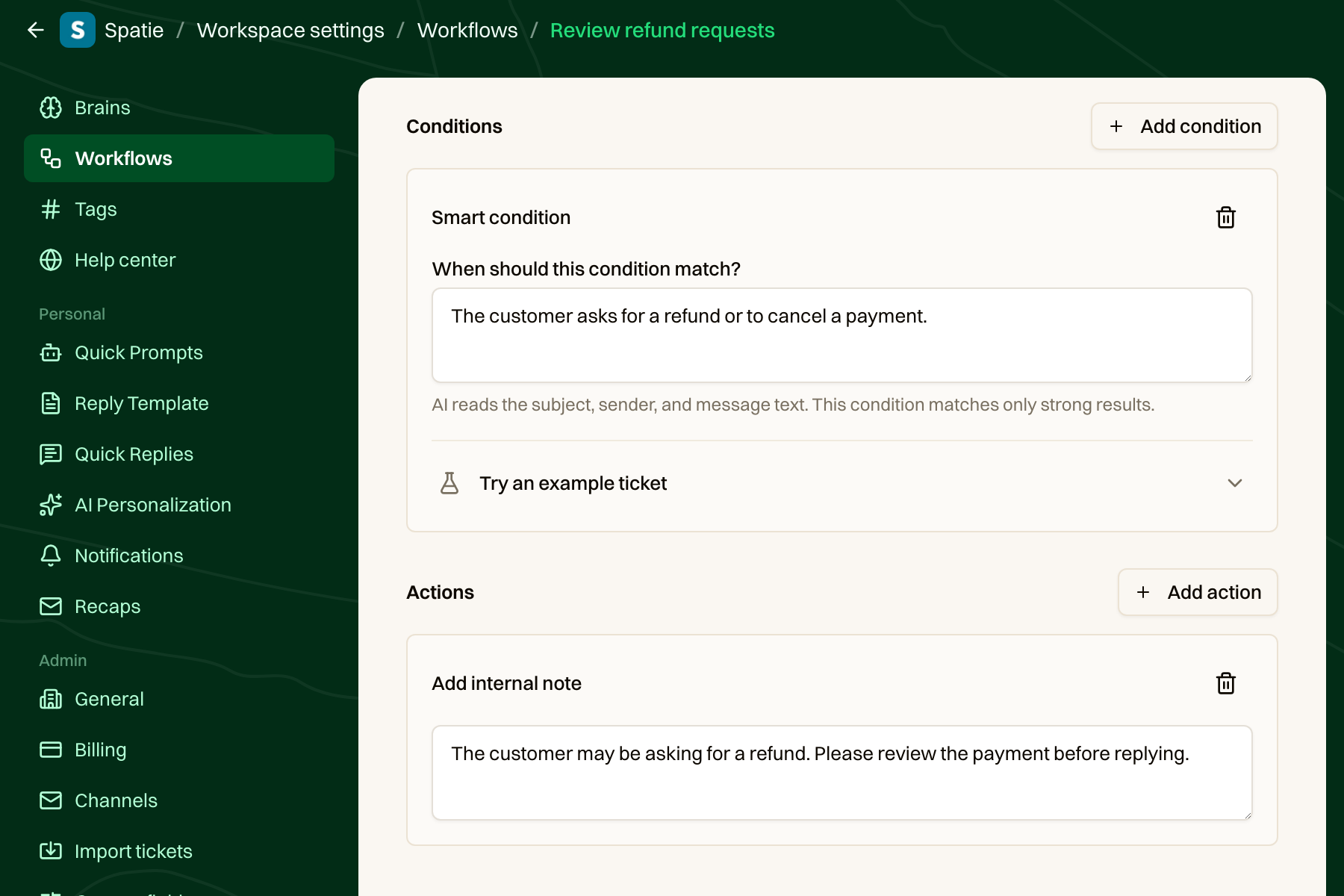
<p>With a smart condition, you describe what should match. Here's one of the example workflows in our local app:</p>
<div style="width:min(900px,max(calc(100vw - 200px),100%));margin-left:calc(100% - min(900px,max(calc(100vw - 200px),100%)))">
<a href="https://fls-a2e13fcd-3430-450d-96b4-4902fda0a655.laravel.cloud/admin-uploads/jev-smart-condition-private-note-20260930.png"><img src="https://fls-a2e13fcd-3430-450d-96b4-4902fda0a655.laravel.cloud/admin-uploads/jev-smart-condition-private-note-20260930.png" alt="A smart condition for refund requests followed by a fixed internal note action" style="display:block;width:100%;max-width:none"></a>
</div>
<p>The condition says &quot;The customer asks for a refund or to cancel a payment.&quot; When it matches, the workflow adds a private note asking us to review the payment. The note is fixed text. We turn the description into a Jev Boolean question:</p>
<pre data-lang="php" class="notranslate"><span class="hl-keyword">public</span> <span class="hl-keyword">static</span> <span class="hl-keyword">function</span> <span class="hl-property">question</span>(<span class="hl-injection"><span class="hl-type">string</span> $description</span>): <span class="hl-type">Boolean</span>
{
    <span class="hl-keyword">return</span> <span class="hl-keyword">new</span> <span class="hl-type">Boolean</span>(
        <span class="hl-value">&quot;The incoming message matches this workflow description: {$description}&quot;</span>,
        [
            <span class="hl-value">'true'</span> =&gt; <span class="hl-value">'The incoming message fits the description.'</span>,
            <span class="hl-value">'false'</span> =&gt; <span class="hl-value">'The incoming message does not fit the description.'</span>,
        ],
    );
}
</pre>
<p>This question joins the spam and auto-reply questions from the first post in the same inbound classification request. The answer is stored with the message, and the workflow reads its probability from there. It doesn't call Jev again when the workflow runs.</p>
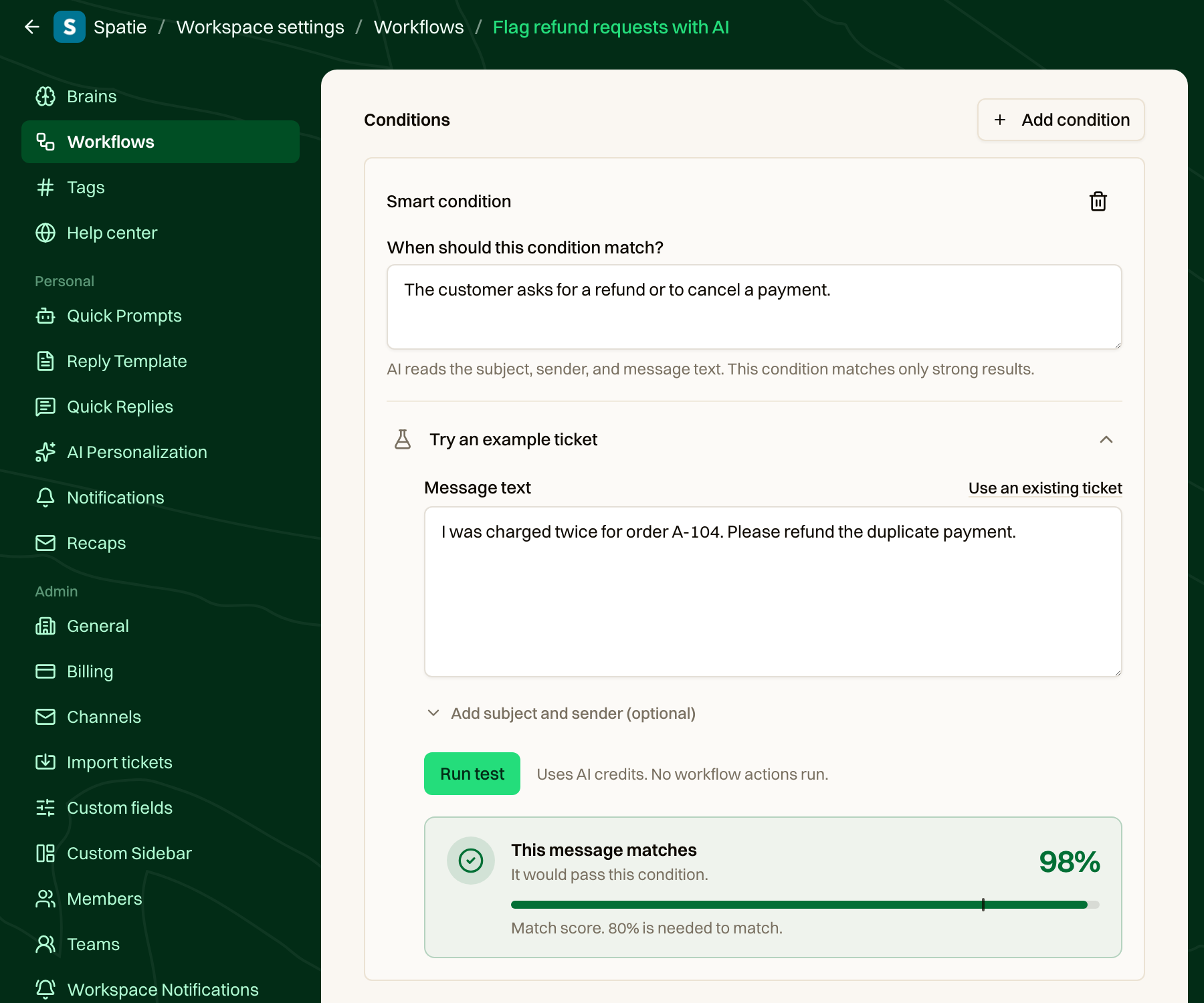
<p>The editor also lets you try a sample email or an existing ticket and see the score before you enable the workflow. Here, a customer asking about a duplicate charge gets a strong match:</p>
<div style="width:min(900px,max(calc(100vw - 200px),100%));margin-left:calc(100% - min(900px,max(calc(100vw - 200px),100%)))">
<a href="https://fls-a2e13fcd-3430-450d-96b4-4902fda0a655.laravel.cloud/admin-uploads/jev-smart-condition-test-compact-20260930.png"><img src="https://fls-a2e13fcd-3430-450d-96b4-4902fda0a655.laravel.cloud/admin-uploads/jev-smart-condition-test-compact-20260930.png" alt="Testing a smart condition with a sample refund request" style="display:block;width:100%;max-width:none"></a>
</div>
<p>Only incoming email is checked. Jev gets the subject, sender, and message text, not the whole ticket history.</p>
<h2 id="letting-jev-choose-who-should-handle-a-ticket">Letting Jev choose who should handle a ticket</h2>
<p>When a ticket comes in, we need to get it to the right person. At Spatie, one person might handle billing questions, while someone else is better placed to help with a browser issue or a design question. We know who can handle what. The hard part is translating every way a customer might describe a problem into fixed routing rules.</p>
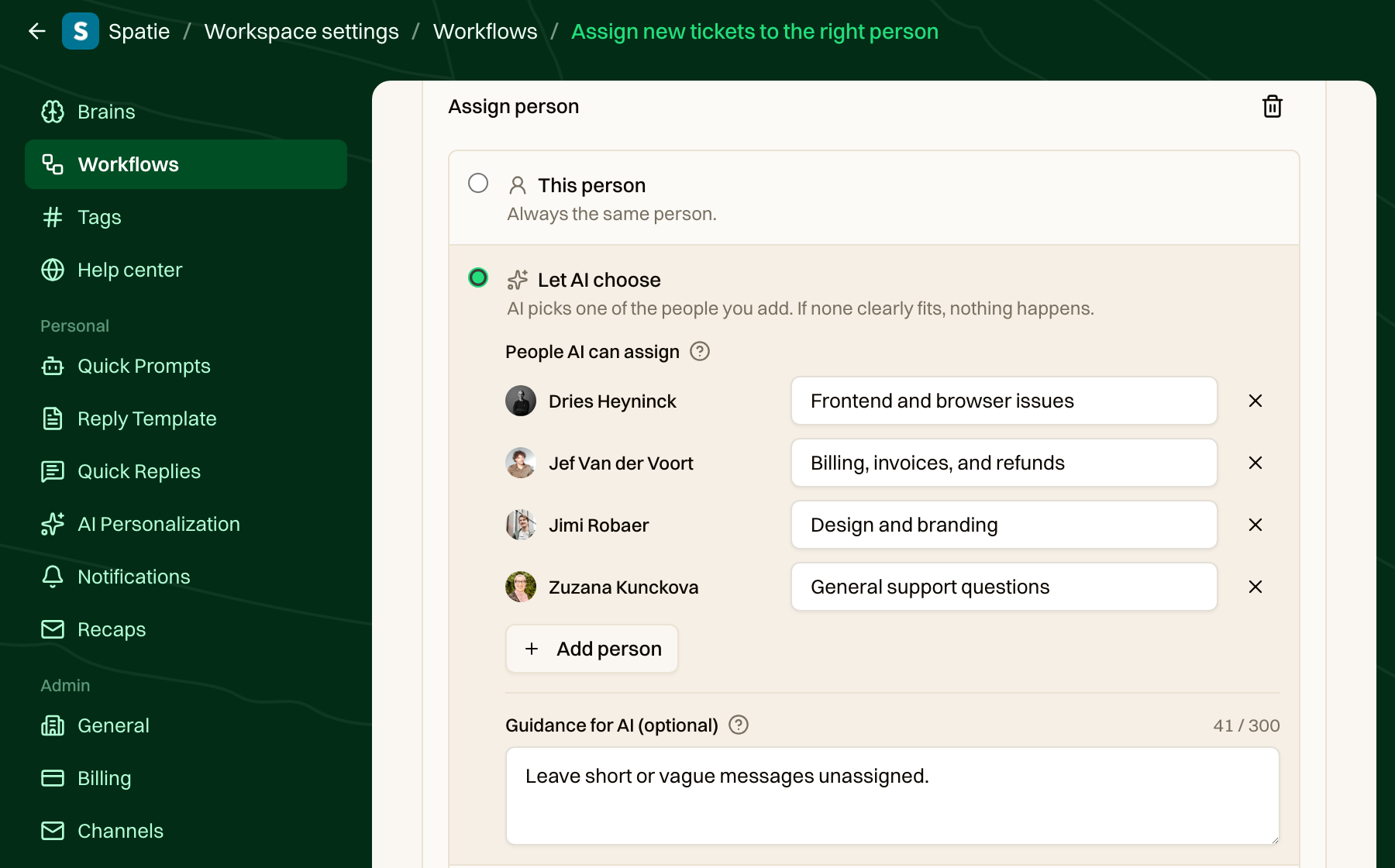
<p>In a workflow, you select the people Jev may choose from and add a short description of what each handles. Here, Dries handles frontend issues, Jef takes billing questions, Jimi handles design, and Zuzana picks up general support:</p>
<div style="width:min(900px,max(calc(100vw - 200px),100%));margin-left:calc(100% - min(900px,max(calc(100vw - 200px),100%)))">
<a href="https://fls-a2e13fcd-3430-450d-96b4-4902fda0a655.laravel.cloud/admin-uploads/jev-ai-person-assignment-20260930.png"><img src="https://fls-a2e13fcd-3430-450d-96b4-4902fda0a655.laravel.cloud/admin-uploads/jev-ai-person-assignment-20260930.png" alt="A workflow where AI chooses between Dries, Jef, Jimi, and Zuzana based on what each person handles" style="display:block;width:100%;max-width:none"></a>
</div>
<p>We ask Jev a Choice question with the people selected in the workflow. It chooses from that list, with one extra option for when nobody fits:</p>
<pre data-lang="php" class="notranslate"><span class="hl-variable">$response</span> = <span class="hl-type">Classification</span>::<span class="hl-property">of</span>(<span class="hl-variable">$state</span>)
    -&gt;<span class="hl-property">questions</span>([<span class="hl-value">'assignee'</span> =&gt; <span class="hl-keyword">new</span> <span class="hl-type">Choice</span>(
        <span class="hl-variable">$instructions</span>,
        [
            ...<span class="hl-property">collect</span>(<span class="hl-variable">$options</span>)
                -&gt;<span class="hl-property">map</span>(<span class="hl-keyword">fn</span> (<span class="hl-injection"><span class="hl-type">Team|User</span> $assignee</span>) =&gt; <span class="hl-variable">$candidates</span>-&gt;<span class="hl-property">descriptionFor</span>(<span class="hl-variable">$assignee</span>))
                -&gt;<span class="hl-property">all</span>(),
            <span class="hl-value">'None of these'</span> =&gt; <span class="hl-value">'None of the others clearly fits this ticket.'</span>,
        ],
    )])
    -&gt;<span class="hl-property">timeout</span>(10)
    -&gt;<span class="hl-property">classify</span>();
</pre>
<p>We only assign when Jev has a clear favorite. Sending a vague ticket to the wrong person creates an unnecessary hand-off, so when nobody clearly fits, the action makes no change. Another workflow can pick it up later.</p>
<p>Before asking Jev, we remove disabled members and anyone who can't access the ticket's channel. The same approach can assign a team, with its own list and descriptions. Team and person assignment are separate actions, so choosing a team doesn't restrict which people Jev can choose from. Spam and automatic replies are skipped before either assignment action runs.</p>
<h2 id="in-closing">In closing</h2>
<p>These additions make our workflows a lot more flexible. We can describe what we're looking for in plain language and route matching tickets to the people best placed to help. The workflow still decides what happens next.</p>
<p>If you missed the first part, <a href="https://freek.dev/3194-detecting-spam-and-auto-replies-with-jev-and-the-laravel-ai-sdk">read how we detect spam and auto-replies with Jev</a>. You can also read the <a href="https://there-there.app/docs/workflows/workflow-conditions">workflow conditions</a> and <a href="https://there-there.app/docs/workflows/workflow-actions">workflow actions</a> docs, or <a href="https://there-there.app">try There There</a>.</p>
]]>
            </summary>
                                    <updated>2026-09-30T16:09:48+02:00</updated>
        </entry>
            <entry>
            <title><![CDATA[Ruthless prioritization while the dog pees on the floor]]></title>
            <link rel="alternate" href="https://freek.dev/3197-ruthless-prioritization-while-the-dog-pees-on-the-floor" />
            <id>https://freek.dev/3197</id>
            <author>
                <name><![CDATA[Freek Van der Herten]]></name>
                <email><![CDATA[freek@spatie.be]]></email>

            </author>
            <summary type="html">
                <![CDATA[<p>Jason Cohen shares a blunt framework for separating the rare 10x opportunities from the many 0.1x tasks that quietly consume time. It is a strong piece on ruthless prioritization, delegation, and why most backlogs should be archived instead of endlessly maintained.</p>


<a href='https://longform.asmartbear.com/prioritization/'>Read more</a>]]>
            </summary>
                                    <updated>2026-09-29T14:30:26+02:00</updated>
        </entry>
            <entry>
            <title><![CDATA[Web Workers: A Second Thread for Your JavaScript]]></title>
            <link rel="alternate" href="https://freek.dev/3196-web-workers-a-second-thread-for-your-javascript" />
            <id>https://freek.dev/3196</id>
            <author>
                <name><![CDATA[Freek Van der Herten]]></name>
                <email><![CDATA[freek@spatie.be]]></email>

            </author>
            <summary type="html">
                <![CDATA[<p>Large photo uploads can be slow, but resizing and compressing images in the browser can freeze the page if the work runs on the main thread. This article shows how to use a Web Worker to process images before uploading them without interrupting the app.</p>


<a href='https://tighten.com/insights/web-workers-a-second-thread-for-your-javascript/'>Read more</a>]]>
            </summary>
                                    <updated>2026-09-28T14:06:24+02:00</updated>
        </entry>
            <entry>
            <title><![CDATA[Agent Experience Engineering: Designing Software Agents Can Work With]]></title>
            <link rel="alternate" href="https://freek.dev/3195-agent-experience-engineering-designing-software-agents-can-work-with" />
            <id>https://freek.dev/3195</id>
            <author>
                <name><![CDATA[Freek Van der Herten]]></name>
                <email><![CDATA[freek@spatie.be]]></email>

            </author>
            <summary type="html">
                <![CDATA[<p>What Agent Experience engineering means in practice: discoverable code paths, scoped agent instructions, useful feedback, and human ownership of risky decisions.</p>


<a href='https://wendelladriel.com/blog/agent-experience-engineering-designing-software-agents-can-work-with'>Read more</a>]]>
            </summary>
                                    <updated>2026-09-25T14:58:26+02:00</updated>
        </entry>
            <entry>
            <title><![CDATA[Introducing: Dark mode for Flare]]></title>
            <link rel="alternate" href="https://freek.dev/3193-introducing-dark-mode-for-flare" />
            <id>https://freek.dev/3193</id>
            <author>
                <name><![CDATA[Freek Van der Herten]]></name>
                <email><![CDATA[freek@spatie.be]]></email>

            </author>
            <summary type="html">
                <![CDATA[<p>Flare now has a dark mode, and this post walks through the design work needed to make it feel right and stay accessible. Nice details on semantic color tokens, fixing gradients and shadows, and using screenshot comparisons to keep the light theme intact.</p>


<a href='https://flareapp.io/blog/introducing-dark-mode-for-flare'>Read more</a>]]>
            </summary>
                                    <updated>2026-09-21T12:30:31+02:00</updated>
        </entry>
            <entry>
            <title><![CDATA[★ Detecting spam and auto-replies with Jev and the Laravel AI SDK]]></title>
            <link rel="alternate" href="https://freek.dev/3194-detecting-spam-and-auto-replies-with-jev-and-the-laravel-ai-sdk" />
            <id>https://freek.dev/3194</id>
            <author>
                <name><![CDATA[Freek Van der Herten]]></name>
                <email><![CDATA[freek@spatie.be]]></email>

            </author>
            <summary type="html">
                <![CDATA[<p>Yesterday <a href="https://x.com/taylorotwell/status/2100700952923713641">Taylor announced</a> that Jev support landed in the 1.x branch of the Laravel AI SDK. We started using it that same day for spam detection in <a href="https://there-there.app">There There</a>. Let's take a look at what Jev is and how you can use it.</p>
<!--more-->
<h2 id="how-jev-is-different-from-an-llm">How Jev is different from an LLM</h2>
<p><a href="https://docs.typesafe.ai">Jev</a> is made by TypeSafe. An LLM generates text: you ask it something, it writes an answer, and if you want structured data back you have to ask for it and hope. Jev doesn't generate anything. You give it some state and a question, and it gives you back a number.</p>
<p>TypeSafe calls these System One models. They read natural language like an LLM does, but instead of writing a reply they pick between answers that you define up front. The probabilities are calibrated, which means they're trained against real outcomes, so across a batch of answers a 0.9 should be right about nine times out of ten.</p>
<p>In practice that means no prose to parse, and no prompt asking the model to please respond with valid JSON.</p>
<p>The Syntax folks made a video explaining it:</p>
<iframe width="560" height="315" src="https://www.youtube.com/embed/QbYBRjOaGOo" title="YouTube video player" frameborder="0" allow="accelerometer; autoplay; clipboard-write; encrypted-media; gyroscope; picture-in-picture; web-share" allowfullscreen></iframe>
<h2 id="noul-choice-and-score">Noul, Choice and Score</h2>
<p>You define what the answers can be using one of three question types.</p>
<p>A Noul is a yes or no question. The answer is a single number: the probability that the answer is yes. Here's how you ask one:</p>
<pre data-lang="php" class="notranslate"><span class="hl-keyword">use</span> <span class="hl-type">Laravel\Ai\Classification</span>;
<span class="hl-keyword">use</span> <span class="hl-type">Laravel\Ai\Classification\Boolean</span>;

<span class="hl-variable">$result</span> = <span class="hl-type">Classification</span>::<span class="hl-property">of</span>(<span class="hl-value">'I have asked three times now. Can I please talk to a real person?'</span>)
    -&gt;<span class="hl-property">question</span>(<span class="hl-value">'urgent'</span>, <span class="hl-keyword">new</span> <span class="hl-type">Boolean</span>(<span class="hl-value">'Does this request need an immediate response?'</span>))
    -&gt;<span class="hl-property">classify</span>();

<span class="hl-variable">$result</span>[<span class="hl-value">'urgent'</span>]-&gt;<span class="hl-property">probability</span>;            <span class="hl-comment">// 0.94</span>
<span class="hl-variable">$result</span>[<span class="hl-value">'urgent'</span>]-&gt;<span class="hl-property">isTrue</span>(<span class="hl-property">threshold</span>: 0.8); <span class="hl-comment">// true</span>
</pre>
<p>Notice that you get back <code>0.94</code> instead of <code>true</code>. You decide where the cutoff is, which means you can set a different one per question.</p>
<p>A Choice picks one option out of a set that you name. Here's an example:</p>
<pre data-lang="php" class="notranslate"><span class="hl-keyword">use</span> <span class="hl-type">Laravel\Ai\Classification\Choice</span>;

<span class="hl-variable">$result</span> = <span class="hl-type">Classification</span>::<span class="hl-property">of</span>(<span class="hl-value">'My card was charged twice for order A-104. Please refund the duplicate.'</span>)
    -&gt;<span class="hl-property">question</span>(<span class="hl-value">'department'</span>, <span class="hl-keyword">new</span> <span class="hl-type">Choice</span>(<span class="hl-value">'Which team should handle this request?'</span>, [
        <span class="hl-value">'billing'</span> =&gt; <span class="hl-value">'Payments, invoices, and refunds'</span>,
        <span class="hl-value">'technical'</span> =&gt; <span class="hl-value">'Bugs, outages, and integrations'</span>,
        <span class="hl-value">'sales'</span> =&gt; <span class="hl-value">'Pricing, plans, and upgrades'</span>,
    ]))
    -&gt;<span class="hl-property">classify</span>();

<span class="hl-variable">$result</span>[<span class="hl-value">'department'</span>]-&gt;<span class="hl-property">choice</span>;                   <span class="hl-comment">// 'billing'</span>
<span class="hl-variable">$result</span>[<span class="hl-value">'department'</span>]-&gt;<span class="hl-property">probabilityOf</span>(<span class="hl-value">'billing'</span>); <span class="hl-comment">// 0.87</span>
<span class="hl-variable">$result</span>[<span class="hl-value">'department'</span>]-&gt;<span class="hl-property">confidence</span>;               <span class="hl-comment">// 0.82</span>
</pre>
<p>Next to the option it picked, you also get a probability for every option, and a confidence score that tells you how concentrated those probabilities were.</p>
<p>A Score rates something against levels that you describe yourself. You could ask how frustrated a customer is, where 0 is calm, 1 is frustrated and 2 is very angry. The answer can land between two levels, so a 1.4 is a perfectly good answer.</p>
<p>The state doesn't have to be a string. When a decision depends on more than one thing, you can pass an array so every part has a name:</p>
<pre data-lang="php" class="notranslate"><span class="hl-type">Classification</span>::<span class="hl-property">of</span>([
    <span class="hl-value">'subject'</span> =&gt; <span class="hl-value">'Duplicate charge'</span>,
    <span class="hl-value">'message'</span> =&gt; <span class="hl-value">'My card was charged twice for order A-104.'</span>,
    <span class="hl-value">'order'</span> =&gt; [<span class="hl-value">'id'</span> =&gt; <span class="hl-value">'A-104'</span>, <span class="hl-value">'charges'</span> =&gt; [49, 49]],
    <span class="hl-value">'refund_policy'</span> =&gt; <span class="hl-value">'Duplicate charges are eligible for a refund.'</span>,
])-&gt;<span class="hl-property">question</span>(<span class="hl-value">'refund_due'</span>, <span class="hl-keyword">new</span> <span class="hl-type">Boolean</span>(<span class="hl-value">'The policy entitles this customer to a refund.'</span>))
    -&gt;<span class="hl-property">classify</span>();
</pre>
<p>That's still one state, even though it holds a message, an order and a policy.</p>
<p>You configure Jev like any other provider in <code>config/ai.php</code>, with a <code>TYPESAFE_API_KEY</code> in your env file.</p>
<h2 id="the-problem-we-wanted-to-solve">The problem we wanted to solve</h2>
<p>You might have noticed that we <a href="https://x.com/freekmurze/status/2100549614248308805">launched There There</a> yesterday as well, our new helpdesk. A lot of the mail that arrives in a helpdesk isn't from a customer. Out-of-office replies, bounces, subscription confirmations, DMARC reports. You don't want those in your inbox, and you don't want to pay an LLM to write a title and a summary for each one.</p>
<p>Some of that mail says what it is in the headers. <code>Auto-Submitted</code>, an empty return path, a sender called mailer-daemon. Checking those costs nothing, so we do that first.</p>
<p>Plenty of mail servers don't set those headers. For those we had a list of subject prefixes: <code>Automatische Antwort</code>, <code>Réponse automatique</code>, <code>Out of office</code>, in fifteen languages. Nine more for bounces. On top of that, rules so that a customer asking a question about auto-replies didn't get treated as one.</p>
<p>Every time we found mail that the list missed, we added another string to it.</p>
<h2 id="replacing-the-list">Replacing the list</h2>
<p>The header checks still run first. Everything they can't answer goes to Jev.</p>
<p>We describe each question once, as a case on an enum that also carries its own threshold. That way adding a fourth question is a single case instead of an edit in four files.</p>
<pre data-lang="php" class="notranslate"><span class="hl-keyword">enum</span> <span class="hl-type">InboundJudgement</span>: <span class="hl-type">string</span>
{
    <span class="hl-keyword">case</span> <span class="hl-property">IsAutoResponse</span> = <span class="hl-value">'is_auto_response'</span>;
    <span class="hl-keyword">case</span> <span class="hl-property">IsBounce</span> = <span class="hl-value">'is_bounce'</span>;
    <span class="hl-keyword">case</span> <span class="hl-property">IsSpam</span> = <span class="hl-value">'is_spam'</span>;

    <span class="hl-keyword">public</span> <span class="hl-keyword">function</span> <span class="hl-property">question</span>(): <span class="hl-type">Boolean</span>
    {
        <span class="hl-keyword">return</span> <span class="hl-keyword">match</span> (<span class="hl-variable">$this</span>) {
            <span class="hl-type">self</span>::<span class="hl-property">IsAutoResponse</span> =&gt; <span class="hl-keyword">new</span> <span class="hl-type">Boolean</span>(
                <span class="hl-value">'A system sent this mail on its own, rather than a person choosing to write to us.'</span>,
                [
                    <span class="hl-value">'true'</span> =&gt; 'Sent on a trigger with no human involved at send <span class="hl-property">time</span>: out-of-office
                        notices, delivery reports, ticket acknowledgements, subscription
                        confirmations, digests <span class="hl-keyword">and</span> alerts. Wording composed in advance still counts',
                    <span class="hl-value">'false'</span> =&gt; '<span class="hl-property">A</span> person sat down <span class="hl-keyword">and</span> sent this. Still <span class="hl-keyword">false</span> when a contact form <span class="hl-keyword">or</span>
                        chat widget wrapped their words in a template <span class="hl-keyword">and</span> added lines such <span class="hl-keyword">as</span> Name,
                        <span class="hl-property">E</span>-mail <span class="hl-keyword">or</span> Subject',
                ],
            ),
            <span class="hl-type">self</span>::<span class="hl-property">IsSpam</span> =&gt; <span class="hl-keyword">new</span> <span class="hl-type">Boolean</span>(
                'This mail is unsolicited bulk mail, a scam, <span class="hl-keyword">or</span> phishing rather than a genuine
                    message from a customer.',
                [
                    <span class="hl-value">'true'</span> =&gt; 'Cold sales outreach, marketing blasts, scams, phishing, <span class="hl-keyword">or</span> anything
                        the recipient never asked for',
                    <span class="hl-value">'false'</span> =&gt; '<span class="hl-property">A</span> real person writing about the product, their account, <span class="hl-keyword">or</span> their own
                        support request, however brief <span class="hl-keyword">or</span> badly written',
                ],
            ),
            <span class="hl-comment">// ...</span>
        };
    }

    <span class="hl-keyword">public</span> <span class="hl-keyword">function</span> <span class="hl-property">threshold</span>(): <span class="hl-type">float</span>
    {
        <span class="hl-keyword">return</span> <span class="hl-keyword">match</span> (<span class="hl-variable">$this</span>) {
            <span class="hl-type">self</span>::<span class="hl-property">IsAutoResponse</span> =&gt; 0.75,
            <span class="hl-type">self</span>::<span class="hl-property">IsBounce</span>, <span class="hl-type">self</span>::<span class="hl-property">IsSpam</span> =&gt; 0.9,
        };
    }
}
</pre>
<p>Those <code>true</code> and <code>false</code> descriptions are optional, but I'd recommend writing them. They do more work than the question above them.</p>
<p>All the questions the headers couldn't answer go out in one request. Jev reads the state once and answers them in parallel, and you only pay for input tokens, so asking three questions costs the same as asking one. Here's the action that does it:</p>
<pre data-lang="php" class="notranslate"><span class="hl-keyword">public</span> <span class="hl-keyword">function</span> <span class="hl-property">execute</span>(<span class="hl-injection"><span class="hl-type">Message</span> $message, <span class="hl-type">Ticket</span> $ticket, <span class="hl-type">Workspace</span> $workspace</span>): <span class="hl-type">void</span>
{
    <span class="hl-variable">$judgements</span> = <span class="hl-property">array_filter</span>(
        <span class="hl-type">InboundJudgement</span>::<span class="hl-property">cases</span>(),
        <span class="hl-keyword">fn</span> (<span class="hl-injection"><span class="hl-type">InboundJudgement</span> $judgement</span>) =&gt; ! <span class="hl-variable">$judgement</span>-&gt;<span class="hl-property">settledByHeaders</span>(<span class="hl-variable">$message</span>),
    );

    <span class="hl-keyword">if</span> (<span class="hl-variable">$judgements</span> === []) {
        <span class="hl-keyword">return</span>;
    }

    <span class="hl-keyword">try</span> {
        <span class="hl-variable">$response</span> = <span class="hl-type">Classification</span>::<span class="hl-property">of</span>([
            <span class="hl-value">'subject'</span> =&gt; <span class="hl-variable">$ticket</span>-&gt;<span class="hl-property">subject</span>,
            <span class="hl-value">'from_name'</span> =&gt; <span class="hl-variable">$message</span>-&gt;<span class="hl-property">author_name</span>,
            <span class="hl-value">'from_email'</span> =&gt; <span class="hl-variable">$message</span>-&gt;<span class="hl-property">author_email</span> ?? <span class="hl-variable">$ticket</span>-&gt;<span class="hl-property">contact</span>?-&gt;<span class="hl-property">email</span>,
            <span class="hl-value">'message'</span> =&gt; <span class="hl-type">Str</span>::<span class="hl-property">limit</span>(<span class="hl-variable">$message</span>-&gt;<span class="hl-property">body_text</span>, 10_000),
        ])
            -&gt;<span class="hl-property">questions</span>(<span class="hl-variable">$this</span>-&gt;<span class="hl-property">questionsFor</span>(<span class="hl-variable">$judgements</span>))
            -&gt;<span class="hl-property">timeout</span>(10)
            -&gt;<span class="hl-property">classify</span>();

        <span class="hl-variable">$verdicts</span> = <span class="hl-variable">$this</span>-&gt;<span class="hl-property">verdicts</span>(<span class="hl-variable">$judgements</span>, <span class="hl-variable">$response</span>);
    } <span class="hl-keyword">catch</span> (<span class="hl-type">Throwable</span> <span class="hl-variable">$exception</span>) {
        <span class="hl-type">Log</span>::<span class="hl-property">warning</span>(<span class="hl-value">'Could not classify an inbound message.'</span>, [
            <span class="hl-value">'message_id'</span> =&gt; <span class="hl-variable">$message</span>-&gt;<span class="hl-property">id</span>,
            <span class="hl-value">'error'</span> =&gt; <span class="hl-variable">$exception</span>-&gt;<span class="hl-property">getMessage</span>(),
        ]);

        <span class="hl-keyword">return</span>;
    }

    <span class="hl-variable">$message</span>-&gt;<span class="hl-property">updateQuietly</span>([...<span class="hl-variable">$verdicts</span>, <span class="hl-value">'classification'</span> =&gt; <span class="hl-variable">$response</span>-&gt;<span class="hl-property">answers</span>]);
}
</pre>
<p>There are two things in there I'd suggest copying. The whole call sits in a try block that logs the problem and moves on, because a classification is a nice to have and it shouldn't be able to break the mail pipeline it's helping. And we truncate the message, because an inbound mail can be megabytes long and nothing past the first part of it changes what the mail is.</p>
<p>Turning the answers into booleans is where each question's own threshold is applied. We store the raw probabilities next to them, so we can change a threshold later and see what it would have done:</p>
<pre data-lang="php" class="notranslate"><span class="hl-keyword">private</span> <span class="hl-keyword">function</span> <span class="hl-property">verdicts</span>(<span class="hl-injection"><span class="hl-type">array</span> $judgements, <span class="hl-type">ClassificationResponse</span> $response</span>): <span class="hl-type">array</span>
{
    <span class="hl-variable">$verdicts</span> = [];

    <span class="hl-keyword">foreach</span> (<span class="hl-variable">$judgements</span> <span class="hl-keyword">as</span> <span class="hl-variable">$judgement</span>) {
        <span class="hl-variable">$answer</span> = <span class="hl-variable">$response</span>-&gt;<span class="hl-property">answer</span>(<span class="hl-variable">$judgement</span>-&gt;<span class="hl-property">value</span>);

        <span class="hl-variable">$verdicts</span>[<span class="hl-variable">$judgement</span>-&gt;<span class="hl-property">value</span>] = <span class="hl-variable">$answer</span>-&gt;<span class="hl-property">isTrue</span>(<span class="hl-variable">$judgement</span>-&gt;<span class="hl-property">threshold</span>());
    }

    <span class="hl-keyword">return</span> <span class="hl-variable">$verdicts</span>;
}
</pre>
<p>Those verdicts are stored on the message. When a customer builds a workflow in There There with an &quot;Is spam&quot; condition, checking that condition reads a single column and doesn't call Jev at all.</p>
<h2 id="in-closing">In closing</h2>
<p>I like that Jev does one small thing. It gives you a number and leaves the rest of the decisions in your own code, where you can read them and write tests for them.</p>
<p>It's also fast and cheap enough that you don't really have to think about it. Classifying a mail with three questions at once takes 639ms, and we get around 48 per second when we run them in parallel. We didn't spend any time tuning that, so I'm sure you could get more out of it, but for what we're doing it's fast enough. Jev costs $0.042 per million input tokens and output tokens are free, which for us comes down to four hundredths of a cent per mail, or about 36 cents a month.</p>
<p>We have a list of other places where we want to use this in There There, and in our other products. Expect more Jev powered features soon.</p>
<p>If you want to read more, there are the <a href="https://docs.typesafe.ai">TypeSafe docs</a> and the <a href="https://github.com/laravel/ai">Laravel AI SDK</a>. And if you'd like to see the spam detection at work, you can try <a href="https://there-there.app">There There</a>.</p>
]]>
            </summary>
                                    <updated>2026-09-18T17:39:46+02:00</updated>
        </entry>
            <entry>
            <title><![CDATA[What's New in PHP 8.6]]></title>
            <link rel="alternate" href="https://freek.dev/3192-whats-new-in-php-86" />
            <id>https://freek.dev/3192</id>
            <author>
                <name><![CDATA[Freek Van der Herten]]></name>
                <email><![CDATA[freek@spatie.be]]></email>

            </author>
            <summary type="html">
                <![CDATA[<p>A concise overview of what's coming in PHP 8.6, including partial function application, clamp(), the new Duration class, and several smaller language and standard library improvements.</p>


<a href='https://laravel-news.com/php-8-6'>Read more</a>]]>
            </summary>
                                    <updated>2026-09-16T14:30:30+02:00</updated>
        </entry>
    </feed>