
Descripción
Fluent Forms is an advanced and lightweight Contact Form Builder
Fluent Forms is the ultimate user-friendly, customizable drag-and-drop WP contact form plugin that offers you all the powerful features. It is a perfect no-code form builder for both beginners and advanced users.
Demo | User Guide | Youtube Video Tutorials | Get Support | Official Facebook Community | Official Fluent Forms Community
Anything from a simple contact form to a more advanced payment, quiz, or calculator form, Fluent Forms can meet virtually all your needs.
Powerful Features available in the Free Version
- Drag & drop builder
- Smart conditional logic
- Conversational form
- Built-in AI Form Builder
- 25+ ready-to-use input fields
- Gutenberg Form Styler
- Reusable form templates
- Accept Payments with Stripe*
- Reporting Dashboard*
- Adjustable multi-column form layout
- Spam protection using reCAPTCHA, hCaptcha & more
- Aviso por correo electrónico
- Form scheduling & restriction
- Export/import forms
- Export entries in CSV/Excel/ODS/JSON format
- Filter entries & Form Finder
- Undo/redo & Form Edit history
- Role manager
- Form analytics & Visual data report
- Set default value for input fields or populate from URL parameters
- Custom CSS & JS
- Fully responsive & accessible for users with special needs
- Migrate from WPForms, Contact Form 7, Gravity Forms, Ninja Forms & Caldera Forms
Features available in the Pro version
- 55+ input fields
- Pago
- Cálculo numérico
- Formulario de varios pasos
- Advanced form styler
- Quiz & survey module
- Inventory management
- Campo dinámico
- Report module
- Advanced search filter
- Import form entries
- Admin approval
- Conditional confirmation messages
- Double opt-in
- Advanced form validation
- Auto-delete entries
- Landing page
- Geo-location provider
- Notificaciones SMS
- Conditional email routing
- User registration
- Advanced post/CPT creation
- Address autocomplete
- 60+ third-party integrations (and a lot more via Zapier)
Super Fast Contact Forms
Fluent Forms is optimized for speed, minimally impacting site performance with less than 30KB of combined CSS and JS for a standard form. This is significantly faster than most form builders, which load over 300KB of assets. Build the fastest online forms quickly.
Drag & Drop Contact Form Builder
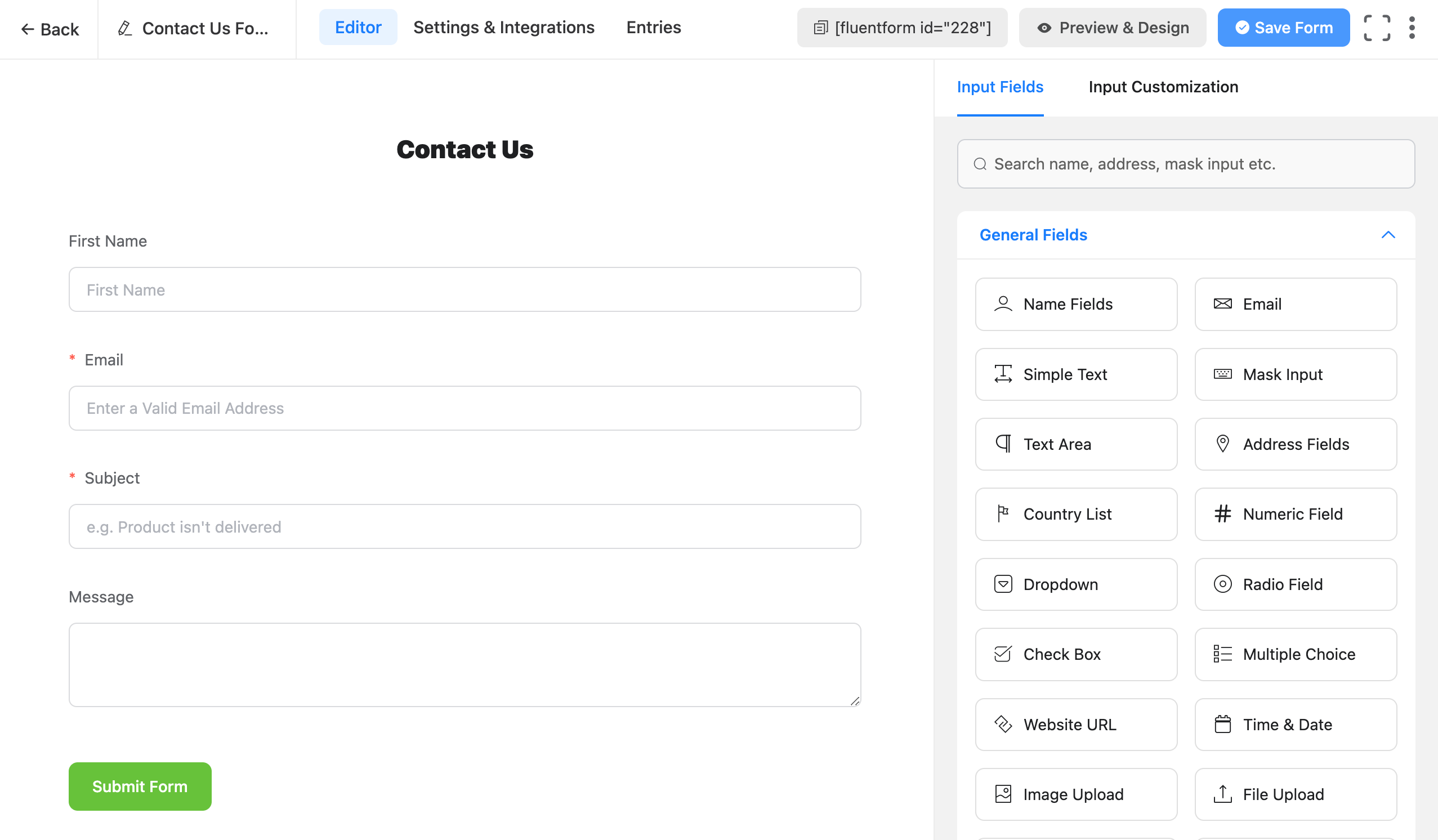
Our drag-and-drop form builder allows you to easily create any form you can imagine in a few minutes without writing any code.
Input Fields
Disponible en la versión gratuita
- Campos de nombre
- Correo electrónico
- Texto simple
- Entrada de máscara
- Área de texto
- Campos de dirección
- Lista de países
- Campo numérico
- Lista desplegable
- Campo de selección única
- Casilla de verificación
- Elección múltiple
- URL del sitio web
- Hora y fecha
- Custom HTML
- Hidden Field
- Section Break
- reCAPTCHA
- hCaptcha
- Turnstile
- Terms & Conditions
- GDPR Agreement
- Campo de contraseña
- Botón de envío personalizado
- One/Two/Three/Four/Five/Six Column Container
- Artículo de pago
- Subscription
- Importe de pago personalizado
- Cantidad de artículos
- Método de pago
- Resumen de pago
Disponible en la versión Pro
- Subir Imagen
- Subir archivo
- Phone/Mobile
- Shortcode
- Action Hook
- Form Step
- Ratings
- Checkable Grid
- Range Slider
- Net Promoter Score
- Campo dinámico
- Selección encadenada
- Color Picker
- Campo repetido
- Selección de entrada/CPT
- Rich Text Input
- Guardar y reanudar
- Quiz Score
- Cupón
- Post Title
- Post Content
- Post Excerpt
- Featured Image
- Actualización de entradas
- Post Taxonomy Fields (Categories, Tags, Formats)
- Repetidor de contenedores
- Accordion/Tab
Gutenberg Form Styler
Customize form colors, typography, spacing, and borders directly within the Gutenberg interface. No more switching between editors or hunting for CSS selectors, style your forms right where you build your pages.
Fully Mobile Responsive Forms
Fluent Forms has been developed to make sure that it satisfies devices of all display sizes. Display your forms on all devices without any extra hassle.
Reusable Form Templates
Stop repetitive work. Fluent Forms offers pre-built forms with a single click, allowing quick tweaks and saving time. We provide dozens of useful templates for fast form building, including:
* Contact Form
* Support Form
* Event Registration Form
* Vendor Contact Form
* Patient Intake Form
* Volunteer Application Form
* Request for Quote Form
* Conference Proposal Form
* Report a bug Form
* Polling Form
* Tell A Friend Form
* My Directory Information Form
* Request for Leave Form
* Admissions Form
* Loan Application Form
* Job Listing Form
* Website Feedback Form
* Comment & Rating Form
* User Registration Form (Pro)
* Donation Form (Pro)
* Payment Form (Pro)
* Subscription Payments Form (Pro)
Conversational Forms
Fluent Forms excels in creating various forms, notably its conversational forms. Unlike traditional forms, these present one question at a time, minimizing distraction and boosting completion rates. They offer multiple layout and sharing options (direct URLs, shortcodes, HTML embedding, etc.).
View Conversational Form Demo
Fluent Forms Pro offers advanced conversational forms. Users can navigate questions via scroll and key press, and customize fonts, colors, and backgrounds to align with their brand.
AI Form Builder
Say hello to Free AI Form Builder! Fluent Forms AI Form Builder simplifies and speeds up form creation. Just describe your needs to generate effective forms with all necessary fields.
Data & Privacy: The AI Form Builder relies on a hosted external service (ai.fluentforms.com) to generate your form. When you use this feature, the form description you enter along with your site URL and site title are sent to that service to build the form structure. Anonymous, aggregated usage data — such as the resulting form type and the field types generated — may be retained to help us improve the feature. Your visitors’ form submissions are never sent. By using the AI Form Builder you consent to this data transfer. Learn more in our Privacy Policy.
Accept Payments with Stripe
Fluent Forms 6.0 now offers payment fields to free users, allowing Stripe payments for events, donations, or sales with a 1.9% transaction fee. Recurring payments are also included via the Subscription field. Pro removes the 1.9% fee, leaving only Stripe’s charges.
Fluent Forms Report Module
Fluent Forms Report Module provides powerful, data-informed insights through three sections: Overview, Payment, and Submissions. The free version includes basic analytics like submission/payment summaries, form ranking, API logs, and detailed charts. The Pro version unlocks advanced reporting, such as partial entry rates, submission data by country, and subscription analytics.
Built-in Data Visualization Tool
Fluent Forms allows easy analysis of form submissions with pie, bar, or tabular charts. As a form or quiz builder, it simplifies data analysis, providing real-time graphical results for surveys or polls.
Aviso por correo electrónico
Get notified every time someone submits a form and also send a confirmation email to the one who fills out the form. To make it more advanced, you can use conditional email notifications to send emails when certain conditions are met.
Multi-column Form Layout
Stack input fields in multiple columns and make the long, boring form appear compact and smart. This will lead to a lower form abandonment rate. There are six types of column containers to choose from.
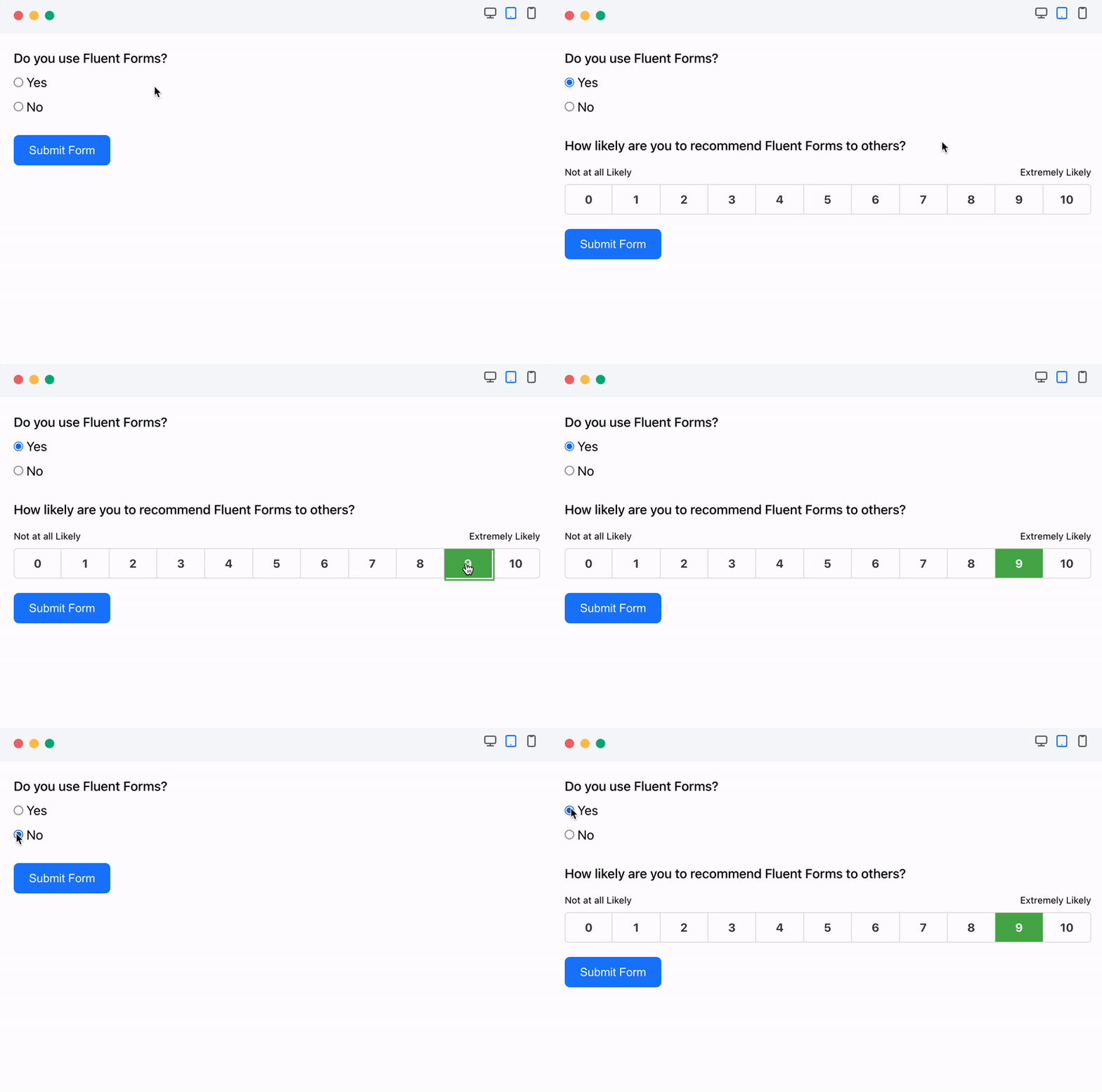
Lógica condicional
Use conditional logic to show or hide form fields based on user behavior, preventing unnecessary clutter. Users can set multiple condition groups by selecting fields and defining rules (e.g., equal, greater than, includes). Conditional logic also allows for automatic email notifications and displaying different confirmation messages based on submission conditions.
Calculator for Advanced Form Calculation
Fluent Forms’ numeric field enables creation of smart calculators like car loan, BMI, mortgage, or tax calculators with ease. You can define the acceptable range for these numerical inputs by setting minimum and maximum values.
Create PDF Files from Form Submission
Generate PDF from your submitted entries and let users download the PDF file or send it via email. You can use this feature to generate invoices, create reports, or provide order summaries.
Conditional Confirmation
Fluent Forms Pro allows you to send customized confirmation messages to your users if they meet specific conditions.
Advanced Form Styler
El «Advanced Form Styler» de Fluent Forms Pro permite personalizar fácilmente los formularios de contacto para aumentar las conversiones. Ajusta los colores, las fuentes, las sombras de los recuadros, los bordes, los márgenes y el relleno. También puedes importar rápidamente estilos de formularios anteriores.
Build Quizzes & Surveys
Fluent Forms Pro es una herramienta versátil que funciona tanto como formulario de contacto como potente maquetador de cuestionarios. Como plugin para cuestionarios, permite crear divertidos cuestionarios, tests de personalidad y concursos de preguntas y respuestas, con puntuación asignada a cada pregunta. Los usuarios pueden ver sus rendimientos inmediatamente después de enviar el cuestionario o por correo electrónico. También admite la realización de encuestas y la visualización de los resultados.
Payment Forms
Fluent Forms Pro es una potente solución para crear formularios de pago, de pedido de productos y de donaciones, además de formularios de contacto. Permite aceptar fácilmente pagos con tarjeta de crédito gracias a su integración con pasarelas de pago tan populares como PayPal, Stripe, Razorpay, Paddle, Square, Paystack, Mollie y Authorize.net.
One-Click Migrator
If you are already using Contact Form 7, WPForms, Caldera Forms, Ninja Forms or Gravity Forms and looking to move to Fluent Forms, you can do this with a single click.
Fluent Forms CLI
Fluent Forms ofrece una potente interfaz de línea de comandos (CLI) para gestionar formularios sin necesidad de utilizar la interfaz gráfica de usuario. La herramienta CLI permite a los usuarios crear, gestionar e importar o exportar datos, realizar un seguimiento de los envíos y configurar los ajustes con facilidad.
Enhanced Email Routing & Automation
Aumenta la eficiencia de tu página web utilizando cadenas de consulta para rellenar automáticamente los datos de los visitantes y dirigir los formularios a los equipos correspondientes mediante el enrutamiento de correos electrónicos, las respuestas automáticas y las condiciones.
Integrations and Add-ons Available in the Free Version
- FluentCRM
- Fluent Support
- FluentBoards
- FluentSMTP
- Ninja Tables
- FluentBooking
- WP Social Ninja
- Generador PDF de Fluent Forms
- MailChimp
- Slack
- Mautic
- Mailpoet
Integrations Available in the Pro Version
- ActiveCampaign
- AffiliateWP
- Airtable
- amoCRM
- Automizy
- Brevo (formerly SendInBlue)
- BuddyBoss
- Campaign Monitor
- ChatGPT
- CleverReach
- ClickSend
- Constant Contact
- Kit, formerly ConvertKit
- Discord
- Drip
- Gist
- GetResponse
- Google Maps
- Hojas de cálculo de Google
- HubSpot
- iContact
- Insightly
- MailerLite
- Mailjet
- Mailster
- Mollie
- MooSend
- Notion
- OnePageCRM
- Paddle
- PayPal
- Paystack
- Pipedrive
- Platformly
- RazorPay
- Salesflare
- Salesforce
- SendFox
- Square
- Stripe
- Telegram
- Trello
- Twilo
- User Registration
- WebHook
- Zapier
- Zoho CRM
- Authorize.net
Check Out the Documentation and the Video Tutorials
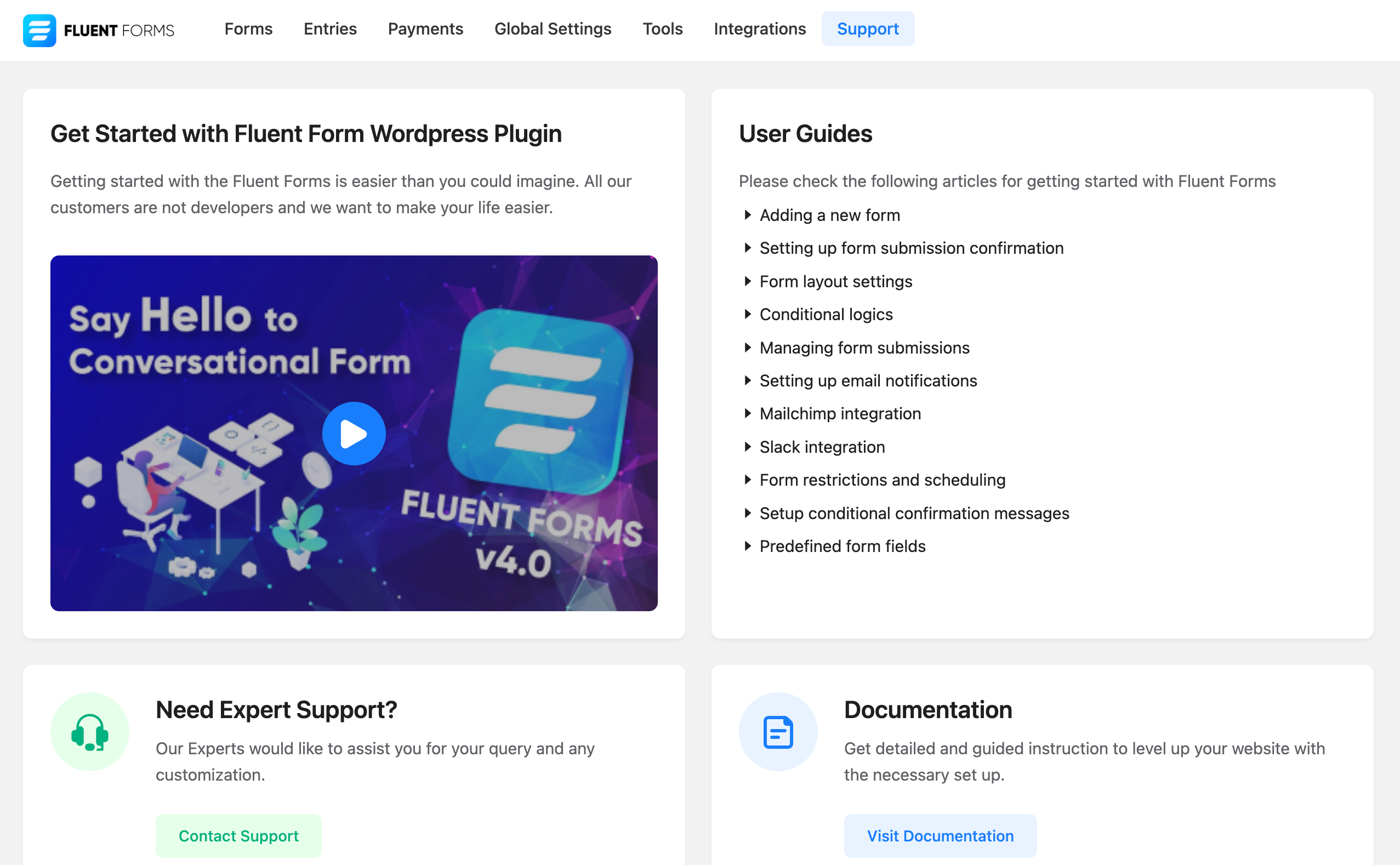
Fluent Forms has detailed step-by-step documentation. Some essential documentations are provided below:
- Getting started with Fluent Forms
- Set up Form Submission Confirmation Message
- Setting up Email Notifications in Fluent Forms Plugin
- Send Email Notifications on Form Submission
- Managing the Submitted Entries in Fluent Forms
- Available Field Types in WordPress Forms
- Set up Forms with Conditional Logic
- WordPress Form Scheduling and Restriction Feature
- Global Inventory Manager in Fluent Forms
- All Available CRM and Marketing Tools Integration Modules
What Our Users Say About Fluent Forms
Fantastic Form Plugin!
I’ve tried a number of premium (and free) WP form plugins including Forminator Pro (by WPMU Dev) and Piotnet Forms. But I’ve come back to Fluent Forms as my favourite. It’s lightweight and easy to use!
– By @jeremywardkccBest form plugin ever with first class support
This is the lightest form plugin I’ve ever used (except basic CF7 which is not enough for me). Great performances, great UI, great features, and above all, amazing dev/support team!!!
Plugin is improving almost every week and they listen to you 🙂
– By @yankiaraAgency Owner / Web Designer
Fluent forms is a great contact form plugin that allows customization and advanced features and addons such as taking payments. As a web designer / agency owner wpmanageninja is my go to for a lot of my software. Sure the software is great, but it is their support that keeps me coming back. I can count on them to assist me when my back is against the wall.
– By @nickyeager123456Powerful Form Plugin
Fluent Forms is very intuitive and easy to use form plugin. I am not an expert in website creation, and learned how to use it very easily. The documentation available in their official website is very usefull, it helps me a lot when in doubt on how to do something. The Pro is even better, and includes some functionalities that are worth it (if you need them, of course). Good deal with lifetime licence. Thank you.
– By @francksdlExcellent Support
Excellent customer service. I have fluent forms and fluent CRM, both pro versions, and not only do they work great but the support you get is excellent. Can totally recommend
– By @facua1Free Version Has Options Found only in Premium Plugins
This is a fantastic email form. It’s fast (very light weight), easy to use, and the support is great. To boot, the free version also has options usually found only in premium email forms. Don’t waste your time looking for another form. I spent countless hours looking for the “right” form, and this one is it, hands down.
– By @nevrsmer
Follow Fluent Forms Social Media
X/Twitter | Facebook | Youtube | Instagram | LinkedIn | Official Fluent Forms Community
Other Plugins By WPManageNinja Team
- Fluent Forms PDF Generator Add-on
- Email Marketing, Newsletter, Email Automation and CRM Plugin for WordPress by FluentCRM
- Ninja Tables – Best WP DataTables Plugin for WordPress
- Fluent Support – WordPress Helpdesk and Customer Support Ticket Plugin
- FluentSMTP – The Most Advanced SMTP, SES Plugin for WordPress
- Simple Payment Donations & Subscriptions Plugin by Paymattic – Best Payments Plugin for WP
- WP Social Ninja – Best Social Feed, Reviews Plugin for WordPress (Google Reviews, Photo Feeds, Chat & More)
- FluentBooking – El mejor plugin de planificación para WordPress
- FluentBoards – Project Management, Task Management, Goal Tracking, Kanban Board, and, Team Collaboration
- FluentCommunity – Red social, comunidad y sistema de gestión del aprendizaje (LMS) completos
- FluentCart: A New Era of eCommerce with WordPress – Faster, Lighter, and Simpler
Capturas






Bloques
Este plugin proporciona 1 bloque.
- Fluentfom Guten Block
Instalación
This section describes how to install the plugin and get it working.
- Upload the plugin files to the
/wp-content/plugins/fluentformdirectory, or install the plugin through the WordPress plugins screen directly. - Activate the plugin through the \’Plugins\’ screen in WordPress
- Use the
Fluent Forms->Global Settingsscreen to configure the plugin - (Make your instructions match the desired user flow for activating and installing your plugin. Include any steps that might be needed for explanatory purposes)
FAQ
-
¿Necesito conocimientos de programación para usar Fluent Forms?
-
No, you don’t need any pre-requisite programming knowledge to build beautiful forms. With Powerful drag and drop features you can build any simple or complex form.
-
¿Fluent Forms ralentizará mi sitio web?
-
Absolutely not. We build Fluent Forms very carefully and maintained WP standards as well as we only load styles / scripts in the pages where you will use the Fluent Forms. Fluent Forms is faster than any form builder plugin. Fluent Forms only load less than 30KB css and js combined.
-
¿Puedo usar lógica condicional al crear un formulario?
-
Yes, with our powerful conditional logic panel you can build any type of complex forms. You can add one or multiple conditional logics to any field and it will work like a charm.
-
¿Puedo crear formularios de varias columnas?
-
Yes, you can use 2 column or 3 column containers and you can build forms.
-
¿Puedo exportar/importar los datos enviados mediante el formulario?
-
Yes, you can export your data in CSV, Excel, ODS, JSON format. You can also import in pro version.
-
Can I migrate from WPForms?
-
Yes. You can use Migrator feature of Fluent Forms to migrate from WPForms. To do so, just go to Fluent Forms -> Tools -> Migrator and you will find a section for the WPForms. Click the Import Form button to migrate your forms. To import the entries, click the Import Entries button.
-
Can I migrate from Gravity Forms?
-
Yes. You can use Migrator feature of Fluent Forms to migrate from Gravity Forms. To do so, just go to Fluent Forms -> Tools -> Migrator and you will find a section for Gravity Forms. Click the Import Form button to migrate your forms. To import the entries, click the Import Entries button.
-
Can I migrate from Ninja Forms?
-
Yes. You can use Migrator feature of Fluent Forms to migrate from Ninja Forms. To do so, just go to Fluent Forms -> Tools -> Migrator and you will find a section for Ninja Forms. Click the Import Form button to migrate your forms. To import the entries, click the Import Entries button.
-
I want to report a bug, where to report?
-
The entire source code is available on github. Please feel free to fork and send a pull request or report a bug.
You can get support from our official support thread at wpmanageninja.com/support-tickets
Reseñas


Colaboradores y desarrolladores
«Fluent Forms – Customizable Contact Forms, Survey, Quiz, & Conversational Form Builder» es un software de código abierto. Las siguientes personas han colaborado con este plugin.
Colaboradores


«Fluent Forms – Customizable Contact Forms, Survey, Quiz, & Conversational Form Builder» está traducido en 18 idiomas. Gracias a los traductores por sus contribuciones.
¿Interesado en el desarrollo?
Revisa el código , echa un vistazo al repositorio SVN o suscríbete al registro de desarrollo por RSS.
Registro de cambios
6.2.6 (Fecha: 10 de julio de 2026)
- Improves the Other option in conversational forms to be keyboard-activatable
- Corrige una escalada de privilegios de administrador a través de un perfil delegado de WordPress.
- Corrige una vulnerabilidad que permitía a los administradores de formularios actualizar transacciones y cancelar suscripciones.
- Fixes an oEmbed JSONP path-traversal XSS vulnerability
- Fixes checkbox and radio Other option values not saving the translated label on multilingual sites
- Corrige el problema por el que la opción «Otro» requería doble clic para seleccionarla en las preguntas de opción múltiple y de casilla de verificación.
6.2.5 (Fecha: 9 de junio de 2026)
- Improved the authorization scope for entry deletion so bulk and single deletes stay within the authorized request
- Adds missing integrations to the addons list and global search
- Corrige un error en la lógica condicional para campos vacíos que podía provocar una evaluación incorrecta, restaurando el comportamiento de la versión 6.2.2.
- Fixes quiz question scores being lost on save when the settings start empty
- Fixes a fatal error when opening the editor for a deleted form
- Fixes duplicate field keys and broken drag-and-drop reorder in the editor advanced options
- Fixes coupon not clearing when conditional logic hides the coupon field
- Fixes overly long entry export URLs
- Fixes full-URL smartcodes being double-encoded by the shortcode parser
- Fixes submission and payment smartcodes not resolving on email/notification resend
- Fixes scheduler temporary-file cleanup to honor the temp_file_delete_time filter
6.2.4 (Fecha: 25 de mayo de 2026)
- Fixes conversational form pretty URLs rendering
- Fixes Pretty URL toggle not persisting when disabled
- Fixes multi-step form submit visibility and step-skip logic
- Agrega un aviso cuando los puntos finales REST de Fluent Forms no están disponibles para que los formularios y listas de entradas vacías después de una actualización sean más fáciles de diagnosticar.
6.2.3 (Fecha: 21 de mayo de 2026)
- Adds option group support for Dropdown and Multi-select fields
- Adds pinned column support in the entries table
- Adds new icon presets, SVG icon support, and active/inactive color options for the Ratings field
- Adds search to the form switcher in entries
- Mejora la navegación por teclado en la tabla de entradas.
- Improves accessibility for fixed columns and action buttons in entries
- Fixes conditional logic settings not showing for custom fields in the editor
- Fixes conditional logic not-equal check when the target field has no value
- Fixes Name field layout when a sub-field has no label
- Fixes text and list formatting differences between the editor and preview
- Fixes AI form builder losing field hints for non-English prompts
- Fixes missing submission date in Excel exports
- Fixes garbled export filenames for forms with non-Latin titles
- Fixes form import breaking confirmation and notification settings
- Fixes the Find feature missing forms inside page builder popups
- Fixes entries not sorting by actual submission date
- Fixes form import corrupting custom CSS and JavaScript code
- Fixes visual artifacts in the collapsed form settings sidebar
- Fixes Global Settings sidebar collapse toggle not working on desktop
- Fixes the Excel export option incorrectly labeled as xlsv
- Fixes entry Next and Previous navigation breaking on sites that use a custom database table prefix
- Fixes fatal error when a Textarea field receives an array value during submission processing
- Fixes multi-word Google Fonts not loading in conversational forms
- Fixes textdomain_just_in_time notice on WordPress 6.7 and later, including WP Staging staging environments
- Fixes several strings that could not be translated on non-English admin sites
- Fixes the Entries page label showing garbled text on German-language sites
- Fixes confirmation redirect URL losing query-string values with encoded characters
6.2.2 (Fecha: 23 de abril de 2026)
- Adds subscription field support in payment calculations
- Fix raw cookie values for smartcodes
- Hardens email attachment path resolution to keep notification attachments inside allowed paths
- Hardens predefined form payload handling and confirmation validation
- Improves compatibility for legacy predefined field option validation
- Improves form-scoped access for submission collection and print endpoints
- Tightens allowed-forms scope handling for form managers
- Ensures form settings are normalized before use
- Fix integration activecampaign issue
- Preserves post feed draft values on resume
- Respects user locale in the form editor
- Improves ACL permission checks and helper coverage for delegated and full-access flows
- Refuerza la sanitización de HTML mediante el bloqueo de controladores de eventos y el escape de la salida del shortcode del mensaje de permiso.
- Improve global integration settings access restriction and protects payment filters AJAX metadata endpoint
- Sanitizes form step settings while preserving safe HTML in step button text
- Improves entry export to honor submission info selection
- Improves multisite site setup until initialization
- Improves long entry content previews
6.2.1 (Fecha: 15 de abril de 2026)
- Hardens form-scoped permissions across legacy AJAX and REST actions
- Adds opt-in legacy HMAC fallback for pre-6.2.0 encrypted tokens to ease upgrade compatibility
- Adds filter hooks for honeypot, Akismet, and CAPTCHA spam/failed messages
- Adds database indexes to the form_analytics table for faster reporting queries
- Adds mbstring fallback for server without the extension
- Mejora la fiabilidad del envío desde la parte pública recurriendo a la URL AJAX de la instancia del formulario cuando faltan variables globales.
- Fixes public PDF download support for legacy links
- Fixes draft submissions table support in entry export
- Fixes entries search ACL issue
- Fixes All Entries page localStorage persistence
- Fixes character-limit validation showing the configured message instead of a raw field name
- Fixes numeric validation so numeric-looking text is no longer treated as a number
- Fixes WPML addon activation failing with an Invalid plugin error
6.2.0 (Fecha: 1 de abril de 2026)
- Actualiza el marco interno para un mejor rendimiento y compatibilidad con PHP 8.4.
- Improves Stripe payment confirmation security
- Improves data export security
- Improves database query performance for reports
- Adds filter hook for conversational form extra inputs
- Fixes textarea line breaks not displaying correctly in entries
- Mejora la seguridad y la estabilidad general del plugin.
- Desarrollador: Guía de actualización para desarrolladores
6.1.21 (Fecha: 17 de marzo de 2026)
- Adds subscription end date to auto-calculate bill_times for subscrition payments
- Hardens Stripe SCA payment confirmation endpoints against fraud and DoS
- Fixes spoofable form_id in SCA payment confirmation that could select wrong Stripe API key
- Adds transaction status validation (intended state) to prevent unauthorized payment confirmations
- Adds payment amount verification after Stripe confirms payment
- Fixes missing capability check on MailChimp interest groups endpoint
- Corrige el parámetro sort_by no sanitizado en las consultas de Logger y Submission.
6.1.20 (Fecha: 4 de marzo de 2026)
- Corrige el redondeo de descuentos de cupones de Stripe que provocaba la pérdida de centavos en artículos de varias unidades.
- Corrige el paso a paso para guardar y reanudar.
6.1.19 (Fecha: 25 de febrero de 2026)
- Adds backward-compatibility for deprecated classes
6.1.18 (Fecha: 25 de febrero de 2026)
- Improves file delete endpoint security
- Adds input sanitization to all report data endpoints
- Adds sanitization to payment receipt shortcode request parameters
- Corrige la inyección de comodines SQL LIKE en la validación de unicidad de campos.
- Corrige patrones de escape SQL mixtos en consultas de tipo de contenido.
6.1.17 (Fecha: 3 de febrero de 2026)
- Fix conversational form subscription plan not showing in payment summary when first option is selected
- Corrige el problema de JavaScript personalizado que desaparecía después de recargar.
- Corrige el problema por el que el campo «Otra opción» del formulario conversacional no aparece para los botones de radio que utilizan el estilo de botón.
6.1.16 (Fecha: 30 de enero de 2026)
- Corrige el problema de la imagen de entrada en el formulario conversacional
- Fix form entries export issue
6.1.15 (Fecha: 29 de enero de 2026)
- Adds default form style option which will auto apply to all new forms with form styler(pro) support
- Adds option to apply default style to imported forms
- Adds prefix/suffix options for textarea, URL and password fields
- Adds mobile keyboard type options for number and mask inputs
- Agrega una página de sugerencias de plugins verificados
- Mejora la seguridad del maquetador de formularios con IA.
- Mejora la accesibilidad de la selección múltiple con el menú desplegable de Choices.js.
- Mejora la generación de títulos de formularios en el historial de formularios.
- Mejora la experiencia de usuario al guardar formularios
6.1.14 (Fecha: 15 de enero de 2026)
- Soluciona un problema con un campo numérico.
- Adds a Form edit button in elementor form widget
6.1.13 (Fecha: 14 de enero de 2026)
- Adds mobile keyboard type option for numeric and Mask Input fields
- Adds ‘Inherit Theme’ option for Form Style Template in Elementor widget
- Adds more string translation support for WPML
- Mejora los nombres de los países según la última lista ISO 3166-1 alfa-2.
- Fixes Business Logo upload issue in payment settings
- Soluciona el problema de Dynamic SmartCode que no funcionaba en los formularios conversacionales.
6.1.12 (Fecha: 26 de diciembre de 2025)
- Corrige el retraso con el control deslizante de condición y rango.
- Corrige el recuento de informes de formularios con mejor rendimiento
- Soluciona el problema de entrada de estilo de botón «Otra opción» con imágenes
- Mejora la seguridad y la desinfección de los mensajes de confirmación.
6.1.11 (Fecha: 4 de diciembre de 2025)
- Fixes issue with saving showing invalid json
- Corrige el comportamiento por defecto de las expresiones regulares en la validación avanzada.
6.1.10 (Fecha: 2 de diciembre de 2025)
- Soluciona el problema de guardado de los ajustes globales
- Compatible otra opción en formato conversacional.
- Fix form submission delay issue for a large condition set
6.1.8 (Fecha: 28 de noviembre de 2025)
- Mejora la detección de IP del cliente.
- Mejora la higiene y la seguridad.
6.1.7 (Fecha: 21 de noviembre de 2025)
- Added autosave feature global settings for Form Editor
- Fix button issue with payment shortcode
- Soluciona el problema de la zona horaria de la fecha con el formulario de programación
6.1.6 (Fecha: 12 de noviembre de 2025)
- Fix block css issue
- Fix conversational form shortcode warnings
6.1.5 (Fecha: 12 de noviembre de 2025)
- Adds Gutenberg Block Form Style Customization
- Adds Conversational Form Editor shortcode support
- Adds Custom CSS/JS support in form AI creation (beta)
- Adds warning message for Name Attribute changes to prevent entry data loss
- Adds a dropdown in permission manager selection
- Add signature field support in conversational form (For signature addon)
- Actualiza la biblioteca de exportación a OpenSpout para una mejor compatibilidad.
- Actualiza la biblioteca del programador de acciones a la última versión.
- Mejora el rendimiento de las consultas a la base de datos con índices optimizados.
- Mejora las mejoras de accesibilidad para los lectores de pantalla.
- Mejora las traducciones
- Mejora la gestión del color en la vista previa de diseño con temas de bloques.
- Improves plugin security and escaping from plugin check suggestions
- Fixes Payment Form submission failures inside Elementor popups
- Fixes Custom style CSS backtick insertion issue
- Fixes country name from «Turkey» to «Türkiye»
- Fixes {user.meta.meta_key} shortcode for non-English languages
- Fixes Advanced Filter UX issue with persistent dialog box
- Fixes textarea line break in entry import/export
- Fixes Entries table showing option values instead of labels for radio/select fields
- Corrige el problema por el que el valor por defecto del campo cantidad no funcionaba con la lógica condicional.
6.1.4 (Fecha: 23 de septiembre de 2025)
– Actualiza los archivos de idioma
6.1.3 (Fecha: 23 de septiembre de 2025)
– Fixes Elementor backend editor not working when Fluent Forms was added
– Fixes the multiple choice field not working in Elementor popup
– Fixes Report Page UI not properly showing in RTL
– Fixes Stripe payment error when global auto-load CAPTCHA is enabled in conversational forms
– Fixes the Conversational Form Phone Field to return numbers in the full International format
– Fixes Custom User Meta Fields not populating
– Fixes the phone field search input style height
– Fixes email notification triggering for empty payment method form
– Fixes the PDF Download link in confirmation message
– Fixes PHP 8 compatibility issues with Excel exports
– Fixes the range slider in conversational forms causing incorrect progress percentage
6.1.2 (Fecha: 29 de agosto de 2025)
– Modificaciones al servicio de iplocation para restricciones por país
– Corrige el problema de traducción del pago de suscripción
6.1.1 (Fecha: 27 de agosto de 2025)
– Adds Report module
– Adds conversational forms scroll to top option
– Adds close button to payment summary items
– Adds keyboard shortcut for delete input field in the editor
– Adds conversational forms terms and condition hide disagree button
– Adds injectable custom Vue component on form editor field view
– Improves Export entries fields by remembering last selected fields
– Improves IP detection
– Improves consistency of settings deletion of captcha
– Fixes form API empty title retrieval issue
– Fixes WPForm Migrator with empty forms
– Fixes radio field customization UI default value selection
– Fixes video playback in Support section
– Fixes CleanTalk/Akismet protection spam submitting forms twice
– Fixes integrations page sidebar menu selection indication on reload
– Fixes conversational forms GDPR checkbox implementation
– Fixes captcha conflict when global and form-specific settings differ
– Fixes hide after submission option setting for conversational forms
– Fixes Terms & Conditions field validation error messages for not Accepted
– Removes un used Reset Form button from conversational forms form settings
– Fixes payment method ‘Test’ Instead ‘Offline’ in payments shortcode
– Fixes multiple address field autocomplete in conversational forms
– Fixes submission on Enter key press with selected radio/checkbox using keyboard
– Fixes entries chart date range filtering
– Fixes database creation errors in WordPress Studio environments
– Fixed trailing comma in keyword restriction that incorrectly blocked all submissions
– Fixes WP Text Editor sanitizer removing links in success messages with search parameters
– Fixes Object Injection Vulnerability unserialize issue when using user profile specific shortcodes
6.1.0. (Fecha: 26 de agosto de 2025)
– Added Fluent Forms Report module
– Added conversational forms scroll to top option
– Added keyboard shortcut for delete input field in the editor
– Improved Export entries fields by remembering last selected fields
– Improved IP detection
– Improved consistency of settings deletion notifications
– Fixed form API empty title retrieval issue
– Fixed WPForm Migrator with empty forms
– Fixed radio field customization UI default value selection
– Fixed video playback in Support section
– Fixed CleanTalk/Akismet protection spam submitting forms twice
– Fixed integrations page sidebar menu selection indication on reload
– Fixed conversational forms GDPR checkbox implementation
– Fixed captcha conflict when global and form-specific settings differ
– Fixed hide after submission option setting for conversational forms
– Fixed Terms & Conditions field validation error messages for not Accepted
– Removed non-functional Reset Form button from conversational forms
– Fixed payment method ‘Test’ Instead ‘Offline’ in payments shortcode
– Fixed multiple address field autocomplete in conversational forms
– Fixed submission on Enter key press with selected radio/checkbox using keyboard
– Fixed entries chart date range filtering
– Fixed database creation errors in WordPress Studio environments
– Fixed trailing comma in keyword restriction that incorrectly blocked all submissions
– Fixed WP Text Editor sanitizer removing links in success messages with search parameters
– Fixed Object Injection Vulnerability unserialize issue when using user profile specific shortcodes
– Close button to payment summary items
6.0.4 (Fecha: 29 de mayo de 2025)
– Fixed the net promoter score field’s zero (0) value in the visual report
– Fixed the multi-select values in the submission including commas
– Fixed tooltip/help message
– Fixed conversational form address field default value meta smart code
– Fixed conversational form section break image layout position
– Fixed email attachment missing for WordPress subdirectory
– Fixed conversational form name and address fields prefilled using URL params
– Fixed keyword-based restriction if IPInfo access key is provided
– Fixed conversational form invisible turnstile autoload
– Fixed email notification/integration sending after payment status change to paid
– Fixed turnstile with WP Rocket compatibility
– Improved honeypot condition check
– Added support for WPML translation with the Multilingual Forms for Fluent Forms with WPML addon
…