

Περιγραφή
Give your site better SEO optimization & ranking with SmartCrawl. Improve keyword optimization, XML sitemaps, optimize your meta tags, titles and descriptions and boost your PageRank on Google.
If you’re looking for the best SEO plugin for WordPress, you need to give SmartCrawl a try. With SmartCrawl, there’s no more juggling settings, making guesses, and wondering if your SEO is properly optimized. Use SmartCrawl’s one-click setup, automatic XML sitemaps, improved social sharing, real-time keyword and content analysis, and scans and reports.
Create clear, bold, targeted content and rank at the top of your favorite search engine – from Google to Bing.
Access the complete SEO tool suite from the start with SmartCrawl Pro.
Level up immediately with exclusive Pro features like scheduled SEO audits & URL crawls, automatic linking, and location based redirects. Learn more about Pro.
Τα εργαλεία SEO του SmartCrawl για το WordPress περιλαμβάνουν:
- One-Click Setup Wizard – Activate settings to boost your reach – no more guesswork!
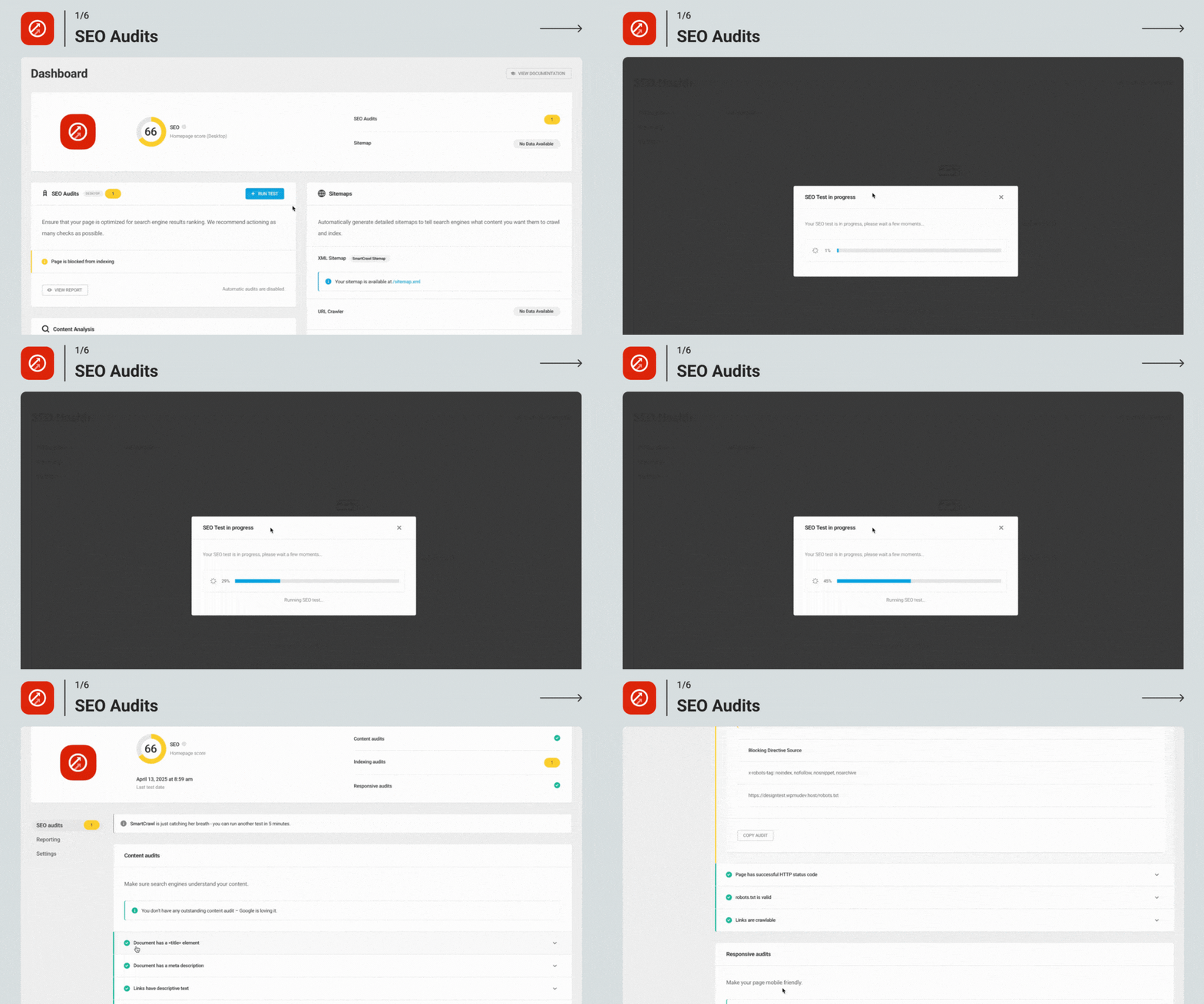
- SEO Checkup & Reports – Run a Checkup and get recommendations for improving SEO.
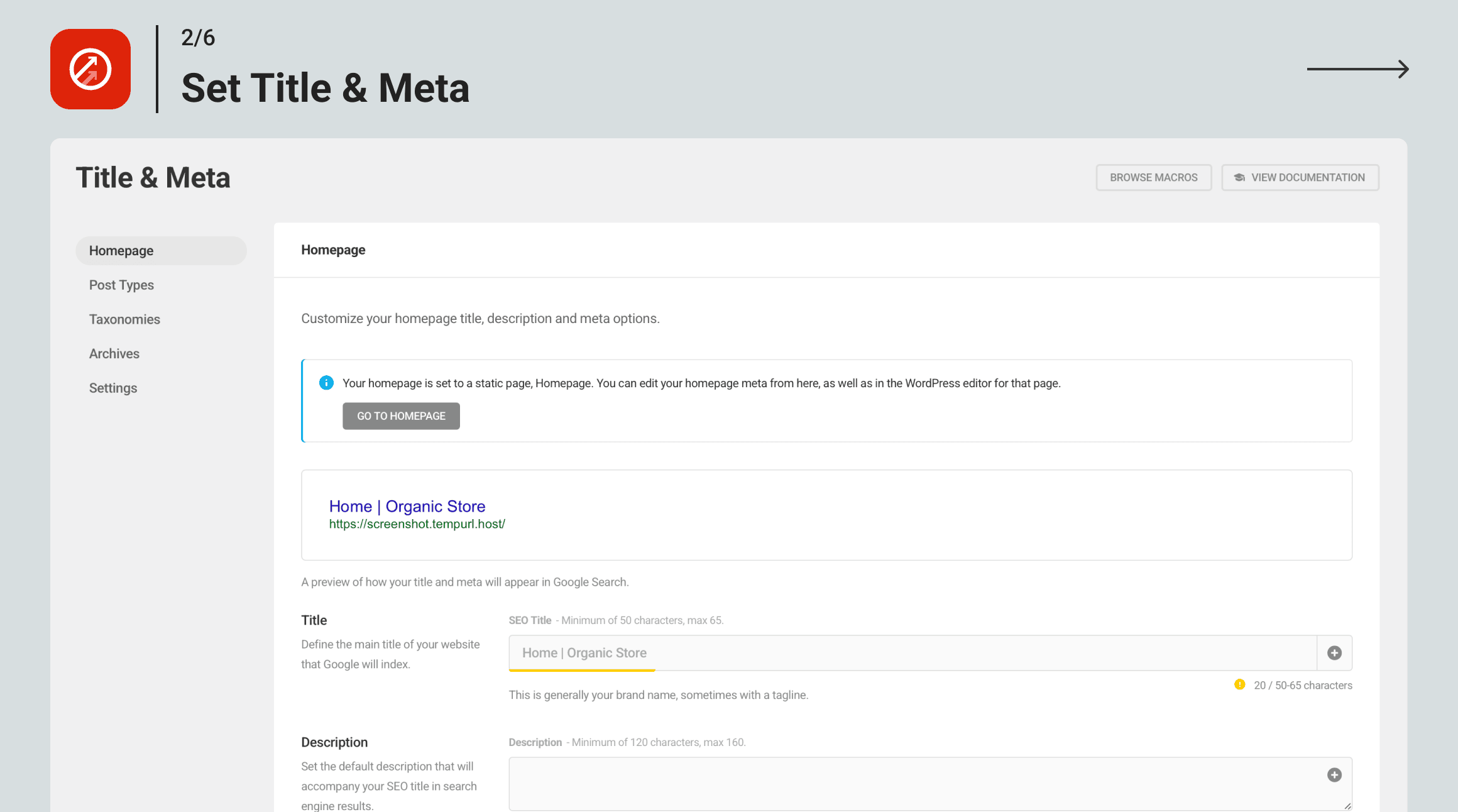
- Titles & Meta Descriptions – Customizes how your meta titles and meta descriptions display on search pages.
- Leverage Social Media – SmartCrawl includes Open Graph, Twitter card, and Pinterest verification and credits you when someone shares your posts.
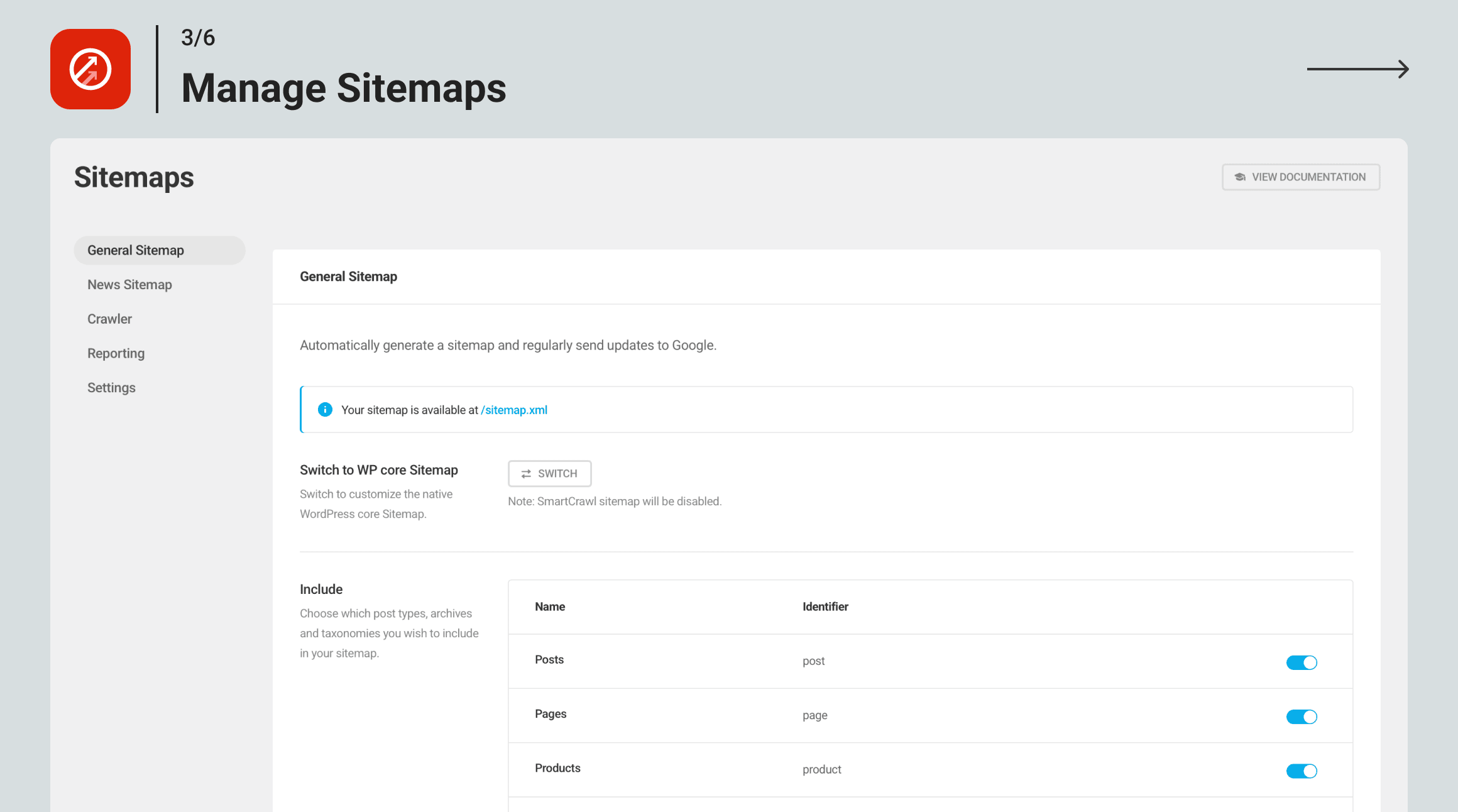
- Sitemap Generator – Choose which post types, archives and taxonomies you wish to include, exclude or add to the XML sitemap.
- Smart Page Analyzer – SmartCrawl has an SEO checker that scans pages and posts for readability and keyword density and makes suggestions for optimizing your content.
- SEO Crawl – Every time you add new content to your site, SmartCrawl will let Google know it’s time to re-crawl your site.
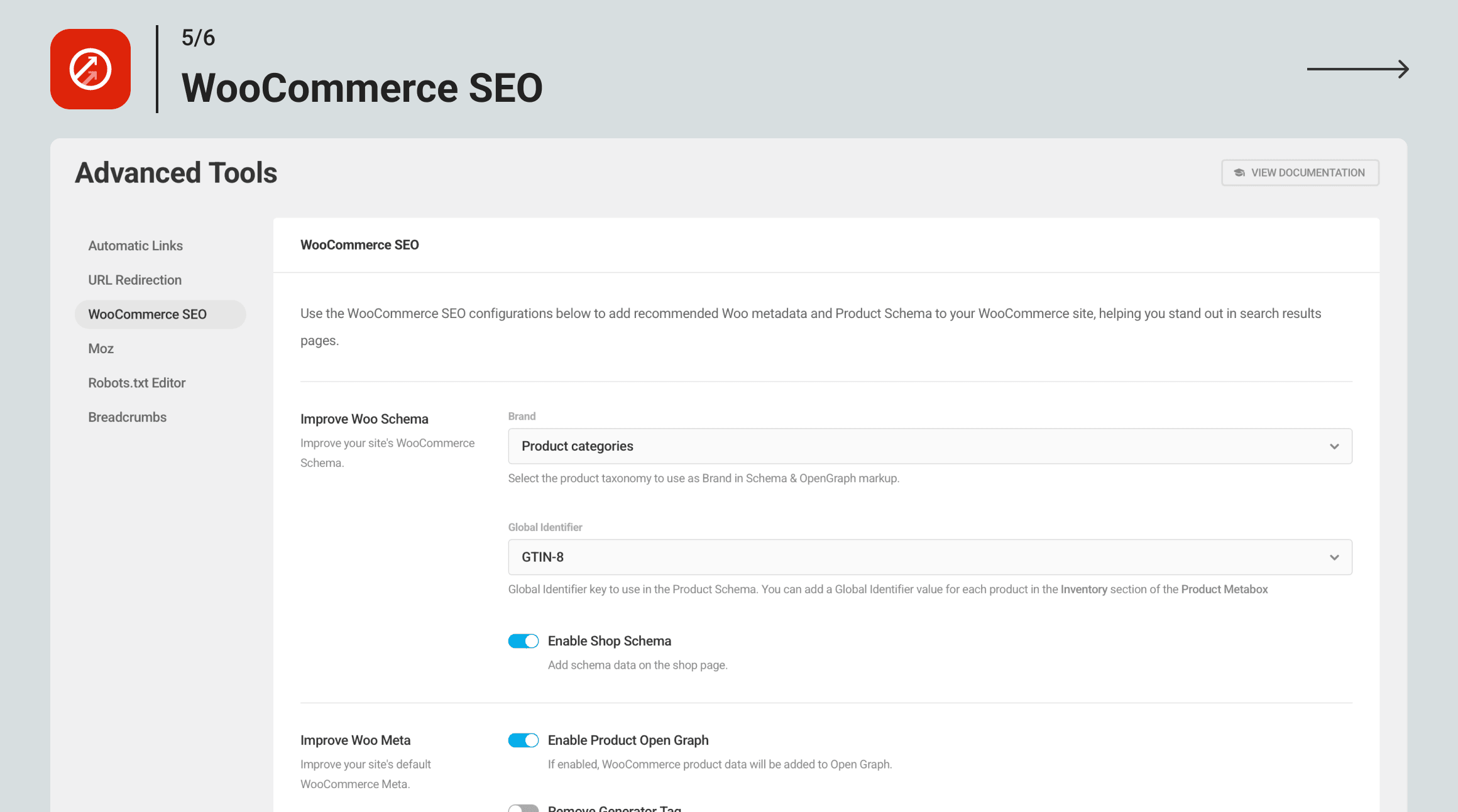
- Schema Markup Support – Make it easier for search engines to understand the meaning of your content.
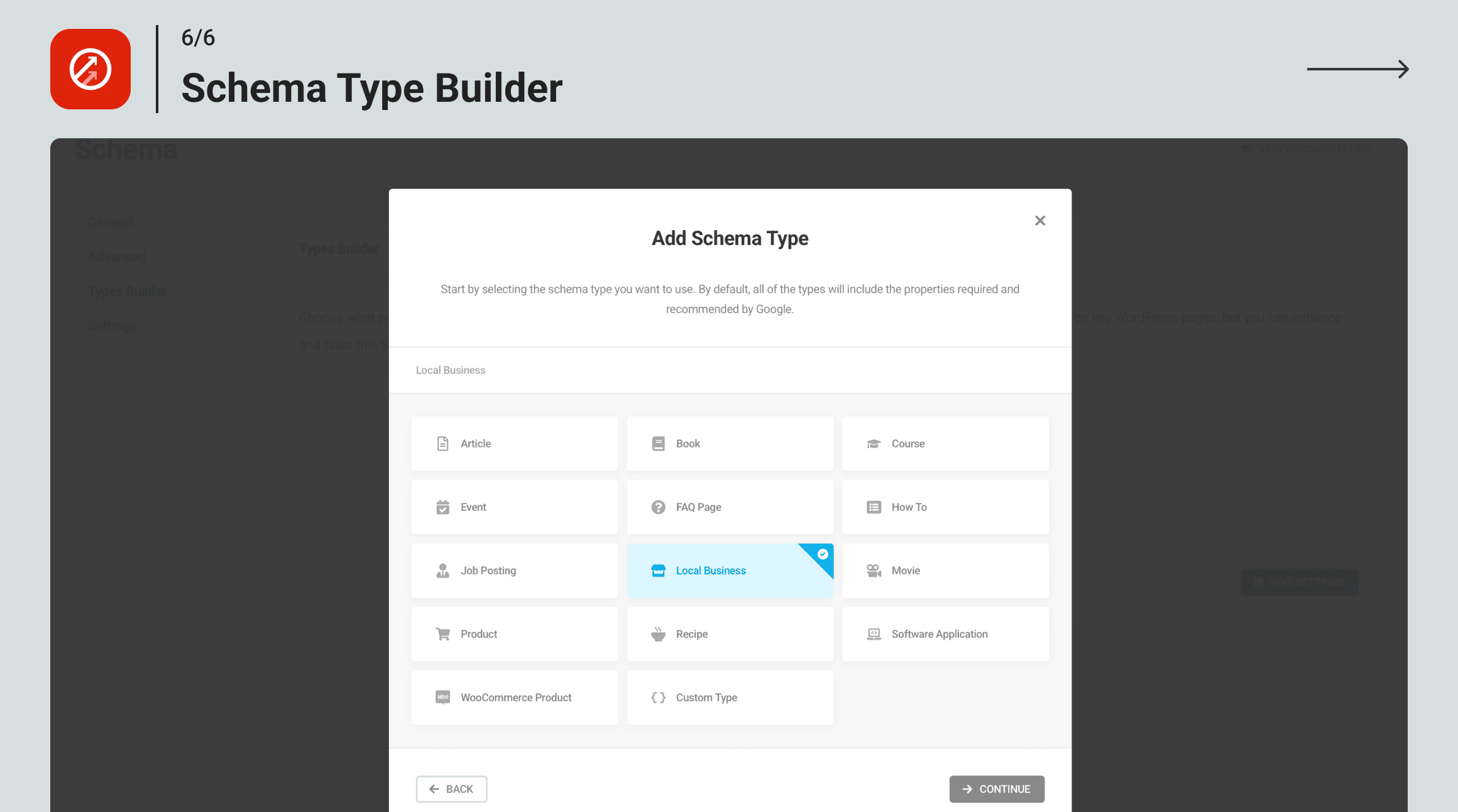
- Schema Types Builder – Add and customize a range of schema markup types.
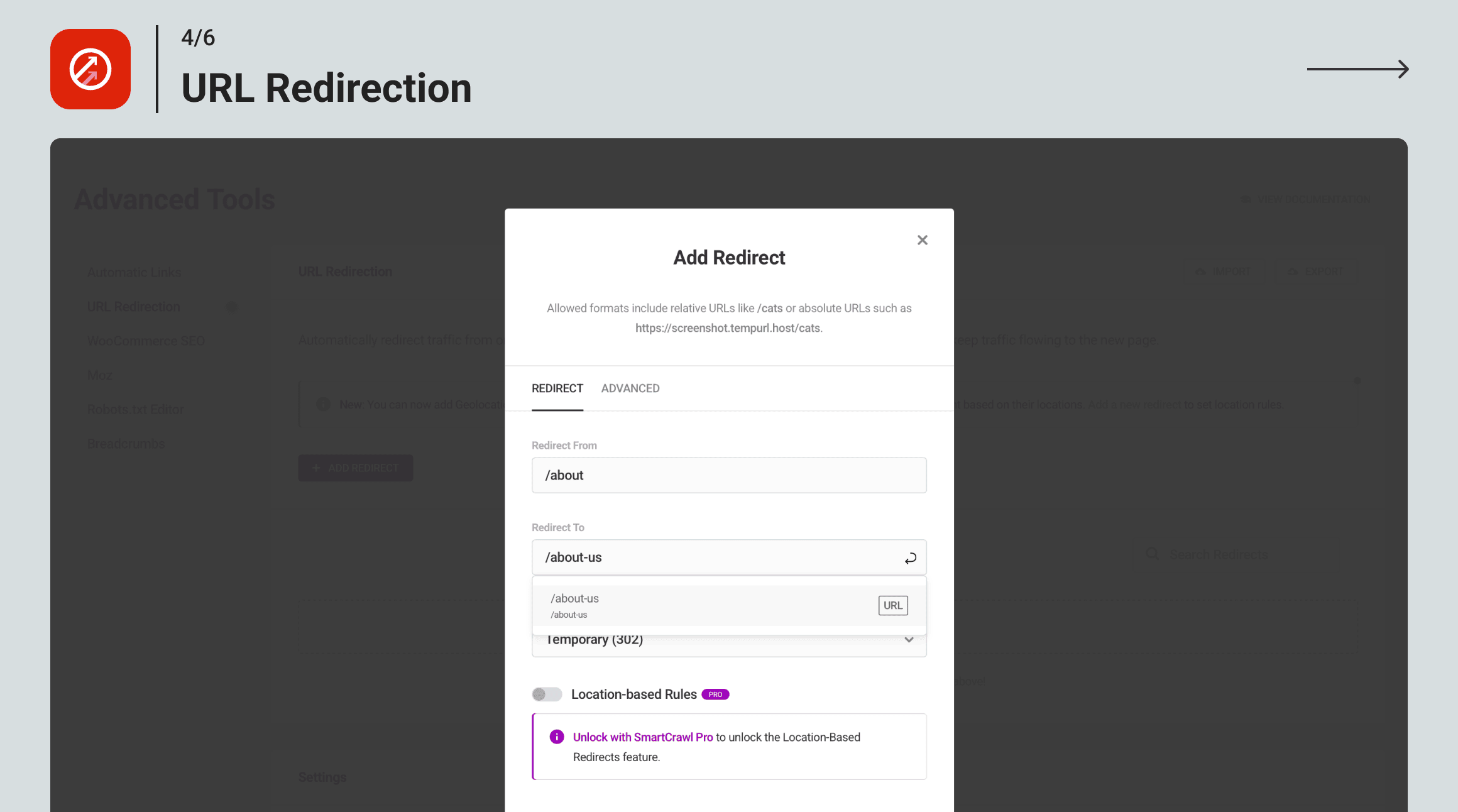
- 301 Redirect – Use SmartCrawl to redirect traffic from one URL to another to protect your hard work and take advantage of high producing links.
- Breadcrumbs – Easily add breadcrumb navigation to posts and pages for better SEO and user experience.
- Integrate With Moz SEO Tools – Already using Moz? Connect your Moz reports and comparison analysis, including rank and links.
- Quick Setup Import/Export – Quickly add your custom SmartCrawl SEO settings to all your sites with included import.
★★★★★
“Το SmartCrawl έχει σχεδιαστεί για να αυξάνει την κυκλοφορία χωρίς να σας κάνει να πετάξετε μέσα από στεφάνες ή να κάνετε σημαντικές αλλαγές στο site. Με τη συμπερίληψη των πιο αποτελεσματικών μεθόδων βελτιστοποίησης και τη λειτουργία του αυτόματου πιλότου, το SmartCrawl σας δίνει περισσότερο χρόνο για άλλες περιοχές του ιστολογίου σας. Καθώς δουλεύετε και μεγαλώνετε, ξέρετε ότι το SmartCrawl φυλάει τα νώτα σας.
“- Neil Patel
Το SmartCrawl ξεκλειδώνει το SEO για το WordPress
Το SEO δεν χρειάζεται να είναι δύσκολο! Το SmartCrawl βελτιστοποιεί τον ιστότοπό σας με ένα κλικ και το καθιστά εύκολο να αλλάζει και να προσαρμόζεται με ένα πλήθος επαγγελματικών συμβουλών για να νικήσετε επισκέπτες.
Δωρεάν έλεγχος SEO
Το SmartCrawl θα σαρώσει τον ιστότοπό σας και θα βρει τρόπους για να βελτιστοποιήσει το περιεχόμενό σας και να το καταστήσει περισσότερο ορατό από τις μηχανές αναζήτησης. Αποφύγετε ανθρώπινο λάθος με το SmartCrawl! Θα βοηθήσει στη δημιουργία καλύτερων συνδέσμων, ετικετών, περιγραφών, εικόνων, χάρτων ιστοτόπου, αγκυρών και βελτίωσης της δομής ολόκληρης της σελίδας.
Αναλύστε το περιεχόμενο και λάβετε προτάσεις σε πραγματικό χρόνο
SmartCrawl runs content analysis in both the post and page editor. Get instant feedback with suggestions for improving your content – SmartCrawl will make your site easier to read and find.
Αποκτήστε το περιεχόμενό σας αναγνωρισμένο στα κοινωνικά μέσα με το Open Graph
Use Open Graph, Twitter Cards, and Pinterest verification to connect Facebook, Instagram, Twitter, LinkedIn, Pinterest, Youtube and almost every social network for sharing and crediting your content. Take full advantage of viral content with SmartCrawl’s social integrations.
Το SmartCrawl έχει πλήρη έλεγχο SEO για Multisite
Το SmartCrawl σάς δίνει τη δυνατότητα να ελέγχετε τις ρυθμίσεις SEO σε ολόκληρο το δίκτυο ως Super Admin ή ισχυρές ρυθμίσεις βελτιστοποίησης αναζήτησης για μεμονωμένους ιδιοκτήτες ιστότοπων. Κάντε μαζικές αλλαγές για το Multisite ή βελτιστοποιήστε κάθε ιστότοπο.
301 URL Redirect
Automatically redirect traffic from one URL to another. Use this tool if you have changed a page’s URL and wish to keep traffic flowing to the new page.
Full Schema Support
SmartCrawl has full support for default schema types and makes it easy for you to let search engines know what your data means, not just what it says.
Schema Types Builder
Add and customize the properties of schema markup types including: Article, Web Page, Rating and Review, Products, Local Business, and more.
Breadcrumbs
Use breadcrumbs to help site visitors with navigation and improve on-page SEO. Customize breadcrumb appearance with a click and easily add them to posts, pages, and archives using a shortcode or PHP code.
The Rank-Higher Convert-Better SEO Tool
Search Engine Optimization is not a trick, it’s all about following best practices.
If you’re running a business website or eCommerce store and are not properly optimizing your sites, you will lose sales.
SmartCrawl is here to help you: it’s a one of a kind WordPress search engine optimization plugin that makes your site easier to find and improves website ranking, for free!
You get our WordPress search optimization tools, which includes the XML sitemap generator, auto-notify search engines when a change is made on your site, integration with MOZ, scans and recommendations, readability checks and so much more.
Smartcrawl is built with ease-of-use in mind: it makes your WordPress site easier to find, but it’s also simple to set up. Run a scan and implement recommended changes in one-click, improving your PageRank in mere minutes. If you need a fully-optimized WordPress site, you should get a WPMU DEV Membership.
Our Membership gives you access to SmartCrawl Pro – which features automated scanning, reports, automatic linking for specific keywords, Crawler that checks for broken URLs, 404s, and multiple redirections – alongside Smush Pro image optimization, all our premium WordPress plugins, and 24/7 WordPress support.
It’s an incredible deal, and you can find out more here.
Take the next step with a WPMU DEV Membership.
What Do People Say About SmartCrawl?
★★★★★
I love the color-coded grading system. It lets me see my SEO effectiveness at a glance. Works great! – elbeedee
★★★★★
I must say that after Yeosting someone else’s plugin for a few years, this interface is much more user-friendly. I am not sure yet, as to its results, but I am happy so far. – billk6969
★★★★★
Took all the mystery out of how to speed up my site! I love this plugin! – vdeluca
★★★★★
There are good developers and then there are great developers. This developer is great! Super high-quality product that works seamlessly without error. I can tell a lot of thought went into creating this software. – Tim Slazyk
A Note From SmartCrawl
Hey! This is SmartCrawl, your trusted Search Engine Optimizer for WordPress. I’m part of the WPMU DEV team, a superhero-suite of WordPress plugins, services, and support. Here are some of our other free plugins:
- Smush – Συμπίεση και βελτιστοποίηση εικόνων
- Forminator – Form, Quiz, Poll and Survey Builder
- Hummingbird – Βελτιστοποίηση Ταχύτητας Ιστoσελίδας
- Hustle – Αναδυόμενα παράθυρα (pop-ups), σλάιντ και μέθοδος συλλογής ηλεκτρονικών διευθύνσεων.
- Defender – Security, Monitoring and Hack Protection
And if you need ALL our Pro plugins AND 24/7 WordPress support, get WPMU DEV membership!
My superhero friends run the WPMU DEV Blog, your source of the very best WordPress tutorials. If you need to be in the know about WordPress, check it out.
Thanks for looking at SmartCrawl, and I look forward to helping you rank higher with the very best SEO practices.
Enjoy, SmartCrawl
Σχετικά με εμάς
WPMU DEV is a premium supplier of quality WordPress plugins, services and support. Join us here:
https://wpmudev.com/
Don’t forget to stay up to date on everything WordPress from the Internet’s number one resource:
WPMU DEV Blog
Hey, one more thing… we hope you enjoy our free offerings as much as we’ve loved making them for you!
Στιγμιότυπα
Συχνές Ερωτήσεις
Έχουμε αφοσιωμένο προσωπικό που παρέχει παγκόσμιας κλάσης υποστήριξη στα φόρουμ του WordPress για όλα τα δωρεάν plugins μας. Αν δεν θέλετε να περιμένετε, αναβαθμίστε για την υποστήριξη ζωντανής συνομιλίας σε πραγματικό χρόνο 24/7/365
Έχω προσθέσει νέους τίτλους στο SmartCrawl και το Google εξακολουθεί να εμφανίζει τους παλιούς τίτλους και τις περιγραφές μου. Τι γίνεται!?
Εάν ενημερώσατε πρόσφατα τους τίτλους και την περιγραφή σας, το Google ίσως δεν έχει ακόμη αναπροσαρμόσει τα στοιχεία τους. Μπορεί να χρειαστεί έως και μια εβδομάδα για να δείξει η Google τις αλλαγές που έχετε κάνει.
Χρησιμοποιήστε το κουμπί “Νέα ανίχνευση” στην καρτέλα Sitemap για να ενημερώσετε την Google σχετικά με τυχόν αλλαγές στον ιστότοπό σας. Η προσωρινή μνήμη Google θα ενημερώνεται όταν ο ιστότοπός σας θα ανιχνεφθεί ξανά. Να είστε υπομονετικοί, μπορεί να χρειαστεί λίγος χρόνος για να εμφανιστούν οι νέες πληροφορίες.
Η λειτουργία SmartCrawl λειτουργεί με προσαρμοσμένους τύπους άρθρων;
Ναι! Το SmartCrawl SEO έχει πλήρη υποστήριξη για προσαρμοσμένους τύπους άρθρων (CPT), τόσο στα γενικά εργαλεία διαχείρισης (Ρυθμίσεις > Τίτλος & Μεταδεδομένα), όσο και στον επεξεργαστή κειμένου. Επιπλέον, λειτουργεί με ενσωματωμένες και προσαρμοσμένες ταξινομίες.
Λειτουργεί το SmartCrawl με περιεχόμενο από κατασκευαστές σελίδων όπως ο Visual Composer ή ο Beaver Builder;
Το SmartCrawl λειτουργεί με οποιοδήποτε κανονικό περιεχόμενο WP και κατασκευαστές σελίδων δεν πρέπει να αποτελούν εξαίρεση. Όσο το θέμα σας χρησιμοποιεί άρθρα, σελίδες και προσαρμοσμένους τύπους άρθρων, το SmartCrawl θα λειτουργήσει.
How can I report security issues or bugs?
We take plugin security incredibly seriously; if you have a bug or vulnerability to report, you can do so through the Patchstack Vulnerability Disclosure Program. It’s fast, easy, and you will be notified when the issue is fixed. Report a vulnerability.
Κριτικές


Συνεισφέροντες & Προγραμματιστές
“SmartCrawl SEO checker, analyzer & optimizer” είναι λογισμικό ανοιχτού κώδικα. Οι παρακάτω έχουν συνεισφέρει στη δημιουργία του.
Συντελεστές
Το “SmartCrawl SEO checker, analyzer & optimizer” έχει μεταφραστεί σε 16 γλώσσες. Ευχαριστούμε τους μεταφραστές για τις συνεισφορές τους.
Μεταφράστε το “SmartCrawl SEO checker, analyzer & optimizer” στην γλώσσα σας.
Ενδιαφέρεστε για την ανάπτυξη;
Περιηγηθείτε στον κώδικα, ανατρέξτε στο αποθετήριο SVN ή εγγραφείτε στο αρχείο καταγραφής αλλαγών ανάπτυξης μέσω RSS .
Σύνοψη αλλαγών
3.16.4 ( 2026-08-19 )
- Fix: SEO Health scans timing out in some cases.
3.16.3 ( 2026-08-10 )
- Fix: Improved security and access controls for AJAX handlers. (Credit: Ezekiel Victor)
3.16.2 ( 2026-06-18 )
- Enhancement: Migrate SmartCrawl Metabox UI to Gutenberg Sidebar.
- Enhancement: Add canonical consolidation for non-translatable WPML posts.
- Enhancement: Add option to disable structured data (JSON-LD) for SmartCrawl breadcrumbs.
- Enhancement: Refine content analysis for keyphrase detection and keyphrase density accuracy.
- Enhancement: Improve stop word detection in focus keyphrases and recommendations.
- Enhancement: Expand breadcrumbs support for WooCommerce and custom post types.
- Enhancement: Add support for dynamic tags from SmartCrawl to the GenerateBlocks plugin.
- Fix: PHP 8.5 compatibility issues.
- Fix: OpenGraph and X (Twitter) cards cannot be deactivated.
- Fix: Post::get_focus_keywords() returns a string instead of an array after set_focus_keywords().
- Fix: Taxonomy Archives remain enabled after disabling via SmartCrawl Pro > Schema > Advanced.
- Fix: Backslash () is not detected in content analysis.
- Fix: Homepage OpenGraph settings are enabled by default.
- Fix: UI issues in the breadcrumbs section.
- Fix: Query errors when entering invalid Moz account credentials.
- Fix: Enabling the link logo in White Label hides footer links and social icons.
- Fix: Incorrect breadcrumbs output when “Posts per page” is set.
- Fix: Fatal error when saving the Breadcrumbs module in Advanced Tools.
- Fix: Gutenberg link popup is not displaying properly.
3.15.0 ( 2026-01-26 )
- Enhancement: Limit Person Schema to specific pages when Organization Schema is enabled.
- Enhancement: Optimize database performance by setting wds_onpage_options autoload to NO.
- Enhancement: Improve compatibility between the Title & Meta module and the Discourse plugin.
- Fix: SEO checks failing on large content pages.
- Fix: Editor getting stuck when typing for more than two minutes while SmartCrawl is enabled.
- Fix: Social accounts being erased from Schema General Settings.
- Fix: Categories and tags not saving under Taxonomy Archives.
- Fix: HTML characters appearing in the SEO Health report.
- Fix: Blog or Posts Archive pages not working with Global Titles & Meta Descriptions.
- Fix: Article Schema being added to all pages
- Fix: Author URL appearing even after disabling it in SmartCrawl settings.
- Fix: SmartCrawl not detecting focus keywords when numbers are used.
- Fix: Auto-linking is causing issues with the WooCommerce cart.
- Fix: Sitemap update schedule select option is being disabled.
3.14.6 ( 2025-12-17 )
- Enhance: Miscellaneous improvements
3.14.5 ( 2025-11-20 )
- Enhance: Miscellaneousness improvements
- Fix: Duplicate homepage URLs appear in the sitemap when using WPML plugin
3.14.4 ( 2025-09-23 )
- Fix: Security improvements
3.14.3 ( 2025-09-15 )
- Fix: Update some instances of Twitter to X
- Fix: X tags not enabled on new posts
3.14.2 ( 2025-08-08 )
- Fix: Security improvements
- Fix: Ensure Social sharing features are correctly enabled when selected during onboarding
3.14.1 ( 2025-07-28 )
- Fix: Website and Organization schema details are not added correctly in certain cases.
- Fix: Meta Title and Description do not apply to the blog page when a static front page is set.
- Fix: Schema Types Builder does not function as expected.
- Fix: Keyphrase detection in post content fails, affecting SEO analysis.
3.14.0 ( 2025-07-07 )
- New: Instant indexing feature
- Enhance: Add condition in SmartCrawl Breadcrumbs PHP code to avoid a fatal error when the plugin is disabled
- Enhance: Remove the Auto-notify search engines feature from SmartCrawl
- Enhance: Improve source data for password-protected content to exclude featured image metadata
- Fix: OpenGraph appears enabled in individual posts when it should be disabled
- Fix: Video Schema generated by SmartCrawl is missing the timezone in uploadDate and lacks a description
- Fix: Auto-linking is hard caching the WooCommerce account page
- Fix: SmartCrawl fields in Quick Edit mode don’t populate
- Fix: OpenGraph and Twitter cards remain active on the homepage even when deactivated in the setup wizard
- Fix: Thumbnail is not set as the default OpenGraph image for WooCommerce product categories
- Fix: Issue with how the meta robots “index” and “follow” values are displayed
- Fix: Error with the report recipient when saving any Sitemap Setting
- Fix: Redirect issue with a mix of Latin and non-Latin characters
- Fix: Improve in-post analysis recommendation for using the focus keyphrase in image alt text
3.13.1 ( 2025-04-24 )
- Enhance: Compatibility with WordPress 6.8
- Enhance: Add a new menu item to help you discover other free plugins by WPMU DEV and more
3.13.0 ( 2025-02-11 )
- Enhance: “Keyword” is now referred to as “Keyphrase”
- Enhance: Improve Stop Word detection in Content Analysis
- Enhance: Resolve conflicts between URL Redirection and WordPress Default Redirection
- Fix: Focus Keyphrase now analyzes the entire keyphrase
- Fix: Focus Keyphrases are not separated by commas
- Fix: Allow in-post override of global Index and Follow settings
- Fix: Automatic Linking is ‘Off’ in the HUB
- Fix: Character limit caps causing errors in URL redirection
- Fix: SmartCrawl activation on WordPress lower than 6.4
- Fix: Autolinking in WooCommerce Product Categories is not working
- Fix: SmartCrawl can be installed on PHP versions lower than 7.4
- Fix: Custom Meta Tags property gets stripped
- Fix: A notice appears related to SmartCrawl after upgrading to WordPress 6.7
- Fix: SEO recommendations incorrectly state that no images are added instead of checking for image alt text
- Fix: “Follow – Override Post Type Setting” option is not working
- Fix: Broken OpenGraph featured image
- Fix: Automatic sitemap updates switch from Automatic to Manual after updating SmartCrawl
- Fix: Handle specific string-type errors that occur with a particular option
3.12.2 ( 2024-12-23 )
- Enhance: Code improvements
- Fix: Fixed missing OG Image tag when “Default Feature Image” is broken.
- Fix: Resolved “undefined” issue in Google Preview.
- Fix: Addressed fatal error with Cloudflare location-based redirection.
- Fix: Fixed redirect URL error on custom post types.
- Fix: Corrected issues with automatic linking for custom links.
- Fix: A notice related to load_plugin_textdomain appearing after upgrading to version 6.7.
3.11.0 ( 2024-09-09 )
- Enhance: White label improvements
- Enhance: Site crawl cooldown timer
- Enhance: Macros to support uppercase in custom fields
- Enhance: Support spaces in redirect URLs
- Fix: Configuration did not work with Advanced Tools modules
- Fix: Permission issues with Advanced Tools in multisite environments
- Fix: Issues with Author Schema
- Fix: Error in automatic linking when using a slash between words
- Fix: Missing uploadDate timezone in Video Schema
- Fix: JavaScript error occurs when creating a redirect
- Fix: Missing Advanced Tools after certain imports
- Fix: Redirects not working with URLs containing special characters
- Fix: OpenGraph tags are not added if images are deleted from the media library
- Fix: Missing description and upload date metadata in YouTube playlists
Full changelog can be found here – SmartCrawl changelog.