پیش‌دید پیوندها

برای جلوگیری از تغییر زمینه وقتی کاربران پیوندی را در Google Chat هم‌رسانی می‌کنند، برنامه Chat شما می‌تواند با پیوست کردن کارت به پیامشان، پیوند را پیش‌نمایش کند. این کارت اطلاعات بیشتری ارائه می‌دهد و به افراد امکان می‌دهد مستقیماً از Google Chat اقدام کنند.

برای مثال، فضای Google Chat را تصور کنید که شامل همه نمایندگان خدمات مشتری شرکت و همچنین برنامه Chat به‌نام Case-y است. کارگزاران اغلب پیوندهای پرونده‌های خدمات مشتری را در فضای Chat هم‌رسانی می‌کنند، و هر بار که این کار را می‌کنند همکارانشان باید پیوند پرونده را باز کنند تا جزئیاتی مثل گیرنده تکلیف، وضعیت، و موضوع را ببینند. به‌همین ترتیب، اگر کسی بخواهد مالکیت پرونده‌ای را برعهده بگیرد یا وضعیت آن را تغییر دهد، باید پیوند را باز کند.

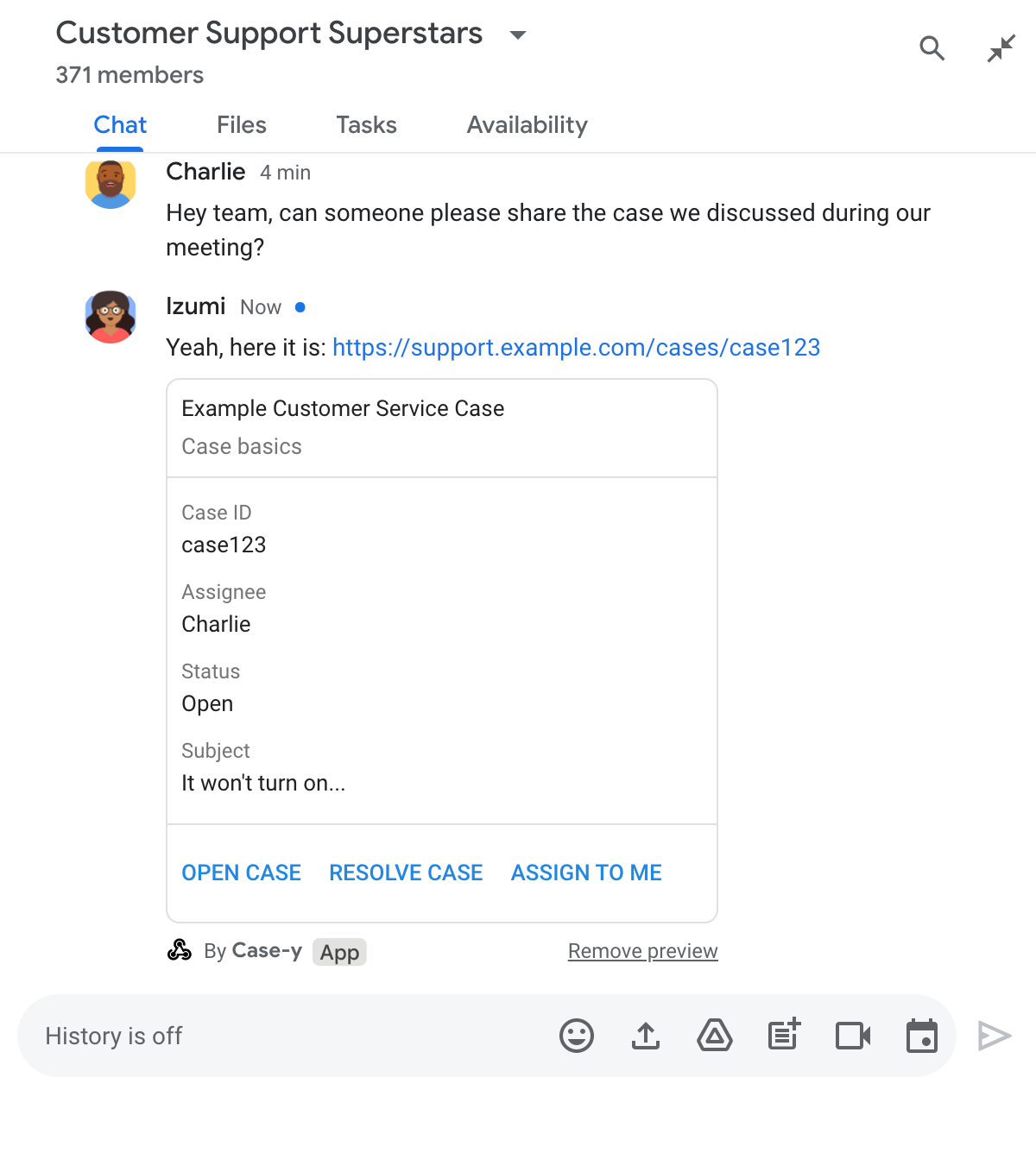
پیش‌نمایش پیوند به برنامه Chat ساکن فضا، Case-y، امکان می‌دهد هرگاه کسی پیوند پرونده‌ای را هم‌رسانی می‌کند، کارتی حاوی موضوع، وضعیت، و فرد واگذارشده را پیوست کند. دکمه‌های روی کارت به نمایندگان امکان می‌دهد مالکیت پرونده را بپذیرند و وضعیت را مستقیماً از جاری‌سازی گپ تغییر دهند.

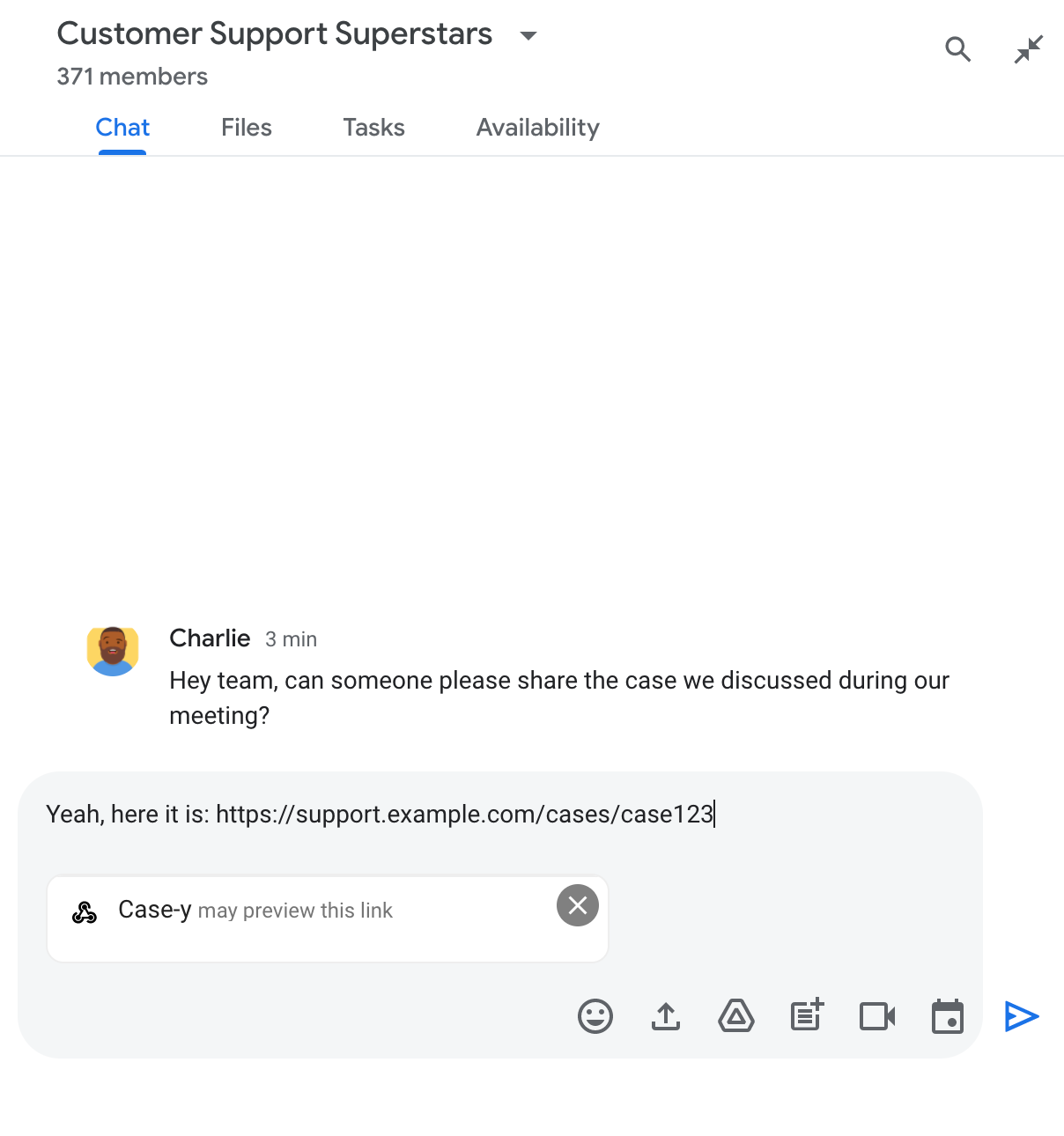
وقتی فردی پیوندی را به پیامش اضافه می‌کند، تراشه‌ای ظاهر می‌شود که به او اطلاع می‌دهد برنامه Chat ممکن است پیوند را پیش‌نمایش کند.

تراشه‌ای که نشان می‌دهد برنامه Chat ممکن است پیوندی را پیش‌دید کند

پس‌از ارسال پیام، پیوند به برنامه Chat ارسال می‌شود، که سپس کارت را تولید و به پیام کاربر پیوست می‌کند.

برنامه Chat با پیوست کردن کارت به پیام، پیوندی را پیش‌دید می‌کند

کارت در کنار پیوند، اطلاعات بیشتری درباره پیوند ارائه می‌دهد، ازجمله عناصر تعاملی مانند دکمه‌ها. برنامه Chat شما می‌تواند کارت پیوست‌شده را در پاسخ به تعاملات کاربر، مانند کلیک روی دکمه، به‌روز کند.

اگر کسی نمی‌خواهد برنامه Chat پیوند او را با پیوست کردن کارت به پیامش پیش‌نمایش کند، می‌تواند با کلیک کردن روی در تراشه پیش‌نمایش از پیش‌نمایش جلوگیری کند. کاربران می‌توانند کارت پیوست‌شده را در هر زمانی با کلیک کردن روی برداشتن پیش‌نمایش بردارند.

پیش‌نیازها

HTTP

برنامه Google Chat که تعاملات کاربر را دریافت و به آن‌ها پاسخ می‌دهد. برای ساختن آن، شروع سریع HTTP را تکمیل کنید.

Apps Script

برنامه Google Chat که تعاملات کاربر را دریافت و به آن‌ها پاسخ می‌دهد. برای ساختن یکی از آن‌ها، راه‌اندازی سریع Apps Script را تکمیل کنید.

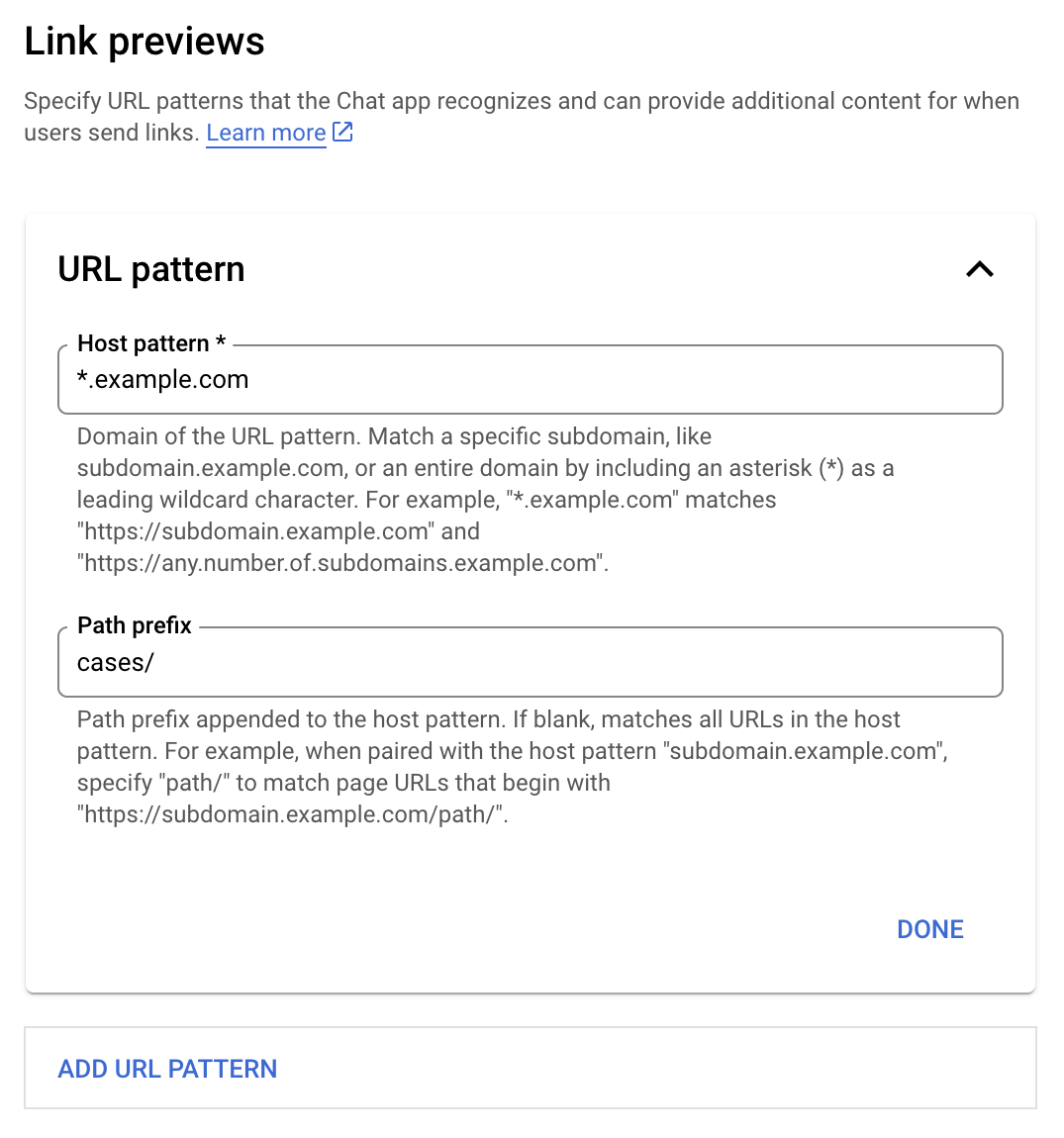
پیوندهای خاص - مانند example.com، support.example.com، و support.example.com/cases/ - را به‌عنوان الگوهای نشانی وب در صفحه پیکربندی برنامه Chat در کنسول Google Cloud ثبت کنید تا برنامه Chat بتواند پیش‌نمایش آن‌ها را نشان دهد.

منو پیکربندی پیش‌نمایش پیوند

  1. کنسول Google Cloud را باز کنید.
  2. در کنار «Google Cloud»، روی «پیکان روبه پایین» کلیک کنید و پروژه برنامه Chat را باز کنید.
  3. در فیلد جستجو، Google Chat API را تایپ کنید و روی Google Chat API کلیک کنید.
  4. روی مدیریت > پیکربندی کلیک کنید.
  5. در بخش «پیش‌نمایش‌های پیوند»، الگوی نشانی وبی را اضافه یا ویرایش کنید.
    1. برای پیکربندی پیش‌نمایش پیوند برای الگوی نشانی وب جدید، روی افزودن الگوی نشانی وب کلیک کنید.
    2. برای ویرایش پیکربندی الگوی نشانی وب موجود، روی «کلید پایین‌بر» کلیک کنید.
  6. در فیلد الگوی میزبان، دامنه الگوی نشانی وب را وارد کنید. برنامه Chat پیوندهای این دامنه را پیش‌دید خواهد کرد.

    برای اینکه برنامه Chat پیوندهای یک زیردامنه خاص، مثل subdomain.example.com، را پیش‌دید کند، زیردامنه را اضافه کنید.

    برای اینکه برنامه Chat پیوندهای کل دامنه را پیش‌دید کند، نویسه عامی را با ستاره (*) به‌عنوان زیردامنه مشخص کنید. برای مثال، *.example.com با subdomain.example.com و any.number.of.subdomains.example.com مطابقت دارد.

  7. در فیلد پیشوند مسیر، مسیری را وارد کنید تا به دامنه الگوی میزبان پیوست شود.

    برای مطابقت دادن همه نشانی‌های وب در دامنه الگوی میزبان، پیشوند مسیر را خالی بگذارید.

    برای مثال، اگر الگوی «میزبان» support.example.com است، برای مطابقت دادن نشانی‌های وب موارد میزبانی‌شده در support.example.com/cases/،‏ cases/ را وارد کنید.

  8. روی تمام کلیک کنید.

  9. روی ذخیره کلیک کنید.

اکنون، هرگاه کسی پیوندی را که با الگوی نشانی وب پیش‌نمایش پیوند مطابقت دارد به پیامی در فضای Chat که شامل برنامه Chat شما است اضافه کند، برنامه شما پیوند را پیش‌نمایش می‌کند.

پس‌از پیکربندی پیش‌نمایش پیوند برای پیوندی معین، برنامه Chat شما می‌تواند پیوند را با پیوست کردن اطلاعات بیشتر به آن تشخیص دهد و پیش‌نمایش کند.

در فضاهای Chat که شامل برنامه Chat شما می‌شود، وقتی پیام کسی حاوی پیوندی باشد که با الگوی نشانی وب پیش‌نمای پیوند مطابقت داشته باشد، برنامه Chat شما شیء رویدادی با MessagePayload دریافت می‌کند. در محتوای پیام، شیء message.matchedUrl (chat.messagePayload.message.matchedUrl.url) حاوی پیوندی است که کاربر در پیام قرار داده است:

(قالب) JSON

message: {
  matchedUrl: {
    url: "https://support.example.com/cases/case123"
  },
  ... // other message attributes redacted
}

با بررسی وجود فیلد matchedUrl در بار پیام رویداد MESSAGE (chat.messagePayload.message.matchedUrl.url)، برنامه Chat شما می‌تواند اطلاعاتی را به پیام با پیوند پیش‌نمایش‌شده اضافه کند. برنامه Chat شما می‌تواند با پیام نوشتاری ساده پاسخ دهد یا کارت پیوست کند.

پاسخ دادن با پیامک

برای پاسخ‌های ساده، برنامه Chat شما می‌تواند پیوندی را با پاسخ دادن با پیامک ساده به پیوند پیش‌دید کند. این مثال پیامی را پیوست می‌کند که نشانی وب پیوندی را که با الگوی نشانی وب پیش‌نمایش پیوند مطابقت دارد تکرار می‌کند.

Node.js

node/chat/preview-link/index.js
// Reply with a text message for URLs of the subdomain "text"
if (chatMessage.matchedUrl.url.includes("text.example.com")) {
  return { hostAppDataAction: { chatDataAction: { createMessageAction: { message: {
    text: 'event.chat.messagePayload.message.matchedUrl.url: ' + chatMessage.matchedUrl.url
  }}}}};
}

‫FUNCTION_URL را با نقطه پایان HTTP که کلیک‌های دکمه را مدیریت می‌کند جایگزین کنید.

Python

python/chat/preview-link/main.py
# Reply with a text message for URLs of the subdomain "text"
if "text.example.com" in chatMessage.get('matchedUrl').get('url'):
  return { 'hostAppDataAction': { 'chatDataAction': { 'createMessageAction': { 'message': {
    'text': 'event.chat.messagePayload.message.matchedUrl.url: ' + chatMessage.get('matchedUrl').get('url')
  }}}}}

‫FUNCTION_URL را با نقطه پایان HTTP که کلیک‌های دکمه را مدیریت می‌کند جایگزین کنید.

جاوا

java/chat/preview-link/src/main/java/com/google/chat/previewLink/App.java
// Reply with a text message for URLs of the subdomain "text"
if (chatMessage.at("/matchedUrl/url").asText().contains("text.example.com")) {
  return new GenericJson() {{
    put("hostAppDataAction", new GenericJson() {{
      put("chatDataAction", new GenericJson() {{
        put("createMessageAction", new GenericJson() {{
          put("message", new Message()
            .setText("event.chat.messagePayload.message.matchedUrl.url: " + chatMessage.at("/matchedUrl/url").asText()));
        }});
      }});
    }});
  }};
}

‫FUNCTION_URL را با نقطه پایانی HTTP که کلیک‌های دکمه را مدیریت می‌کند جایگزین کنید.

Apps Script

apps-script/chat/preview-link/preview-link.gs
// Reply with a text message for URLs of the subdomain "text".
if (chatMessage.matchedUrl.url.includes("text.example.com")) {
  return { hostAppDataAction: { chatDataAction: { createMessageAction: { message: {
    text: 'event.chat.messagePayload.message.matchedUrl.url: ' + chatMessage.matchedUrl.url
  }}}}};
}

برای پیوست کردن کارت به پیوند پیش‌نمایش‌شده، کنش DataActions را با شیء ChatDataActionMarkup از نوع UpdateInlinePreviewAction برگردانید.

در مثال زیر، برنامه Chat کارت پیش‌نمایشی به پیام‌هایی که حاوی الگوی نشانی وب support.example.com هستند اضافه می‌کند.

برنامه Chat با پیوست کردن کارت به پیام، پیوندی را پیش‌دید می‌کند

Node.js

node/chat/preview-link/index.js
// Attach a card to the message for URLs of the subdomain "support"
if (chatMessage.matchedUrl.url.includes("support.example.com")) {
  // A hard-coded card is used in this example. In a real-life scenario,
  // the case information would be fetched and used to build the card.
  return { hostAppDataAction: { chatDataAction: { updateInlinePreviewAction: { cardsV2: [{
    cardId: 'attachCard',
    card: {
      header: {
        title: 'Example Customer Service Case',
        subtitle: 'Case basics',
      },
      sections: [{ widgets: [
      { decoratedText: { topLabel: 'Case ID', text: 'case123'}},
      { decoratedText: { topLabel: 'Assignee', text: 'Charlie'}},
      { decoratedText: { topLabel: 'Status', text: 'Open'}},
      { decoratedText: { topLabel: 'Subject', text: 'It won\'t turn on...' }},
      { buttonList: { buttons: [{
        text: 'OPEN CASE',
        onClick: { openLink: {
          url: 'https://support.example.com/orders/case123'
        }},
      }, {
        text: 'RESOLVE CASE',
        onClick: { openLink: {
          url: 'https://support.example.com/orders/case123?resolved=y',
        }},
      }, {
        text: 'ASSIGN TO ME',
        onClick: { action: { function: FUNCTION_URL }}
      }]}}
      ]}]
    }
  }]}}}};
}

‫FUNCTION_URL را با نقطه پایانی HTTP که کلیک‌های دکمه را مدیریت می‌کند جایگزین کنید.

Python

python/chat/preview-link/main.py
# Attach a card to the message for URLs of the subdomain "support"
if "support.example.com" in chatMessage.get('matchedUrl').get('url'):
  # A hard-coded card is used in this example. In a real-life scenario,
  # the case information would be fetched and used to build the card.
  return { 'hostAppDataAction': { 'chatDataAction': { 'updateInlinePreviewAction': { 'cardsV2': [{
    'cardId': 'attachCard',
    'card': {
      'header': {
        'title': 'Example Customer Service Case',
        'subtitle': 'Case basics',
      },
      'sections': [{ 'widgets': [
      { 'decoratedText': { 'topLabel': 'Case ID', 'text': 'case123'}},
      { 'decoratedText': { 'topLabel': 'Assignee', 'text': 'Charlie'}},
      { 'decoratedText': { 'topLabel': 'Status', 'text': 'Open'}},
      { 'decoratedText': { 'topLabel': 'Subject', 'text': 'It won\'t turn on...' }},
      { 'buttonList': { 'buttons': [{
        'text': 'OPEN CASE',
        'onClick': { 'openLink': {
          'url': 'https://support.example.com/orders/case123'
        }},
      }, {
        'text': 'RESOLVE CASE',
        'onClick': { 'openLink': {
          'url': 'https://support.example.com/orders/case123?resolved=y',
        }},
      }, {
        'text': 'ASSIGN TO ME',
        'onClick': { 'action': { 'function': FUNCTION_URL }}
      }]}}
      ]}]
    }
  }]}}}}

‫FUNCTION_URL را با نقطه پایان HTTP که کلیک‌های دکمه را مدیریت می‌کند جایگزین کنید.

جاوا

java/chat/preview-link/src/main/java/com/google/chat/previewLink/App.java
// Attach a card to the message for URLs of the subdomain "support"
if (chatMessage.at("/matchedUrl/url").asText().contains("support.example.com")) {
  // A hard-coded card is used in this example. In a real-life scenario,
  // the case information would be fetched and used to build the card.
  CardWithId cardV2 = new CardWithId()
    .setCardId("attachCard")
    .setCard(new GoogleAppsCardV1Card()
      .setHeader(new GoogleAppsCardV1CardHeader()
        .setTitle("Example Customer Service Case")
        .setSubtitle("Case basics"))
      .setSections(List.of(new GoogleAppsCardV1Section().setWidgets(List.of(
        new GoogleAppsCardV1Widget().setDecoratedText(new GoogleAppsCardV1DecoratedText()
          .setTopLabel("Case ID")
          .setText("case123")),
        new GoogleAppsCardV1Widget().setDecoratedText(new GoogleAppsCardV1DecoratedText()
          .setTopLabel("Assignee")
          .setText("Charlie")),
        new GoogleAppsCardV1Widget().setDecoratedText(new GoogleAppsCardV1DecoratedText()
          .setTopLabel("Status")
          .setText("Open")),
        new GoogleAppsCardV1Widget().setDecoratedText(new GoogleAppsCardV1DecoratedText()
          .setTopLabel("Subject")
          .setText("It won't turn on...")),
        new GoogleAppsCardV1Widget().setButtonList(new GoogleAppsCardV1ButtonList()
          .setButtons(List.of(
            new GoogleAppsCardV1Button()
              .setText("OPEN CASE")
            .setOnClick(new GoogleAppsCardV1OnClick()
                .setOpenLink(new GoogleAppsCardV1OpenLink()
                  .setUrl("https://support.example.com/orders/case123"))),
            new GoogleAppsCardV1Button()
              .setText("RESOLVE CASE")
            .setOnClick(new GoogleAppsCardV1OnClick()
                .setOpenLink(new GoogleAppsCardV1OpenLink()
                  .setUrl("https://support.example.com/orders/case123?resolved=y"))),
            new GoogleAppsCardV1Button()
              .setText("ASSIGN TO ME")
              .setOnClick(new GoogleAppsCardV1OnClick()
                .setAction(new GoogleAppsCardV1Action().setFunction(FUNCTION_URL)))
          ))
        )
      ))))
    );

  return new GenericJson() {{
    put("hostAppDataAction", new GenericJson() {{
      put("chatDataAction", new GenericJson() {{
        put("updateInlinePreviewAction", new GenericJson() {{
          put("cardsV2", List.of(cardV2));
        }});
      }});
    }});
  }};
}

‫FUNCTION_URL را با نقطه پایان HTTP که کلیک‌های دکمه را مدیریت می‌کند جایگزین کنید.

Apps Script

apps-script/chat/preview-link/preview-link.gs
// Attach a card to the message for URLs of the subdomain "support".
if (chatMessage.matchedUrl.url.includes("support.example.com")) {
  // A hard-coded card is used in this example. In a real-life scenario,
  // the case information would be fetched and used to build the card.
  return { hostAppDataAction: { chatDataAction: { updateInlinePreviewAction: { cardsV2: [{
    cardId: 'attachCard',
    card: {
      header: {
        title: 'Example Customer Service Case',
        subtitle: 'Case summary',
      },
      sections: [{ widgets: [
      { decoratedText: { topLabel: 'Case ID', text: 'case123'}},
      { decoratedText: { topLabel: 'Assignee', text: 'Charlie'}},
      { decoratedText: { topLabel: 'Status', text: 'Open'}},
      { decoratedText: { topLabel: 'Subject', text: 'It won\'t turn on...' }},
      { buttonList: { buttons: [{
        text: 'OPEN CASE',
        onClick: { openLink: {
          url: 'https://support.example.com/orders/case123'
        }},
      }, {
        text: 'RESOLVE CASE',
        onClick: { openLink: {
          url: 'https://support.example.com/orders/case123?resolved=y',
        }},
      }, {
        text: 'ASSIGN TO ME',
        // Clicking this button triggers the execution of the function
        // "assign" from the Apps Script project.
        onClick: { action: { function: 'assign'}}
      }]}}
      ]}]
    }
  }]}}}};
}

وقتی کاربران با کارت پیش‌نمایش پیوند تعامل برقرار می‌کنند، مثلاً روی دکمه‌ای در کارت کلیک می‌کنند، برنامه Chat شما می‌تواند کارت پیش‌نمایش پیوند را به‌روز کند.

برای به‌روزرسانی کارت، برنامه Chat شما باید کنش DataActions را با یکی از اشیاء ChatDataActionMarkup زیر برگرداند:

  • اگر کاربر پیام را ارسال کرده است، UpdateMessageAction شیء را برگردانید.
  • اگر برنامه Chat پیام را ارسال کرده است، UpdateInlinePreviewAction شیء را برگردانید.

برای تعیین اینکه چه کسی پیام را ارسال کرده است، از محتوای رویداد (buttonClickedPayload) استفاده کنید تا بررسی کنید که آیا فرستنده (message.sender.type) روی HUMAN (کاربر) یا BOT (برنامه Chat) تنظیم شده است یا نه.

مثال زیر نشان می‌دهد که چگونه برنامه Chat هرگاه کاربری روی دکمه Assign to Me (به من واگذار شود) کلیک می‌کند، پیش‌نمایش پیوند را با به‌روزرسانی فیلد Assignee (گیرنده واگذاری) کارت و غیرفعال کردن دکمه به‌روز می‌کند.

برنامه Chat پیوندی را با نسخه به‌روزشده کارتی که به پیام پیوست شده است پیش‌نمایش می‌کند

Node.js

node/chat/preview-link/index.js
/**
 * Respond to clicks by assigning and updating the card that's attached to a
 * message previewed link of the pattern "support.example.com".
 *
 * @param {Object} chatMessage The chat message object from Google Workspace Add On event.
 * @return {Object} Action response depending on the message author.
 */
function handleCardClick(chatMessage) {
  // Creates the updated card that displays "You" for the assignee
  // and that disables the button.
  //
  // A hard-coded card is used in this example. In a real-life scenario,
  // an actual assign action would be performed before building the card.
  const message = { cardsV2: [{
    cardId: 'attachCard',
    card: {
      header: {
        title: 'Example Customer Service Case',
        subtitle: 'Case basics',
      },
      sections: [{ widgets: [
        { decoratedText: { topLabel: 'Case ID', text: 'case123'}},
        // The assignee is now "You"
        { decoratedText: { topLabel: 'Assignee', text: 'You'}},
        { decoratedText: { topLabel: 'Status', text: 'Open'}},
        { decoratedText: { topLabel: 'Subject', text: 'It won\'t turn on...' }},
        { buttonList: { buttons: [{
          text: 'OPEN CASE',
          onClick: { openLink: {
            url: 'https://support.example.com/orders/case123'
          }},
        }, {
          text: 'RESOLVE CASE',
          onClick: { openLink: {
            url: 'https://support.example.com/orders/case123?resolved=y',
          }},
        }, {
          text: 'ASSIGN TO ME',
          // The button is now disabled
          disabled: true,
          onClick: { action: { function: FUNCTION_URL }}
        }]}}
      ]}]
    }
  }]};

  // Use the adequate action response type. It depends on whether the message
  // the preview link card is attached to was created by a human or a Chat app.
  if(chatMessage.sender.type === 'HUMAN') {
    return { hostAppDataAction: { chatDataAction: { updateInlinePreviewAction: message }}};
  } else {
    return { hostAppDataAction: { chatDataAction: { updateMessageAction: message }}};
  }
}

‫FUNCTION_URL را با نقطه پایانی HTTP که کلیک‌های دکمه را مدیریت می‌کند جایگزین کنید.

Python

python/chat/preview-link/main.py
def handle_card_click(chatMessage: dict) -> dict:
  """Respond to clicks by assigning and updating the card that's attached to a
  message previewed link of the pattern "support.example.com".

  - Reply with text messages that echo "text.example.com" link URLs in messages.
  - Attach cards to messages with "support.example.com" link URLs.

  Args:
      chatMessage (Mapping[str, Any]): The chat message object from Google Workspace Add On event.

  Returns:
      Mapping[str, Any]: Action response depending on the message author.
  """
  # Creates the updated card that displays "You" for the assignee
  # and that disables the button.
  #
  # A hard-coded card is used in this example. In a real-life scenario,
  # an actual assign action would be performed before building the card.
  message = { 'cardsV2': [{
    'cardId': 'attachCard',
    'card': {
      'header': {
        'title': 'Example Customer Service Case',
        'subtitle': 'Case basics',
      },
      'sections': [{ 'widgets': [
      { 'decoratedText': { 'topLabel': 'Case ID', 'text': 'case123'}},
      # The assignee is now "You"
      { 'decoratedText': { 'topLabel': 'Assignee', 'text': 'You'}},
      { 'decoratedText': { 'topLabel': 'Status', 'text': 'Open'}},
      { 'decoratedText': { 'topLabel': 'Subject', 'text': 'It won\'t turn on...' }},
      { 'buttonList': { 'buttons': [{
        'text': 'OPEN CASE',
        'onClick': { 'openLink': {
          'url': 'https://support.example.com/orders/case123'
        }},
      }, {
        'text': 'RESOLVE CASE',
        'onClick': { 'openLink': {
          'url': 'https://support.example.com/orders/case123?resolved=y',
        }},
      }, {
        'text': 'ASSIGN TO ME',
        # The button is now disabled
        'disabled': True,
        'onClick': { 'action': { 'function': FUNCTION_URL }}
      }]}}
      ]}]
    }
  }]}

  # Use the adequate action response type. It depends on whether the message
  # the preview link card is attached to was created by a human or a Chat app.
  if chatMessage.get('sender').get('type') == 'HUMAN':
    return { 'hostAppDataAction': { 'chatDataAction': { 'updateInlinePreviewAction': message }}}
  else:
    return { 'hostAppDataAction': { 'chatDataAction': { 'updateMessageAction': message }}}

‫FUNCTION_URL را با نقطه پایان HTTP که کلیک‌های دکمه را مدیریت می‌کند جایگزین کنید.

جاوا

java/chat/preview-link/src/main/java/com/google/chat/previewLink/App.java
/**
 * Respond to clicks by assigning and updating the card that's attached to a
 * message previewed link of the pattern "support.example.com".
 *
 * @param chatMessage The chat message object from Google Workspace Add On event.
 * @return Action response depending on the message author.
 */
GenericJson handleCardClick(JsonNode chatMessage) {
  // Creates the updated card that displays "You" for the assignee
  // and that disables the button.
  //
  // A hard-coded card is used in this example. In a real-life scenario,
  // an actual assign action would be performed before building the card.
  Message message = new Message().setCardsV2(List.of(new CardWithId()
    .setCardId("attachCard")
    .setCard(new GoogleAppsCardV1Card()
      .setHeader(new GoogleAppsCardV1CardHeader()
        .setTitle("Example Customer Service Case")
        .setSubtitle("Case basics"))
      .setSections(List.of(new GoogleAppsCardV1Section().setWidgets(List.of(
        new GoogleAppsCardV1Widget().setDecoratedText(new GoogleAppsCardV1DecoratedText()
          .setTopLabel("Case ID")
          .setText("case123")),
        // The assignee is now "You"
        new GoogleAppsCardV1Widget().setDecoratedText(new GoogleAppsCardV1DecoratedText()
          .setTopLabel("Assignee")
          .setText("You")),
        new GoogleAppsCardV1Widget().setDecoratedText(new GoogleAppsCardV1DecoratedText()
          .setTopLabel("Status")
          .setText("Open")),
        new GoogleAppsCardV1Widget().setDecoratedText(new GoogleAppsCardV1DecoratedText()
          .setTopLabel("Subject")
          .setText("It won't turn on...")),
        new GoogleAppsCardV1Widget().setButtonList(new GoogleAppsCardV1ButtonList()
          .setButtons(List.of(
            new GoogleAppsCardV1Button()
              .setText("OPEN CASE")
              .setOnClick(new GoogleAppsCardV1OnClick()
                .setOpenLink(new GoogleAppsCardV1OpenLink()
                  .setUrl("https://support.example.com/orders/case123"))),
            new GoogleAppsCardV1Button()
              .setText("RESOLVE CASE")
              .setOnClick(new GoogleAppsCardV1OnClick()
                .setOpenLink(new GoogleAppsCardV1OpenLink()
                  .setUrl("https://support.example.com/orders/case123?resolved=y"))),
            new GoogleAppsCardV1Button()
              .setText("ASSIGN TO ME")
              // The button is now disabled
              .setDisabled(true)
              .setOnClick(new GoogleAppsCardV1OnClick()
                .setAction(new GoogleAppsCardV1Action().setFunction(FUNCTION_URL)))
          ))
        )
      ))))
    )
  ));

  // Use the adequate action response type. It depends on whether the message
  // the preview link card is attached to was created by a human or a Chat app.
  if("HUMAN".equals(chatMessage.at("/sender/type").asText())) {
    return new GenericJson() {{
      put("hostAppDataAction", new GenericJson() {{
        put("chatDataAction", new GenericJson() {{
          put("updateInlinePreviewAction", message);
        }});
      }});
    }};
  } else {
    return new GenericJson() {{
      put("hostAppDataAction", new GenericJson() {{
        put("chatDataAction", new GenericJson() {{
          put("updateMessageAction", message);
        }});
      }});
    }};
  }
}

‫FUNCTION_URL را با نقطه پایانی HTTP که کلیک‌های دکمه را مدیریت می‌کند جایگزین کنید.

Apps Script

apps-script/chat/preview-link/preview-link.gs
/**
 * Assigns and updates the card that's attached to a message with a
 * previewed link of the pattern "support.example.com".
 *
 * @param {Object} event The event object from the Google Workspace add-on.
 * @return {Object} Action response depending on the message author.
 */
function assign(event) {
  // Creates the updated card that displays "You" for the assignee
  // and that disables the button.
  //
  // A hard-coded card is used in this example. In a real-life scenario,
  // an actual assign action would be performed before building the card.
  const message = { cardsV2: [{
    cardId: 'attachCard',
    card: {
      header: {
        title: 'Example Customer Service Case',
        subtitle: 'Case summary',
      },
      sections: [{ widgets: [
        { decoratedText: { topLabel: 'Case ID', text: 'case123'}},
        // The assignee is now "You"
        { decoratedText: { topLabel: 'Assignee', text: 'You'}},
        { decoratedText: { topLabel: 'Status', text: 'Open'}},
        { decoratedText: { topLabel: 'Subject', text: 'It won\'t turn on...' }},
        { buttonList: { buttons: [{
          text: 'OPEN CASE',
          onClick: { openLink: {
            url: 'https://support.example.com/orders/case123'
          }},
        }, {
          text: 'RESOLVE CASE',
          onClick: { openLink: {
            url: 'https://support.example.com/orders/case123?resolved=y',
          }},
        }, {
          text: 'ASSIGN TO ME',
          // The button is now disabled
          disabled: true,
          onClick: { action: { function: 'assign'}}
        }]}}
      ]}]
    }
  }]};

  // Use the adequate action response type. It depends on whether the message
  // the preview link card is attached to was created by a human or a Chat app.
  if(event.chat.buttonClickedPayload.message.sender.type === 'HUMAN') {
    return { hostAppDataAction: { chatDataAction: { updateInlinePreviewAction: message }}};
  } else {
    return { hostAppDataAction: { chatDataAction: { updateMessageAction: message }}};
  }
}

محدودیت‌ها و ملاحظات

هنگام پیکربندی پیش‌نمایش پیوند برای برنامه Chat، این محدودیت‌ها و ملاحظات را درنظر بگیرید:

  • هر برنامه Chat از پیش‌نمایش پیوند برای حداکثر ۵ الگوی نشانی وب پشتیبانی می‌کند.
  • برنامه‌های Chat یک پیوند در هر پیام را پیش‌نمایش می‌کنند. اگر چندین پیوند پیش‌نمایش‌شدنی در یک پیام وجود داشته باشد، فقط اولین پیوند پیش‌نمایش‌شدنی پیش‌نمایش می‌شود.
  • برنامه‌های گپ فقط پیوندهایی را پیش‌نمایش می‌کنند که با https:// شروع می‌شوند، بنابراین https://support.example.com/cases/ پیش‌نمایش می‌شود، اما support.example.com/cases/ پیش‌نمایش نمی‌شود.
  • مگر اینکه پیام شامل اطلاعات دیگری باشد که به برنامه Chat ارسال می‌شود، مانند فرمان خط مورب، فقط نشانی وب پیوند توسط پیش‌نمایش پیوند به برنامه Chat ارسال می‌شود.
  • اگر کاربری پیوند را پست کند، برنامه Chat فقط درصورتی می‌تواند کارت پیش‌نمایش پیوند را به‌روز کند که کاربران با کارت تعامل داشته باشند، مثلاً روی دکمه کلیک کنند. نمی‌توانید روش update() «میانای برنامه‌سازی کاربردی Chat» را در منبع Message برای به‌روزرسانی ناهمزمان پیام کاربر فراخوانی کنید.
  • برنامه‌های Chat باید پیوندها را برای همه افراد در فضا پیش‌دید کنند، بنابراین پیام باید فیلد privateMessageViewer را حذف کند.

هم‌زمان با پیاده‌سازی پیش‌نمای پیوند، ممکن است لازم باشد با خواندن گزارش‌های برنامه، برنامه Chat خود را اشکال‌زدایی کنید. برای خواندن گزارش‌ها، به کاوشگر گزارش‌ها در کنسول Google Cloud مراجعه کنید.

اسناد زیر برای برنامه‌های Chat که برافزاهای Google Workspace نیستند اعمال می‌شود. برای انتقال برنامه Chat که برافزا نیست، تبدیل برنامه Google Chat به برافزای Google Workspace را ببینید.

در فضاهای Chat که شامل برنامه Chat است که برافزا نیست، وقتی پیام کسی حاوی پیوندی است که با الگوی نشانی وب پیش‌نمایش پیوند مطابقت دارد، برنامه Chat رویداد تعامل MESSAGE را دریافت می‌کند. بار JSON برای رویداد تعامل حاوی فیلد matchedUrl است:

(قالب) JSON

message: {
  matchedUrl: {
    url: "https://support.example.com/cases/case123"
  },
  ... // other message attributes redacted
}

با بررسی وجود فیلد matchedUrl در بار MESSAGE رویداد، برنامه Chat که برافزا نیست می‌تواند اطلاعات را به پیام دارای پیوند پیش‌دیدشده اضافه کند.

پاسخ دادن با پیامک

برای پاسخ‌های پایه، برنامه Chat که برافزا نیست می‌تواند با پاسخ دادن با پیامک ساده به پیوند، آن را پیش‌دید کند. این مثال پیامی را پیوست می‌کند که نشانی وب پیوندی را که با الگوی نشانی وب پیش‌نمایش پیوند مطابقت دارد تکرار می‌کند:

Node.js

node/preview-link/index.js
// Reply with a text message for URLs of the subdomain "text"
if (event.message.matchedUrl.url.includes("text.example.com")) {
  return {
    text: 'event.message.matchedUrl.url: ' + event.message.matchedUrl.url
  };
}

Python

python/preview-link/main.py
# Reply with a text message for URLs of the subdomain "text"
if 'text.example.com' in event.get('message').get('matchedUrl').get('url'):
  return {
    'text': 'event.message.matchedUrl.url: ' +
            event.get('message').get('matchedUrl').get('url')
  }

جاوا

java/preview-link/src/main/java/com/google/chat/preview/App.java
// Reply with a text message for URLs of the subdomain "text"
if (event.at("/message/matchedUrl/url").asText().contains("text.example.com")) {
  return new Message().setText("event.message.matchedUrl.url: " +
    event.at("/message/matchedUrl/url").asText());
}

Apps Script

apps-script/preview-link/preview-link.gs
// Reply with a text message for URLs of the subdomain "text"
if (event.message.matchedUrl.url.includes("text.example.com")) {
  return {
    text: 'event.message.matchedUrl.url: ' + event.message.matchedUrl.url
  };
}

کارتی را که پیش‌نمایش پیوند است پیوست کنید

برای پیوست کردن کارت به پیوند پیش‌دیدشده در برنامه Chat که برافزا نیست، ActionResponse از نوع UPDATE_USER_MESSAGE_CARDS برگردانید. این مثال کارت ساده‌ای را پیوست می‌کند:

Node.js

node/preview-link/index.js
// Attach a card to the message for URLs of the subdomain "support"
if (event.message.matchedUrl.url.includes("support.example.com")) {
  // A hard-coded card is used in this example. In a real-life scenario,
  // the case information would be fetched and used to build the card.
  return {
    actionResponse: { type: 'UPDATE_USER_MESSAGE_CARDS' },
    cardsV2: [{
      cardId: 'attachCard',
      card: {
        header: {
          title: 'Example Customer Service Case',
          subtitle: 'Case basics',
        },
        sections: [{ widgets: [
          { decoratedText: { topLabel: 'Case ID', text: 'case123'}},
          { decoratedText: { topLabel: 'Assignee', text: 'Charlie'}},
          { decoratedText: { topLabel: 'Status', text: 'Open'}},
          { decoratedText: { topLabel: 'Subject', text: 'It won\'t turn on...' }},
          { buttonList: { buttons: [{
            text: 'OPEN CASE',
            onClick: { openLink: {
              url: 'https://support.example.com/orders/case123'
            }},
          }, {
            text: 'RESOLVE CASE',
            onClick: { openLink: {
              url: 'https://support.example.com/orders/case123?resolved=y',
            }},
          }, {
            text: 'ASSIGN TO ME',
            onClick: { action: { function: 'assign'}}
          }]}}
        ]}]
      }
    }]
  };
}

Python

python/preview-link/main.py
# Attach a card to the message for URLs of the subdomain "support"
if 'support.example.com' in event.get('message').get('matchedUrl').get('url'):
  # A hard-coded card is used in this example. In a real-life scenario,
  # the case information would be fetched and used to build the card.
  return {
    'actionResponse': { 'type': 'UPDATE_USER_MESSAGE_CARDS' },
    'cardsV2': [{
      'cardId': 'attachCard',
      'card': {
        'header': {
          'title': 'Example Customer Service Case',
          'subtitle': 'Case basics',
        },
        'sections': [{ 'widgets': [
          { 'decoratedText': { 'topLabel': 'Case ID', 'text': 'case123'}},
          { 'decoratedText': { 'topLabel': 'Assignee', 'text': 'Charlie'}},
          { 'decoratedText': { 'topLabel': 'Status', 'text': 'Open'}},
          { 'decoratedText': { 'topLabel': 'Subject', 'text': 'It won\'t turn on...' }},
          { 'buttonList': { 'buttons': [{
            'text': 'OPEN CASE',
            'onClick': { 'openLink': {
              'url': 'https://support.example.com/orders/case123'
            }},
          }, {
            'text': 'RESOLVE CASE',
            'onClick': { 'openLink': {
              'url': 'https://support.example.com/orders/case123?resolved=y',
            }},
          }, {
            'text': 'ASSIGN TO ME',
            'onClick': { 'action': { 'function': 'assign'}}
          }]}}
        ]}]
      }
    }]
  }

جاوا

java/preview-link/src/main/java/com/google/chat/preview/App.java
// Attach a card to the message for URLs of the subdomain "support"
if (event.at("/message/matchedUrl/url").asText().contains("support.example.com")) {
  // A hard-coded card is used in this example. In a real-life scenario,
  // the case information would be fetched and used to build the card.
  return new Message()
    .setActionResponse(new ActionResponse()
      .setType("UPDATE_USER_MESSAGE_CARDS"))
    .setCardsV2(List.of(new CardWithId()
      .setCardId("attachCard")
      .setCard(new GoogleAppsCardV1Card()
        .setHeader(new GoogleAppsCardV1CardHeader()
          .setTitle("Example Customer Service Case")
          .setSubtitle("Case basics"))
        .setSections(List.of(new GoogleAppsCardV1Section().setWidgets(List.of(
          new GoogleAppsCardV1Widget().setDecoratedText(new GoogleAppsCardV1DecoratedText()
            .setTopLabel("Case ID")
            .setText("case123")),
          new GoogleAppsCardV1Widget().setDecoratedText(new GoogleAppsCardV1DecoratedText()
            .setTopLabel("Assignee")
            .setText("Charlie")),
          new GoogleAppsCardV1Widget().setDecoratedText(new GoogleAppsCardV1DecoratedText()
            .setTopLabel("Status")
            .setText("Open")),
          new GoogleAppsCardV1Widget().setDecoratedText(new GoogleAppsCardV1DecoratedText()
            .setTopLabel("Subject")
            .setText("It won't turn on...")),
          new GoogleAppsCardV1Widget()
            .setButtonList(new GoogleAppsCardV1ButtonList().setButtons(List.of(
              new GoogleAppsCardV1Button()
                .setText("OPEN CASE")
                .setOnClick(new GoogleAppsCardV1OnClick()
                  .setOpenLink(new GoogleAppsCardV1OpenLink()
                    .setUrl("https://support.example.com/orders/case123"))),
              new GoogleAppsCardV1Button()
                .setText("RESOLVE CASE")
                .setOnClick(new GoogleAppsCardV1OnClick()
                  .setOpenLink(new GoogleAppsCardV1OpenLink()
                    .setUrl("https://support.example.com/orders/case123?resolved=y"))),
              new GoogleAppsCardV1Button()
                .setText("ASSIGN TO ME")
                .setOnClick(new GoogleAppsCardV1OnClick()
                  .setAction(new GoogleAppsCardV1Action().setFunction("assign")))))))))))));
}

Apps Script

این مثال با برگرداندن JSON کارت، پیام کارت ارسال می‌کند. همچنین می‌توانید از خدمات کارت Apps Script استفاده کنید.

apps-script/preview-link/preview-link.gs
// Attach a card to the message for URLs of the subdomain "support"
if (event.message.matchedUrl.url.includes("support.example.com")) {
  // A hard-coded card is used in this example. In a real-life scenario,
  // the case information would be fetched and used to build the card.
  return {
    actionResponse: { type: 'UPDATE_USER_MESSAGE_CARDS' },
    cardsV2: [{
      cardId: 'attachCard',
      card: {
        header: {
          title: 'Example Customer Service Case',
          subtitle: 'Case basics',
        },
        sections: [{ widgets: [
          { decoratedText: { topLabel: 'Case ID', text: 'case123'}},
          { decoratedText: { topLabel: 'Assignee', text: 'Charlie'}},
          { decoratedText: { topLabel: 'Status', text: 'Open'}},
          { decoratedText: { topLabel: 'Subject', text: 'It won\'t turn on...' }},
          { buttonList: { buttons: [{
            text: 'OPEN CASE',
            onClick: { openLink: {
              url: 'https://support.example.com/orders/case123'
            }},
          }, {
            text: 'RESOLVE CASE',
            onClick: { openLink: {
              url: 'https://support.example.com/orders/case123?resolved=y',
            }},
          }, {
            text: 'ASSIGN TO ME',
            onClick: { action: { function: 'assign'}}
          }]}}
        ]}]
      }
    }]
  };
}

به‌روزرسانی کارت پیش‌نمایش پیوند

برای به‌روز کردن کارت پیش‌نمایش پیوند در برنامه Chat که برافزا نیست، رویداد تعامل CARD_CLICKED را مدیریت کنید و براساس اینکه چه کسی پیامی را که حاوی پیش‌نمایش پیوند است ارسال کرده است، actionResponse را برگردانید:

  • اگر کاربر پیام را ارسال کرده است، actionResponse.type را روی UPDATE_USER_MESSAGE_CARDS تنظیم کنید.
  • اگر برنامه Chat پیام را ارسال کرده است، actionResponse.type را روی UPDATE_MESSAGE تنظیم کنید.

برای تعیین اینکه چه کسی پیام را ارسال کرده است، می‌توانید از فیلد message.sender.type رویداد تعامل استفاده کنید تا ببینید فرستنده کاربر HUMAN بوده است یا BOT.

مثال زیر نشان می‌دهد که چگونه یک برنامه Chat که برافزا نیست هرگاه کاربر روی دکمه اختصاص دادن به من کلیک می‌کند، پیش‌نمایش پیوند را با به‌روز کردن فیلد اختصاص‌دهنده کارت و غیرفعال کردن دکمه به‌روز می‌کند:

Node.js

node/preview-link/index.js
/**
 * Updates a card that was attached to a message with a previewed link.
 *
 * @param {Object} event The event object from Chat.
 *
 * @return {Object} Response from the Chat app. Either a new card attached to
 * the message with the previewed link, or an update to an existing card.
 */
function onCardClick(event) {
  // To respond to the correct button, checks the button's actionMethodName.
  if (event.action.actionMethodName === 'assign') {
    // A hard-coded card is used in this example. In a real-life scenario,
    // an actual assign action would be performed before building the card.

    // Checks whether the message event originated from a human or a Chat app
    // and sets actionResponse.type to "UPDATE_USER_MESSAGE_CARDS if human or
    // "UPDATE_MESSAGE" if Chat app.
    const actionResponseType = event.message.sender.type === 'HUMAN' ?
      'UPDATE_USER_MESSAGE_CARDS' :
      'UPDATE_MESSAGE';

    // Returns the updated card that displays "You" for the assignee
    // and that disables the button.
    return {
      actionResponse: { type: actionResponseType },
      cardsV2: [{
        cardId: 'attachCard',
        card: {
          header: {
            title: 'Example Customer Service Case',
            subtitle: 'Case basics',
          },
          sections: [{ widgets: [
            { decoratedText: { topLabel: 'Case ID', text: 'case123'}},
            // The assignee is now "You"
            { decoratedText: { topLabel: 'Assignee', text: 'You'}},
            { decoratedText: { topLabel: 'Status', text: 'Open'}},
            { decoratedText: { topLabel: 'Subject', text: 'It won\'t turn on...' }},
            { buttonList: { buttons: [{
              text: 'OPEN CASE',
              onClick: { openLink: {
                url: 'https://support.example.com/orders/case123'
              }},
            }, {
              text: 'RESOLVE CASE',
              onClick: { openLink: {
                url: 'https://support.example.com/orders/case123?resolved=y',
              }},
            }, {
              text: 'ASSIGN TO ME',
              // The button is now disabled
              disabled: true,
              onClick: { action: { function: 'assign'}}
            }]}}
          ]}]
        }
      }]
    };
  }
}

Python

python/preview-link/main.py
def on_card_click(event: dict) -> dict:
  """Updates a card that was attached to a message with a previewed link."""
  # To respond to the correct button, checks the button's actionMethodName.
  if 'assign' == event.get('action').get('actionMethodName'):
    # A hard-coded card is used in this example. In a real-life scenario,
    # an actual assign action would be performed before building the card.

    # Checks whether the message event originated from a human or a Chat app
    # and sets actionResponse.type to "UPDATE_USER_MESSAGE_CARDS if human or
    # "UPDATE_MESSAGE" if Chat app.
    actionResponseType = 'UPDATE_USER_MESSAGE_CARDS' if \
      event.get('message').get('sender').get('type') == 'HUMAN' else \
      'UPDATE_MESSAGE'

    # Returns the updated card that displays "You" for the assignee
    # and that disables the button.
    return {
      'actionResponse': { 'type': actionResponseType },
      'cardsV2': [{
        'cardId': 'attachCard',
        'card': {
          'header': {
            'title': 'Example Customer Service Case',
            'subtitle': 'Case basics',
          },
          'sections': [{ 'widgets': [
            { 'decoratedText': { 'topLabel': 'Case ID', 'text': 'case123'}},
            # The assignee is now "You"
            { 'decoratedText': { 'topLabel': 'Assignee', 'text': 'You'}},
            { 'decoratedText': { 'topLabel': 'Status', 'text': 'Open'}},
            { 'decoratedText': { 'topLabel': 'Subject', 'text': 'It won\'t turn on...' }},
            { 'buttonList': { 'buttons': [{
              'text': 'OPEN CASE',
              'onClick': { 'openLink': {
                'url': 'https://support.example.com/orders/case123'
              }},
            }, {
              'text': 'RESOLVE CASE',
              'onClick': { 'openLink': {
                'url': 'https://support.example.com/orders/case123?resolved=y',
              }},
            }, {
              'text': 'ASSIGN TO ME',
              # The button is now disabled
              'disabled': True,
              'onClick': { 'action': { 'function': 'assign'}}
            }]}}
          ]}]
        }
      }]
    }

جاوا

java/preview-link/src/main/java/com/google/chat/preview/App.java
// Updates a card that was attached to a message with a previewed link.
Message onCardClick(JsonNode event) {
  // To respond to the correct button, checks the button's actionMethodName.
  if (event.at("/action/actionMethodName").asText().equals("assign")) {
    // A hard-coded card is used in this example. In a real-life scenario,
    // an actual assign action would be performed before building the card.

    // Checks whether the message event originated from a human or a Chat app
    // and sets actionResponse.type to "UPDATE_USER_MESSAGE_CARDS if human or
    // "UPDATE_MESSAGE" if Chat app.
    String actionResponseType =
      event.at("/message/sender/type").asText().equals("HUMAN")
      ? "UPDATE_USER_MESSAGE_CARDS" : "UPDATE_MESSAGE";

    // Returns the updated card that displays "You" for the assignee
    // and that disables the button.
    return new Message()
    .setActionResponse(new ActionResponse()
      .setType(actionResponseType))
    .setCardsV2(List.of(new CardWithId()
      .setCardId("attachCard")
      .setCard(new GoogleAppsCardV1Card()
        .setHeader(new GoogleAppsCardV1CardHeader()
          .setTitle("Example Customer Service Case")
          .setSubtitle("Case basics"))
        .setSections(List.of(new GoogleAppsCardV1Section().setWidgets(List.of(
          new GoogleAppsCardV1Widget().setDecoratedText(new GoogleAppsCardV1DecoratedText()
            .setTopLabel("Case ID")
            .setText("case123")),
          new GoogleAppsCardV1Widget().setDecoratedText(new GoogleAppsCardV1DecoratedText()
            .setTopLabel("Assignee")
            // The assignee is now "You"
            .setText("You")),
          new GoogleAppsCardV1Widget().setDecoratedText(new GoogleAppsCardV1DecoratedText()
            .setTopLabel("Status")
            .setText("Open")),
          new GoogleAppsCardV1Widget().setDecoratedText(new GoogleAppsCardV1DecoratedText()
            .setTopLabel("Subject")
            .setText("It won't turn on...")),
          new GoogleAppsCardV1Widget()
            .setButtonList(new GoogleAppsCardV1ButtonList().setButtons(List.of(
              new GoogleAppsCardV1Button()
                .setText("OPEN CASE")
                .setOnClick(new GoogleAppsCardV1OnClick()
                  .setOpenLink(new GoogleAppsCardV1OpenLink()
                    .setUrl("https://support.example.com/orders/case123"))),
              new GoogleAppsCardV1Button()
                .setText("RESOLVE CASE")
                .setOnClick(new GoogleAppsCardV1OnClick()
                  .setOpenLink(new GoogleAppsCardV1OpenLink()
                    .setUrl("https://support.example.com/orders/case123?resolved=y"))),
              new GoogleAppsCardV1Button()
                .setText("ASSIGN TO ME")
                // The button is now disabled
                .setDisabled(true)
                .setOnClick(new GoogleAppsCardV1OnClick()
                  .setAction(new GoogleAppsCardV1Action().setFunction("assign")))))))))))));
  }
  return null;
}

Apps Script

این مثال با برگرداندن JSON کارت، پیام کارت ارسال می‌کند. همچنین می‌توانید از خدمات کارت Apps Script استفاده کنید.

apps-script/preview-link/preview-link.gs
/**
 * Updates a card that was attached to a message with a previewed link.
 *
 * @param {Object} event The event object from Chat.
 *
 * @return {Object} Response from the Chat app. Either a new card attached to
 * the message with the previewed link, or an update to an existing card.
 */
function onCardClick(event) {
  // To respond to the correct button, checks the button's actionMethodName.
  if (event.action.actionMethodName === 'assign') {
    // A hard-coded card is used in this example. In a real-life scenario,
    // an actual assign action would be performed before building the card.

    // Checks whether the message event originated from a human or a Chat app
    // and sets actionResponse.type to "UPDATE_USER_MESSAGE_CARDS if human or
    // "UPDATE_MESSAGE" if Chat app.
    const actionResponseType = event.message.sender.type === 'HUMAN' ?
      'UPDATE_USER_MESSAGE_CARDS' :
      'UPDATE_MESSAGE';

    // Returns the updated card that displays "You" for the assignee
    // and that disables the button.
    return {
      actionResponse: { type: actionResponseType },
      cardsV2: [{
        cardId: 'attachCard',
        card: {
          header: {
            title: 'Example Customer Service Case',
            subtitle: 'Case basics',
          },
          sections: [{ widgets: [
            { decoratedText: { topLabel: 'Case ID', text: 'case123'}},
            // The assignee is now "You"
            { decoratedText: { topLabel: 'Assignee', text: 'You'}},
            { decoratedText: { topLabel: 'Status', text: 'Open'}},
            { decoratedText: { topLabel: 'Subject', text: 'It won\'t turn on...' }},
            { buttonList: { buttons: [{
              text: 'OPEN CASE',
              onClick: { openLink: {
                url: 'https://support.example.com/orders/case123'
              }},
            }, {
              text: 'RESOLVE CASE',
              onClick: { openLink: {
                url: 'https://support.example.com/orders/case123?resolved=y',
              }},
            }, {
              text: 'ASSIGN TO ME',
              // The button is now disabled
              disabled: true,
              onClick: { action: { function: 'assign'}}
            }]}}
          ]}]
        }
      }]
    };
  }
}