

Beschreibung
SEOPress – Das schnelle, datenschutzorientierte WordPress-SEO-Plugin, einsatzbereit für KI-Suche
Erziele bessere Platzierungen bei Google UND in KI-Antwortmaschinen (ChatGPT, Claude, Perplexity, Gemini). SEOPress ist das All-in-One-WordPress-SEO-Plugin, auf das seit 2017 mehr als 350.000 Websites vertrauen: vollständig als White-Label-Lösung, „Privacy by Design“ und jetzt KI-fähig.
- ✔ Ein SEO-Plugin für alle Page-Builder: Universelle SEO-Metabox für Gutenberg, Elementor, Divi 4 und 5, Bricks, Oxygen, Breakdance, WPBakery, Avada, Kadence und mehr. Alle Integrationen anzeigen.
- ✔ KI-gestützte Metadaten: Erstelle SEO-Titel, Meta-Beschreibungen, Open-Graph-Daten, X (Twitter)-Karten und Bild-Alternativtext in großen Mengen mit OpenAI, Google Gemini, Anthropic Claude, MistralAI oder DeepSeek. Mehr erfahren.
- ✔ Entwickelt für die KI-Suche (AEO / GEO): Native Unterstützung für llms.txt und mit einem Klick ist die „Agent Readiness“ aktiviert, damit ChatGPT, Claude, Perplexity und Gemini deine Inhalte verstehen.
- ✔ Datenschutz an erster Stelle und vollständig als White-Label-Lösung entwickelt: Kein Tracking, keine Datenspuren, keine Upsells im Admin-Bereich. Deine Daten bleiben deine Daten. Warum White-Label wichtig ist.
- ✔ Inhaltsanalyse mit einer unbegrenzten Anzahl von Suchbegriffen: Keine künstliche Begrenzung pro Beitrag.
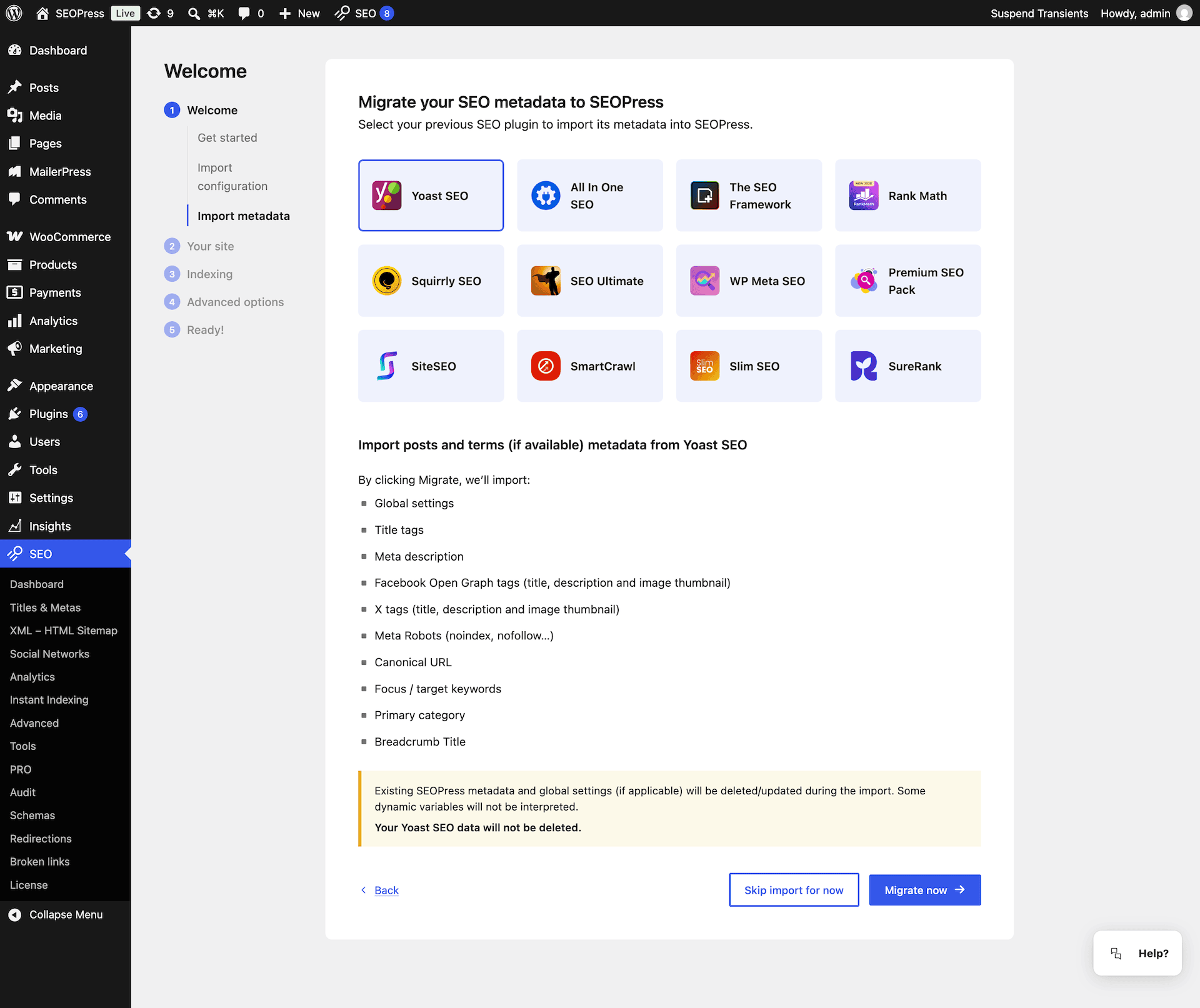
- ✔ Migration mit einem Klick: Von Yoast SEO, Rank Math, AIOSEO, The SEO Framework, Slim SEO, SmartCrawl, Squirrly, SEO Ultimate, WP Meta SEO, Premium SEO Pack, SiteSEO. Migration starten.
- ✔ In über 30 Sprachen professionell übersetzt Bei der Übersetzung mithelfen.
SEOPress PRO ab 49 $/Jahr: 1 Website • Unbegrenzte Anzahl von Websites für 149 $/Jahr
Funktionen | Migration | PRO | Integrationen | Support | White Label | KI
Was gibt es Neues in SEOPress 10.3?
A cookie banner that works with your cache plugin, connected schemas, and your Search Console data where you need it.
- 🤖 Manage your SEO from your AI assistant: The new MCP server connects your site to Claude, ChatGPT, Cursor or any MCP client. 14 tools in SEOPress Free, 13 more for redirections, schemas, target keywords, AI generation and the technical audit (PRO). Read-only connections, tool by tool control and one-click revocation.
- 🍪 A cookie banner that works with your cache plugin: With WP Rocket, LiteSpeed Cache or W3 Total Cache, each visitor’s browser now applies their own consent choice. Google Analytics, Matomo and Microsoft Clarity start only for visitors who said yes.
- 🧩 Schemas that tell Google who you are: Your Organization, WebSite and other schemas now have stable IDs and are linked together. New Book schema, Service provider linked in one click, and more Local Business and Video options (PRO).
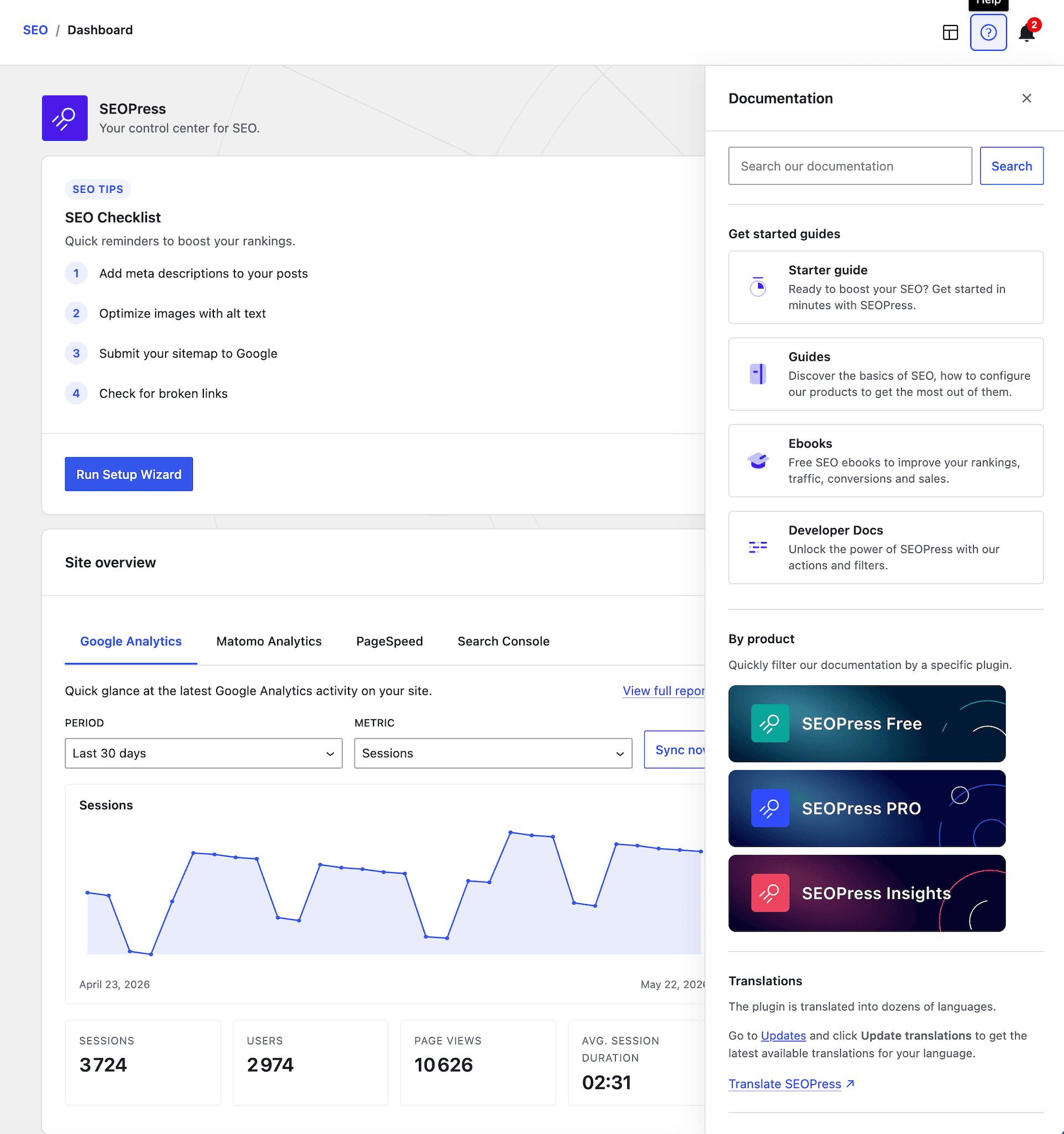
- 📈 Your Search Console data, where you need it (PRO): A 12-month performance chart on the dashboard, post metrics in the SEO metabox, and the Google indexing status in your post lists.
- ↪️ Redirections that look out for you (PRO): A warning in the editor when the URL you are about to publish is already redirected, theme error pages for 410 and 451 rules, batched imports and more reliable regex matching.
- 📊 More Google Analytics 4 options: Cross-domain tracking, 404 tracking, plus WooCommerce checkout starts and product lists (PRO).
- ⭐ Google preferred sources, now in one click: The „Preferred source“ button opens Google’s flow in a popup, so readers stay on your page.
- ⚡ A faster, more reliable SEO metabox: Rebuilt with the native WordPress components. Same layout, faster loading, and more reliable saving.
- 🛠️ Other enhancements and fixes: Full-width cookie banner on mobile, Google Analytics connection (PRO), and more.
Die vollständigen Versionshinweise zu 10.3 lesen
Warum ist SEOPress das beste WordPress-SEO-Plugin?
- Alles in einem:: Schemata, Weiterleitungen, XML-Sitemaps, GSC, Bild-SEO, Brotkrumen, Überprüfung auf defekte Links und mehr in einem Plugin. Weniger Plugins, weniger Konflikte, geringerer Wartungsaufwand.
- Modular: Du benötigst eine Funktion nicht? Deaktiviere sie mit einem Klick, ohne deine Einstellungen zu verlieren.
- Erschwinglich: PRO ab 49 $/Jahr für 1 Website. Unbegrenzte Anzahl an Websites für 149 $/Jahr. Keine „Agentur“-Gebühr.
- Standardmäßig als White-Label-Lösung entwickelt: Ersetze den Namen des Plugins, das Logo, die Links und die Ansichten. Ideal für Agenturen und Freiberufler.
- DSGVO-konform: „Privacy by Design“. Integrierte Kompatibilität mit Einwilligungsplattformen.
- Für Anfänger bis zum Experten: Installationsassistent für Einsteiger, Hunderte von Hooks, REST-API und WP-CLI für Entwickler. Kostenlose Anleitungen und SEO-E-Books.
- Bewährt im Einsatz: Über 350.000 aktive Installationen, regelmäßige Updates, ein engagiertes Team seit 2017.
Kostenlose Funktionen von SEOPress
- Installations-Assistent: In wenigen Minuten einrichten.
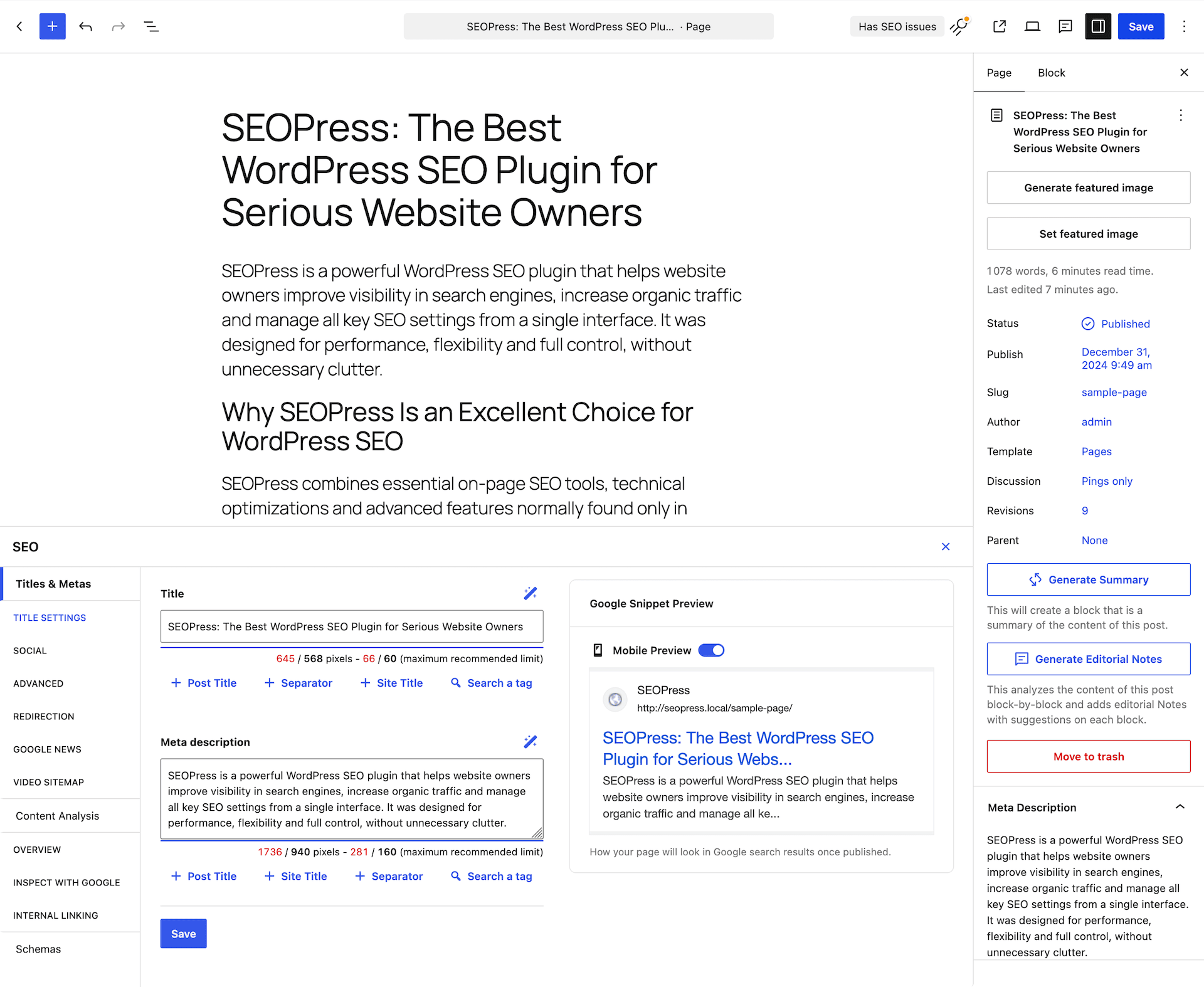
- Universelle SEO Metabox: Bearbeite Titel, Beschreibungen, Open Graph, X Cards, Schema, Robots und Canonical-Tags in jedem Editor (Gutenberg, Elementor, Divi, Bricks, Oxygen, Breakdance, WPBakery, Avada, Kadence…).
- Befehlspalette (Cmd/Strg+K): Wechsle sofort zu einer beliebigen Einstellung.
- Inhaltsanalyse mit **unbegrenzter Anzahl an Suchbegriffen**, um Inhalte zu erstellen, die gut ranken.
- Google-Vorschau für Mobilgeräte und Desktop: Sieh dir deinen SERP-Ausschnitt vor der Veröffentlichung an.
- Vorschau für Facebook und X (Twitter) für eine höhere Klickrate in den sozialen Medien.
- Titel und Meta-Beschreibungen mit dynamischen Variablen (individuellen Felder, Begriffe, Taxonomien).
- Open Graph und X (Twitter) Cards für Facebook, LinkedIn, Instagram, Pinterest, WhatsApp, Threads…
- Google Knowledge Graph: Unternehmensdaten mit Adress- und Rechtsangaben (neu in Version 9.8).
- llms.txt und Agent Readiness: Hilf KI-Suchmaschinen dabei, deine Website besser zu verstehen (neu in Version 9.8).
- Google Analytics 4 und Matomo: Download-Tracking, individuelle Dimensionen, IP-Anonymisierung, Remarketing, demografische Daten, domänenübergreifendes Tracking, DSGVO-konform.
- Integration für Microsof Clarity: Kostenlose Heatmaps und Sitzungsaufzeichnungen.
- Individuelle kanonische URLs und Meta-Robots-Anweisungen (noindex, nofollow, noimageindex, nosnippet).
- XML-Sitemaps (Beiträge, Seiten, individuelle Inhaltstypen, Taxonomien, Bilder, Autoren): sind schneller denn je in Version 9.8.
- HTML-Sitemap für Barrierefreiheit und Navigation.
- XML-Sitemap für Bilder für Google Bilder.
- Weiterleitungen auf der Ebene von Beiträgen, Seiten und individuellen Inhaltstypen.
- URL-Bereinigung: Entfernung von /category/, /product-category/, ?replytocom; Weiterleitung von Anhangseiten zur übergeordneten Seite oder zur Datei-URL.
- Bild-SEO: Automatische Festlegung von Bildtitel, Alt-Text, Bildunterschrift und Beschreibung.
- Google Indexing API & IndexNow (Bing/Yandex) für die sofortige Indizierung.
- Importiere/exportiere Einstellungen von einer Website zur anderen.
- Migration mit einem Klick von Yoast, Rank Math, AIOSEO, SEO Framework, SureRank, Slim SEO, SmartCrawl, Squirrly, SEO Ultimate, WP Meta SEO, Premium SEO Pack und SiteSEO.
Entdecke hier alle kostenlosen Funktionen von SEOPress
SEOPress PRO: Bringt SEO auf die nächste Stufe
- KI-SEO: Automatische Massenerstellung von Titeln, Beschreibungen, OG-/X-Tags und Bild-Alt-Texten mit OpenAI, Google Gemini (einschließlich **Gemini 3 Flash & 3.1 Pro**), Anthropic Claude, MistralAI und DeepSeek.
- Website-Überprüfung: Umfassende React- und DataViews-Erlebnis mit **auf GSC basierenden Empfehlungen**, Scan-Verlauf, Live-Fortschrittsanzeige, KI-gestützte Korrekturen von alternativen Texten mit einem Klick sowie CSV-Export.
- SEO-Warnmeldungen: Lasse dich warnen, bevor SEO-Rückschritte auf die Produktionsumgebung gelangen.
- Google Search Console: Klicks, Impressionen, Klickrate (CTR) und durchschnittliche Position direkt in den Beitragslisten.
- Google-Vorschläge bei der Inhaltsanalyse zur Ermittlung von Long-Tail-Keywords.
- Weiterleitungs-Manager: Unbegrenzte Anzahl von 301/302/307/410/451-Weiterleitungen, reguläre Ausdrücke, Modal zum Testen von URLs, Kategorien, Import und Export von CSV-Dateien und .htaccess-Dateien.
- 404-Überwachung und automatische Weiterleitung mit E-Mail-Benachrichtigungen.
- Überprüfung auf defekte Links: Zuverlässiger CRON-basierte Batch-Überprüfung. Funktioniert selbst auf den größten Websites.
- Schema.org / JSON-LD-Editor mit **Live-Vorschau**: Artikel, LocalBusiness, Dienstleistung, Anleitung, FAQ, Kurs, Rezept, Softwareanwendung, Video, Veranstaltung, Produkt, Stellenanzeige, Rezension, Profilseite, individuelles Schema.
- Automatische Schemata mit erweiterten Bedingungen (UND/ODER, Inhaltstypen, Taxonomien).
- Barrierefreie Brotkrumen: : Schema.org, A11Y-fähig, Live-Vorschau, individuell anpassbar pro CPT/Begriff.
- Lokale Suchmaschinenoptimierung: Schema für lokale Unternehmen mit Öffnungszeiten und mehreren Filialen.
- WooCommerce SEO: Produktschema mit globalen Identifikatoren (GTIN, MPN, Marke), Enhanced Ecommerce, OG-Preis/Währung, noindex für Warenkorb, Kasse und Konto.
- Integration von Easy Digital Downloads.
- Vorschläge für interne Verlinkungen.
- Video-XML-Sitemap mit automatischer YouTube-Erkennung + **Google News-Sitemap**.
- Google Analytics-Dashboard: Kennzahlen direkt in WordPress, ohne Kontextwechsel.
- Berichte zu PageSpeed Insights und Core Web Vitals.
- robots.txt- und .htaccess-Editor: Für Multisite und mehrere Domains geeignet.
- Optionen für individuelle RSS-Feeds.
- Mehrsprachige llms.txt mit TranslatePress.
SEOPress Insights: Verfolge Rankings und Backlinks direkt in WordPress
- Schlüsselwort-Rank-Tracker: 52 Google-Suche-Standorte.
- Verfolge täglich 50 Suchbegriffe pro Website.
- Wettbewerber-Tracking: Erfahre, wer in den Suchergebnissen vor dir rangiert.
- Backlinks werden wöchentlich überwacht.
- Google Trends: Finde neue Blickwinkel für deine Inhalte.
- Lebenslanger Zugriff auf Daten: Export in CSV / PDF / Excel.
- E-Mail- und Slack-Benachrichtigungen.
WooCommerce und EDD SEO (SEOPress PRO)
- Produktschema mit globalen Identifikatoren (GTIN, MPN, Marke).
- OG-Preis und Währung für ansprechendere Beiträge in sozialen Netzwerken.
- XML-Sitemaps für Produkte, einschließlich Bildergalerien.
- Zentralisierte „noindex“-Einstellung für Seiten wie „Warenkorb“, „Kasse“, „Konto“ und „Dankeseite“.
- Entfernt den WooCommerce/EDD-Generator-Meta-Tag.
- Manuelle oder automatische JSON-LD-Produktschemata.
- Brotkrumen mit WooCommerce-Unterstützung.
- Globale dynamische Schlagwörter für Titel und Meta-Beschreibungen.
- Google erweitertes E-Commerce-Tracking: Käufe, Produktaufrufe, Warenkorb-Ereignisse.
Verbessere die SEO deines Shops
Universelle SEO-Metabox: funktioniert mit jedem Editor
Bearbeite dein SEO direkt in Gutenberg, Elementor, Divi, Bricks, Oxygen, Breakdance, WPBakery, Avada, Kadence und WP Fusion. Kein Hin und Her mehr zwischen dem Page-Builder und dem WordPress-Adminbereich.
Für Entwickler gemacht
- Hunderte von Hooks: Die Hooks-Referenz durchsuchen.
- REST-API: Für headless und statische Websites. Erste Schritte.
- WP-CLI-Befehle: Automatisiere alles. CLI-Referenz.
- Über 13 neue Entwickler-Hooks in Version 9.8.
Vom gleichen Team
Teste MailerPress, das beste E-Mail-Marketing-Plugin für WordPress
Screenshots





Blöcke
Dieses Plugin bietet 4 Blöcke.
- FAQ (legacy) Allows to easily build FAQs
- Google Preferred Sources Display a button inviting visitors to add your site as a preferred source on Google.
- FAQ Allows to easily build FAQs
- Sitemap Display an HTML sitemap
Installation
- Lade
wp-seopressin den Ordner/wp-content/plugins/hoch oder installiere es über Plugins Plugin hinzufügen in deinem WordPress-Adminbereich. - Aktiviere SEOPress über das Menü Plugins.
- Starte den Installationsassistenten über SEO in der Admin-Seitenleiste.
FAQ
-
Kann ich von einem anderen SEO-Plugin migrieren?
-
Ja, mit unserem Import-Werkzeug:
Wir unterstützen folgende SEO-Plugins:
– Yoast
– AIOSEO
– RankMath
– The SEO Framework
– Squirrly SEO
– SEO Ultimate
– WP Meta SEO
– Premium SEO Pack
– SiteSEO
– Slim SEO
– SmartCrawl -
Was sind „Agent Readiness“ und „llms.txt“?
-
LLMs und KI-Antwortmaschinen (ChatGPT, Claude, Perplexity, Gemini) entdecken und zitieren Websites anders als klassische Suchmaschinen. SEOPress 9.8 fügt einen Schalter für Agenten-Bereitschaft hinzu, der Reinttext-Versionen deiner Inhalte sowie eine standardisierte
/llms.txt-Datei veröffentlicht. So können KI-Agenten die Struktur, Dienste und Richtlinien deiner Website besser verstehen – was deine Sichtbarkeit in AEO (Answer Engine Optimization) und GEO (Generative Engine Optimization) verbessert. -
Wie funktioniert die neue Befehlspalette?
-
Drücke überall im WordPress-Adminbereich Cmd+K (Mac) oder Strg+K (Windows/Linux), während SEOPress aktiv ist. Durchsuche über 240 indexierte Einträge: Einstellungen, Tools, Schemas, Umleitungen – und springe direkt dorthin oder führe Aktionen sofort aus. Kürzlich verwendete Befehle werden gespeichert.
-
Welche Themes und Page-Builder werden unterstützt?
-
Alle. Gutenberg (Block-Editor), Elementor, Divi, Bricks, Oxygen, Breakdance, WPBakery, Avada Builder, Kadence, Beaver Builder. Unsere universelle SEO-Metabox funktioniert in jedem Editor.
-
Ist SEOPress mit WooCommerce und Easy Digital Downloads kompatibel?
-
Ja. SEOPress PRO enthält tiefgehendes WooCommerce-SEO (Produkt-Schema mit GTIN/MPN/Marke, Enhanced Ecommerce, OG-Preis/Währung, Noindex für Warenkorb/Kasse) und EDD-Unterstützung.
-
Unterstützt SEOPress mehrsprachige Websites?
-
Ja: Polylang, WPML und TranslatePress. SEOPress 9.8 fügt eine mehrsprachige llms.txt mit TranslatePress hinzu.
-
In wie vielen Sprachen ist unsere Benutzeroberfläche verfügbar?
-
+30 Sprachen – und es werden immer mehr!
🇺🇸 English (UK) (Englisch (Großbritannien)) – professionelle Übersetzung
🇫🇷 Français (Französisch (Frankreich)) – professionelle Übersetzung
🇪🇸 Español (Spanisch (Spanien) – professionelle Übersetzung
🇩🇪 Deutsch – professionelle Übersetzung
🇳🇱 Nederlands (Niederländisch) – professionelle Übersetzung
🇷🇺 Русский (Russisch) – professionelle Übersetzung
🇯🇵 日本語 (Japanisch) – professionelle Übersetzung
🇮🇳 हिन्दी (Hindi) – professionelle Übersetzung
🇨🇳 中文 (Chinesisch (China)) – professionelle Übersetzung
🇧🇷 Português do Brasil (Portugiesisch (Brasilien)) – professionelle Übersetzung
🇵🇱 Polskie (Polnisch) – professionelle Übersetzung
🇸🇪 Svenska (Schwedisch) – professionelle Übersetzung
🇮🇹 Italiano (Italienisch) – professionelle Übersetzung
🇨🇿 Čeština (Tschechisch) – professionelle Übersetzung
🇬🇷 Ελληνικά (Griechisch)
🇧🇬 Български (Bulgarisch)
🇮🇩 Bahasa Indonesia (Indonesisch)
🇻🇳 Loki Web (Vietnamesisch)
🇷🇴 Română (Rumänisch)
🇰🇷한국인 (Koreanisch)
🇸🇦 العربية (Arabisch)
فارسی (Persisch)
Türkçe (Türkisch)
… -
Wie verwendet man den Google Tag Manager bzw. andere Skripte mit SEOPress?
-
Gehe zu „SEO“ > „Analysedienste“ > Tab „Individuelles Tracking“. Füge den GTM- bzw. individuellen Tracking-Code in die Textfelder [HEAD-Tracking-Code] bzw. [BODY-Tracking-Code] ein. Speichere die Änderungen und leere deinen Cache.
-
Welche Arten von Sitemaps unterstützt SEOPress?
-
Kostenlos: XML-Sitemaps für Beiträge, Seiten, CPTs, Taxonomien, Bilder, Autoren + HTML-Sitemap. PRO: Google News- und Video-XML-Sitemaps mit automatischer YouTube-Erkennung.
-
Wie kann ich Unterstützung bekommen?
-
Für Benutzer der KOSTENLOSEN Version: Anleitungen, Forum auf w.org, FAQ, Hooks für Entwickler sowie Videos auf unserem YouTube-Kanal.
Für PRO-Benutzer: Support per E-Mail über das Kundenkonto. -
Ist SEOPress DSGVO-konform?
-
Ja. SEOPress ist nach dem Prinzip „Privacy by Design“ gebaut und vollständig White-Label. Mehr erfahren.
-
Ist SEOPress mit WordPress Multisite kompatibel?
-
Ja: Einschließlich netzwerkweiter Einstellungen, Multisite-/Multidomain-robots.txt und .htaccess-Bearbeitung.
-
Ist White Label eine kostenlose Funktion?
-
Ja! Erfahre hier mehr über SEOPress und die White-Label-Funktion
-
Meine XML-Sitemap gibt einen 404-Fehler zurück
-
Lies diesen Beitrag, um dieses Problem zu beheben
-
Meine XML-Sitemap zeigt eine leere Seite an
-
Lies diesen Beitrag, um dieses Problem zu beheben
-
Ich sehe den richtigen Titel nicht!
-
Dein Theme verwendet wahrscheinlich eine veraltete Funktion zur Verarbeitung des Titels. Mehr erfahren
-
Google zeigt den falschen Titel bzw. die falsche Meta-Beschreibung an
-
Google macht, was es will!
Weitere Informationen findest du in unserem Leitfaden. -
Wo finde ich den unminifizierten Quellcode?
-
The JavaScript shipped in the plugin’s
public/directory is built with webpack from the React sources kept inapp/. Those sources, together with the build tooling (package.json,webpack.config-beacon.js,.babelrc,.browserslistrc,postcss.config.js) and the build instructions, are published for every release on our public repository: github.com/wp-seopress/wp-seopress-public. -
Wie kann ich Sicherheitslücken melden?
-
Über unser Kontaktformular (als Betreff bitte „Sonstiges“ auswählen) oder direkt über Patchstack.
-
Meine Frage ist hier nicht aufgeführt!
-
Lies unsere vollständigen FAQ auf unserer Website oder stelle deine Frage in unserem Support-Forum.
Rezensionen


Mitwirkende und Entwickler
„SEOPress – KI-SEO-Plugin & Onsite-SEO“ ist Open-Source-Software. Folgende Menschen haben an diesem Plugin mitgewirkt:
Mitwirkende


„SEOPress – KI-SEO-Plugin & Onsite-SEO“ wurde in 32 Sprachen übersetzt. Danke an die Übersetzer für ihre Mitwirkung.
Übersetze „SEOPress – KI-SEO-Plugin & Onsite-SEO“ in deine Sprache.
Interessiert an der Entwicklung?
Durchstöbere den Code, sieh dir das SVN-Repository an oder abonniere das Entwicklungsprotokoll per RSS.
Änderungsprotokoll
10.3 Lies den aktualisierten Blogbeitrag
NEW MCP server: manage your SEO from Claude, ChatGPT, Cursor or any MCP client, with up to 27 tools
NEW MCP server: read-only connections, tool by tool control and one-click revocation
NEW MCP server: 14 tools in SEOPress Free, plus 13 for redirections, schemas, target keywords, AI generation and the technical audit (PRO)
NEW Cookie banner now works with page cache plugins (WP Rocket, LiteSpeed Cache, W3 Total Cache…): each visitor’s consent choice is respected, even on cached pages
NEW Google preferred sources: readers can add your site as a preferred source in a popup, without leaving your page
NEW Google Analytics 4: optional cross-domain tracking, to follow visitors across several of your websites
NEW Google Analytics 4: optional tracking of 404 pages, without counting extra page views
NEW Google Analytics 4: optional WooCommerce tracking of checkout starts, and of product views and clicks in product lists (PRO)
NEW Schemas: your Organization (or Person) and WebSite schemas are now linked together, to help Google understand who publishes your site
NEW Schemas: a list of the available dynamic variables to help you write custom JSON-LD
NEW Book schema, with a ready-to-use template for book catalogs (PRO)
NEW Service schema: link the service provider to your site’s Organization instead of typing its details again (PRO)
NEW Local Business schema: add an optional email, logo and social profiles (PRO)
NEW Video schema: add your own YouTube API key to fill in video details automatically (PRO)
NEW Search Console: a 12-month chart of your clicks, impressions, CTR and average position in the dashboard (PRO)
NEW Search Console: see the clicks, impressions, CTR and position of each post directly in the SEO metabox (PRO)
NEW Search Console: a new column in your post lists shows the last saved Google indexing status (PRO)
NEW Redirections: a warning appears in the editor when the URL you are about to publish is already redirected (PRO)
NEW Redirections: 410 and 451 rules now display your theme’s error page instead of a blank page (PRO)
NEW AI: Claude Sonnet 5 is now available (PRO)
NEW WP-CLI: run a content analysis on all your posts in one command, handy after switching from another SEO plugin (PRO)
INFO SEO metabox: faster and more reliable, now built on the native WordPress components
INFO Pages are now shared on social networks as „website“ instead of „article“
INFO Schemas and Search Console now use your site address, not the WordPress install folder
INFO Tools: new check for your IndexNow key file, and fewer false alerts on the XML sitemap check
INFO Clearer settings for the Knowledge Graph, WebSite schema and role restrictions
INFO WooCommerce: HPOS and Cart/Checkout blocks compatibility declared
INFO Developers: new filters to disable bulk actions, keep the canonical on noindexed pages and change the priority of your custom tracking code
INFO Security hardening for tracking codes, imports and settings exports
FIX Cookie banner no longer overflows the screen width on mobile
FIX Content analysis: decorative images (empty alt) are accepted, and schemas are counted correctly
FIX Content analysis: works with translated homepages and Bricks templates, and ignores login pages
FIX Primary category: removed categories are no longer used in breadcrumbs and permalinks
FIX Custom field variables holding a list of values are now displayed
FIX Zero values („0“) are no longer removed from schemas and dynamic variables
FIX Meta descriptions keep the text wrapped in shortcodes
FIX Canonical URL of a static homepage
FIX FAQ block: question links and schema anchors
FIX XML sitemaps: deleted post types, deleted product images and inactive WPML languages are no longer listed
FIX Instant Indexing: URLs with special characters are kept intact
FIX Divi 5: the SEO button now loads in the visual builder
FIX Polylang: schemas use the right domain for each language
FIX WPML 5.0 compatibility
FIX White label: the SEOPress name and logo no longer appear in the new admin screens
FIX Advanced settings now save correctly in the Classic Editor
FIX Redirection search now works with plain permalinks
FIX Removed the useless „Save changes“ button from the Tools page
FIX Google Analytics: connections made since 10.2 work again, and sync errors are explained (PRO)
FIX Search Console: your data is kept when a sync fails, and service account keys are checked (PRO)
FIX Redirections: large imports no longer fail, and duplicate imports are prevented (PRO)
FIX Redirections: regex rules with a trailing slash, query parameters, WPML or Weglot URLs now match (PRO)
FIX Redirections: disabled regex rules no longer block active ones (PRO)
FIX Redirections: homepage redirects and the URL tester are more accurate (PRO)
FIX Breadcrumbs: the „Home“ item is kept, and item names are plain text in the schema (PRO)
FIX Product schema: store pickup is excluded, free shipping stays free, and no made-up price expiry dates (PRO)
FIX Local Business schema: partial opening hours are kept, and empty address fields are no longer output (PRO)
FIX Video schema: no empty publisher logo (PRO)
FIX Site Audit: scores are calculated from the current page content (PRO)
FIX Broken Links: bulk actions and pagination are back (PRO)
FIX AI: an exhausted quota is no longer reported as an invalid API key (PRO)
FIX License activation is retried after a domain change (PRO)
FIX PHP 8.5 deprecation notice in the setup wizard (PRO)
Zum vollständigen Änderungsprotokoll
Du musst ein Downgrade durchführen oder einen Rollback vornehmen?