

Beschreibung
Members ist ein auf Rollen und Berechtigungen basierendes WordPress-Plugin für Mitgliedschaften. Es bietet deinen Benutzern das ultimative Mitgliedererlebnis. Denn es stellt dir leistungsstarke Werkzeuge zur Verfügung, um Rollen und Berechtigungen hinzuzufügen und sie deinen Benutzern zuzuweisen.
Mit Members kannst du Berechtigungen festlegen, um Inhalte auf deiner Website einzuschränken, indem du eine einfache Benutzeroberfläche (UI) für das leistungsstarke Rollen- und Berechtigungssystem von WordPress bereitstellst, das bisher nur Entwicklern zur Verfügung stand, die wissen, wie man es von Hand programmiert.
Plugin Eigenschaften
- Rolleneditor: Ermöglicht dir, Rollen zu bearbeiten, zu erstellen und zu löschen sowie Berechtigungen für diese Rollen festzulegen.
- Mehrere Benutzerrollen: Weise jedem Benutzer eine, zwei oder sogar mehr Rollen zu.
- Berechtigungen explizit verweigern: Verweigere bestimmte Berechtigungen für bestimmte Benutzerrollen.
- Rollen duplizieren: Erstelle eine neue Rolle auf Basis einer existierenden Rolle.
- Role Import / Export: Export all roles and Members settings to a JSON file, export selected roles from the roles table, and preview imported roles before choosing whether to import, skip, overwrite, or rename each one.
- Berechtigungen für Inhalte / Eingeschränkte Inhalte: Schütze Inhalte, um festzulegen, welche Benutzer (nach Rolle) Zugriff auf Beitragsinhalte haben.
- Shortcodes: Shortcodes, um zu kontrollieren, wer Zugang zu den Inhalten hat.
- Widgets: Ein Anmeldeformular-Widget und ein Benutzer-Widget, die in den Seitenleisten deines Themes angezeigt werden.
- Private Website: Wenn du willst, kannst du deine Website und ihren Feed komplett privat machen.
- Administrator Rescue (Magic Link): If you lose access to the WordPress admin (e.g. after editing roles), you can request a secure, time-limited link by email to restore your Administrator role and Members capabilities—no support ticket or database access required.
- Plugin-Integration: Members wird von anderen WordPress-Entwicklern gern empfohlen. Viele bestehende Plugins integrieren ihre individuellen Rollen und Berechtigungen direkt in dieses Plugin.
Nahtlose Integration mit MemberPress
If you’re looking to build a business out of your membership site by creating paid memberships there’s no better way than to use MemberPress. Members and MemberPress work together to provide the ultimate member experience and will help you start and profit from your amazing WordPress membership sites!
Alle Add-ons sind jetzt enthalten
In Members sind jetzt ALLE Add-ons völlig kostenlos! Hier sind einige der fantastischen Funktionen, die Members dadurch erhält:
- Berechtigungen für Blöcke: Ermöglicht Website-Besitzern, Blöcke je nach Status des angemeldeten Benutzers, seiner Rolle oder seiner Berechtigungen ein- oder auszublenden.
- Datenschutz-Berechtigungen: Erstellt zusätzliche Berechtigungen für die Kontrolle der Funktionen von WordPress zum Schutz der Privatsphäre und der persönlichen Daten (DSGVO).
- Admin-Zugang: Ermöglicht Website-Administratoren, über die Rolle zu steuern, welche Benutzer Zugriff auf den WordPress-Adminbereich haben.
- Core-Berechtigungen zum Erstellen: Fügt die Berechtigungen create_posts und create_pages zu Beiträgen/Seiten hinzu, um sie von ihren edit_*-Gegenstücken zu unterscheiden und flexiblere Berechtigungen für die Bearbeitung zu schaffen.
- Berechtigungen für Kategorien und Schlagwörter: Das Add-on „Berechtigungen für Kategorien und Schlagwörter“ erstellt individuelle Berechtigungen für die zentralen Kategorien und Schlagwörter der Beiträge. Damit können Website-Betreiber genau steuern, wer Kategorien/Schlagwörter verwalten, bearbeiten, löschen oder zuweisen darf.
- Role Levels: Exposes the old user levels system, which fixes the WordPress author drop-down bug when users don’t have a role with one of the assigned levels.
- Rollenhierarchie: Erzeugt ein hierarchisches System von Rollen.
- ACF-Integration: Erstellt individuelle Berechtigungen für das Plugin Advanced Custom Fields (ACF), die mit dem Plugin Members verwaltet werden können.
- Integration mit EDD: Integriert die Berechtigungen des Plugins Easy Digital Downloads in den Rollenmanager des Plugins Members.
- Integration mit GiveWP: Integriert die Berechtigungen der Plugins GiveWP und GiveWP Recurring Donations in den Rollenmanager des Plugins Members.
- Integration mit Meta Box: Integriert die Berechtigungen des Plugins Meta Box in den Rollenmanager des Plugins Members.
- Integration mit WooCommerce: Integriert die Berechtigungen des Plugins WooCommerce in den Rollenmanager des Plugins Members.
For more info, visit the Members plugin home page.
Gefällt dir dieses Plugin?
The Members plugin is a massive project with 1,000s of lines of code to maintain. A major update can take weeks or months of work. We don’t make any money directly from this plugin while other, similar plugins charge substantial fees to even download them or get updates. Please consider helping the cause by:
Documentation
Support
If you need plugin support from us, you can visit our support page.
Plugin Entwicklung
Falls du Autor von Themes oder Plugins oder einfach ein Hobby-Coder bist, kannst du die Entwicklung dieses Plugins im GitHub Repository verfolgen.
Screenshots


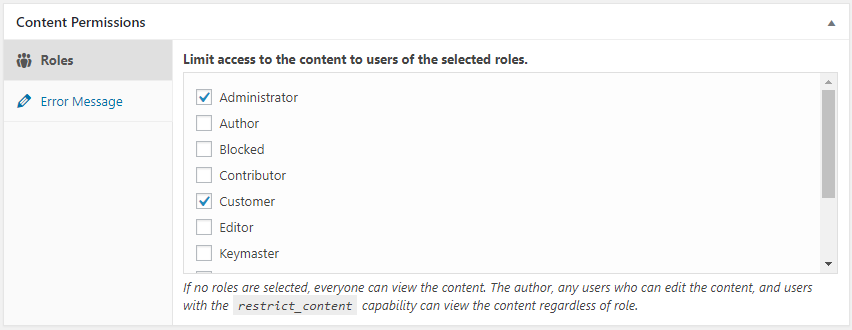


Installation
- Lade
Membersin das Verzeichnis/wp-content/plugins/hoch. - Aktiviere das Plugin über das Menü „Plugins“ in WordPress.
- Gehe zu „Einstellungen > Members“, um auszuwählen, welche Einstellungen du verwenden möchtest.
Detailliertere Anweisungen sind in der readme.html Datei des Plugins zu finden.
FAQ
-
Warum wurde dieses Plugin entwickelt?
-
We weren’t satisfied with the current user, role, and permissions plugins available. Yes, some of them are good, but nothing fit what we had in mind perfectly. Some offered few features. Some worked completely outside of the WordPress APIs. Others lacked the GPL license.
So, we just built something we actually enjoyed using.
-
What’s the difference between Members and MemberPress?
-
Members and MemberPress solve different problems and are designed to work together.
Members is a free roles and capabilities plugin. It gives you a UI on top of WordPress‘ native roles and capabilities system so you can create and edit roles, assign multiple roles to users, and restrict content by role or capability. It’s the right tool when you need to control who can do what inside your site—dashboard access, content permissions, and capability management—without charging for access.
MemberPress is a premium, all-in-one WordPress membership platform built for monetization and much more. In addition to paid subscriptions, payment processing (Stripe, PayPal, and more), recurring billing, coupons, and drip content, MemberPress also includes:
- Courses — a built-in LMS for creating and selling online courses with lessons, quizzes, and progress tracking.
- CoachKit — tools for running coaching programs, including milestones, habits, and client check-ins.
- Community Groups — private member communities and discussion spaces tied to your memberships.
- Member Profiles & Directories — customizable front-end profiles and searchable member directories.
- Email marketing integrations, affiliate program support, and many more premium features.
It’s the right tool when you need to sell access to content, courses, coaching, or communities—and grow a full membership business around it.
The two plugins are complementary, not competing. Many sites use Members for fine-grained role and capability management alongside MemberPress for everything membership-business related. For a full side-by-side comparison, see Members vs MemberPress.
-
Wie benutze ich es?
-
Most things should be fairly straightforward, but you can also view the docs online.
-
Can I move roles between sites?
-
Yes. On the Roles screen, use Export All to download a JSON file containing every role, its capabilities, and your Members plugin settings. To export only some roles, select them in the roles table and choose Export from the Bulk Actions menu.
To import roles, upload a Members export JSON file from the same screen and click Upload and Preview. Members will show each role before anything is changed, so you can import new roles, skip roles, overwrite existing roles, or import conflicting roles under a new slug. Protected roles, such as the built-in Administrator role, your current role, and the site’s default role, cannot be overwritten or renamed.
-
PHP-Mindestanforderungen.
-
Members erfordert jetzt PHP 7.4 oder höher
-
Ich kann auf die Verwaltung der Rollen nicht zugreifen.
-
When the plugin is first activated, it runs a script that sets specific capabilities to the „Administrator“ role on your site that grants you access to this feature. So, you must be logged in with the administrator account to access the role manager.
Wenn du aus irgendeinem Grund die Rolle des Administrators hast und immer noch nicht auf den Rollenmanager zugreifen kannst, deaktiviere das Plugin. Aktiviere es anschließend erneut.
-
Warum können Administratoren auf Multisites keine Rollen verwalten?
-
If you have a multisite installation, only Super Admins can create, edit, and delete roles by default. This is a security measure to make sure that you absolutely trust sub-site admins to make these types of changes to roles. If you’re certain you want to allow this, add the Create Roles (
create_roles), Edit Roles (edit_roles), and/or Delete Roles (delete_roles) capabilities to the role on each sub-site where you want to allow this. -
How do I use Administrator Rescue (Magic Link) if I’m locked out?
-
If you can no longer access the WordPress admin (for example, after changing your role or capabilities), you can restore your Administrator access yourself:
- Go to your site’s login page:
yoursite.com/wp-login.php - In the address bar, add
?action=members_rescueso the URL is:yoursite.com/wp-login.php?action=members_rescue - Enter the email address of an account that has (or had) the built-in Administrator role, or is a Super Admin (multisite).
- Click „Send Rescue Link“. If that account is eligible, a secure link will be sent to that email (you may need to check spam).
- Open the link from the email within 15 minutes. Your Administrator role and Members capabilities will be restored, and you’ll be redirected to the login page to sign in.
Only users with the built-in WordPress „Administrator“ role (or Super Admins on multisite) can use this feature; custom or cloned roles are not eligible. The link expires after 15 minutes and is limited to a few attempts per IP to prevent abuse.
- Go to your site’s login page:
-
Hilfe! Ich habe mich aus meiner Seite ausgesperrt!
-
Please read the documentation for the plugin before actually using it, especially a plugin that controls permissions for your site. We cannot stress this enough. This is a powerful plugin that allows you to make direct changes to roles and capabilities in the database.
If you have the built-in Administrator role (or are a Super Admin on multisite) but lost access to the admin (e.g. after editing roles), try the Administrator Rescue (Magic Link) first: go to
yoursite.com/wp-login.php?action=members_rescue, enter your admin email, and use the link we send you to restore access.If that doesn’t apply or didn’t work, stop by our support forums to see if we can help. Your web host may also be able to restore your site from a recent backup, but we only recommend that as a last resort, as it could mean losing work or members added since the backup.
Rezensionen


Mitwirkende und Entwickler
„Members – Editor-Plugin für Mitgliedschaften & Benutzerrollen“ ist Open-Source-Software. Folgende Menschen haben an diesem Plugin mitgewirkt:
Mitwirkende

„Members – Editor-Plugin für Mitgliedschaften & Benutzerrollen“ wurde in 21 Sprachen übersetzt. Danke an die Übersetzer für ihre Mitwirkung.
Übersetze „Members – Editor-Plugin für Mitgliedschaften & Benutzerrollen“ in deine Sprache.
Interessiert an der Entwicklung?
Durchstöbere den Code, sieh dir das SVN-Repository an oder abonniere das Entwicklungsprotokoll per RSS.
Änderungsprotokoll
3.2.26
- Fixed: On the user profile / edit-user screen with Multiple User Roles enabled, the role checkboxes could appear to have no checkmark — looking „unresponsive“ — when another plugin’s admin CSS overrode core checkbox styles (e.g. line-height: 0). The checkboxes always toggled and saved; only the checkmark was hidden. The Members role checkboxes now defensively assert their own rendering so the checkmark shows regardless of such global overrides.
- Fixed: Hardened the Multiple User Roles save against a possible PHP 8 TypeError from malformed submitted role data (a nested array reaching members_sanitize_role()).
3.2.25
- Fixed: Saving a post via the REST API as a user without the
restrict_contentcapability (e.g. custom roles, Gutenberg + ACF Pro) failed with „Sorry, you are not allowed to edit the _members_access_role custom field,“ and silently dropped other meta such as ACF fields. The request pre-processor was hooked to a non-existent action (rest_before_insert_{$post_type}) so it never ran; it now correctly strips the Content Permissions meta keys for users who cannot manage them, before the save. - Fixed: The REST protected-posts exclusion scoped its restriction lookup to the queried post type, so posts inheriting a restriction from an ancestor of a different post type were not excluded, making X-WP-Total / pagination counts inaccurate. All restriction roots are now considered regardless of post type.
- Fixed: Content Permissions role configuration and the custom error message were visible in REST API responses to any user who could read the post (registered meta is readable regardless of its write auth callback). Both meta keys are now blanked to their empty defaults in REST responses for users who cannot manage content permissions.
- Fixed: Comments on role-protected posts were fully readable — bodies, author names, dates — via the REST API comments endpoint (/wp/v2/comments), including by anonymous visitors. Comment collections now exclude protected posts and single-comment reads are denied for users who cannot view the post.
- Fixed: With „Hide protected posts from REST API“ enabled, hidden posts remained enumerable by ID — a single-item GET (/wp/v2/posts/ID) returned a 200 response exposing the title, slug, date, and author. Hidden posts now return the same 404 as a nonexistent ID.
- Fixed: A crafted form submission with nested array values could cause a PHP 8 TypeError fatal in the classic Content Permissions meta box save.
- Fixed: Evaluating protected posts for the REST exclusion no longer triggers the legacy
_rolemeta conversion, which performed database writes during unauthenticated GET requests and could destructively migrate_rolepostmeta belonging to unrelated plugins. The evaluation is now read-only and also guards against posts of unregistered post types (previously a source of PHP warnings). - Fixed: The block editor „Error Message“ field in the Content Permissions panel was a rich-text control used outside a block context, so it silently ignored Enter and formatting — a multi-line message could not be entered. It is now a standard multi-line text field.
- Fixed: Opening a brand-new post in the block editor marked it as having unsaved changes before the user touched anything, because default roles were written to post meta on load. Default roles are now shown pre-selected without dirtying the editor, and persist normally once the post is edited.
- Fixed: Content Permissions REST meta and its block editor save now also register on rest_api_init, so post types registered later than other plugins/themes no longer show a Content Permissions panel that fails to save.
- Fixed: Content Permissions can once again be enabled for attachments via the members_enable_attachment_content_permissions filter (a 3.2.22 change returned early for attachments before the filter ran).
- Fixed: Saving the classic Content Permissions meta box no longer drops stored roles that were hidden from the checklist by the members_wp_roles filter; those roles are now preserved like deleted-role (orphan) slugs.
- Changed: The REST protected-posts exclusion scopes its permission checks to the queried post type(s) — restriction roots of other post types are only evaluated when they can actually pass a restriction down to the queried type — computes its hidden-post list once per request per user and type combination, primes caches in bounded chunks, and no longer walks post revisions when expanding inherited restrictions.
3.2.24
- Fixed: Content Permissions could not be saved via the REST API (block editor, Elementor, and other page builders) in 3.2.23, failing with „Sorry, you are not allowed to edit the _members_access_role custom field.“ The meta auth callback wrongly honored WordPress‘ default deny for protected meta keys, blocking every user including administrators.
- Fixed: The 3.2.23 REST protected-posts exclusion (CVE-2026-12426 fix) generated deeply nested correlated subqueries that caused severe database load and timeouts on large sites. It is now resolved to a flat list of excluded IDs computed in PHP.
- Fixed: The same REST exclusion query could exceed MySQL’s join/subquery limits and return zero posts even when nothing was restricted. Pagination counts remain accurate and the side channel stays closed.
3.2.23
- Fixed: Unauthenticated sensitive information disclosure via a REST API pagination side channel (CVE-2026-12426). Protected posts are now excluded from REST queries at the SQL level so the result counts and pagination headers no longer reveal hidden posts.
- Fixed: REST API and block editor hangs when saving posts that use content permissions. Content permissions handling in the block editor was reworked for reliable saving.
- Fixed: Custom capability creation could break when a role’s hidden capabilities were not stored as an array.
- Fixed: Trailing space in the
members_show_roles_page_capfilter name that prevented the filter from ever firing. - Changed: Optimized role user counting on sites with large numbers of users to reduce database load.
- Changed: Refactored the login widget to use get_current_user_id() for improved security and maintainability.
3.2.22
- Added import/export feature
- Added capabilities search
- Ensure WP 7.0 Compat
3.2.21
- Fixed: Privacy Caps add-on not granting privacy capabilities to administrators on fresh activations
- Removed: Legacy standalone-plugin code from bundled add-ons (dead activation hooks, obsolete build scripts, orphaned readme/uninstall files)
3.2.20
- Added: Reset roles
- Added: Add rescue link for Administrator roles only
- Changed: Refreshed branding with updated WordPress.org banner and icon assets, header SVG, and logo
- Changed: Updated About page design
- Changed: Optimized role user count retrieval using transients for improved performance
- Fixed: Missing header banner on some admin pages
- Removed: Bundled POT file (translations now delivered via WordPress.org language packs)
3.2.19
- Fixed: Added support for WF 2FA error messages
- Fixed: Missing „you are already logged in“ string
- Fixed: Add-on page RTL CSS fix
- Fixed: Block permissions fixes
- Fixed: Fix redirect_to issue on shortcode
- Fixed: Other minor bugfixes
3.2.18
- Fixed: Add-on activate toggle display issue on narrow screens
- Fixed: Login error redirection
- Fixed: Outdated Login form styling
- Fixed: Allow changing display name for some Roles
3.2.17
- Added: Bulk select/unselect checkboxes on Role capabilities
3.2.16
- Fixed: Protected posts being forced-hidden from API search even if setting was off
3.2.15
- Added: Growth Tools menu item
- Fixed: Translation errors
- Fixed: Styles and formatting on add-ons and about pages
3.2.14
- Fixed: Error in REST API calls when posts results not an array
3.2.12
- Fixed: Cleaned up prior author name and links
- Fixed: Cleaned up broken or incorrect links
- Fixed: Removed some unnecessary files
- Fixed: Incorrect gettext calls
- Fixed: Removed unneeded load_plugin_textdomain calls
- Fixed: Updated POT translation file
3.2.11
- Fixed: Translation warnings after WP 6.7
- Fixed: Add option to hide protected content from REST API searches
- Fixed: Add support for Loco Translate plugin (via new loco.xml file)
3.2.10
- Fixed: Capability checks on AJAX calls
- Fixed: PHP warning for $wp_embed
- Changed: Now requires PHP 7.4 minimum
3.2.9
- Fixed: PHP 8.1 deprecation notice on ACF integration (props @DSGND)
3.2.8
- Added: members_wp_roles filter to WP roles in Content Permission box
- Fixed: Content Permission icon in Panel block
- Fixed: Position of Field Group menu item in ACF
3.2.6-7
- Fixed: PHP 8+ compatibility
- Added: members_show_roles_page_cap filter for edit_roles_cap
- Fixed: Improperly named variable
3.2.5
- Fixed: WP Cron task for in-plugin notifications running unnecessarily
3.2.4
- Fixed: More package deployment fixes
3.2.3
- Added: Footer with helpful links
- Fixed: Package files deployed unnecessarily
- Fixed: Debug warnings
- Fixed: Correct bootstrap file required
3.2.2
- Fixed: Undefined index notice
3.2.1
- Fixed: Uncaught TypeError: in_array()
3.2.0
- Added: Members Notifications
- Changed: Converted
jQuery.fn.click()(deprecated) tojQuery.fn.on('click') - Changed: Replaced references to Affiliate Royale with Easy Affiliate
- Changed: WP Tested Up To version (5.9)
3.1.7
- Fixed: Hierarchical roles missing settings
- Changed: Refactored checks for whether MemberPress is active; added
members_is_memberpress_active() - Changed: „Paid Memberships“ section of Content Permissions meta box should not show when MemberPress is active
- Changed: Wording from „Upgrade to MemberPress“ to „Add MemberPress“
3.1.6
- Added: „Miscellaneous“ settings section
- Added: „Disable Review Prompt“ setting to permanently remove the review prompt
- Added:
MEMBERS_DISABLE_REVIEW_PROMPTconstant to permanently remove the review prompt - Changed: WP Tested Up To version (5.8)
- Fixed: Using transients for review prompt caused the prompt to persist when dismissed; switched to using options instead
- Fixed: Users widget not working in new block-based widgets editor
3.1.5
- Fixed: Block permissions not working for nested blocks (e.g. columns)
3.1.4
- Changed: Converted instance of wp.editor to wp.blockEditor
- Changed: Check for MemberPress constant instead of using
is_plugin_active() - Fixed: Compatibility for PHP 8
3.1.3
- Changed: Disabled Content Permissions side meta box
- Fixed: Issue with comma-separated roles that include spaces
3.1.2
- Fixed: Review prompt should only show to admins
3.1.1
- Changed: Admin UI cleanup
3.1.0
- Changed: Admin UI
- Fixed: Issue with custom capabilities not saving to custom roles
3.0.10
- Fixed: Users who can promote should be able to assign roles to their own account
3.0.9
- Fixed: ACF integration trying to bump priority on ACF menu
3.0.8
- Fixed: Settings page error
3.0.7
- Fixed: Issues related to translated admin menu slug
3.0.6
- Fixed: Settings page throwing error on non-English sites
3.0.5
- Fixed: Collapse Permissions block editor section by default
3.0.4
- Added: Filter for applying custom validation to settings
- Fixed: Inaccessible settings page in Admin Access
3.0.3
- Changed: Display icons using file_get_contents() instead of include() to prevent executing them as PHP
- Fixed: PHP warnings being thrown
- Fixed: Make sure admin menu is always accessible
3.0.2
- Fixed: Minimized SVG icons to fix issues with parsing them
3.0.1
- Fixed: Some JS and image files weren’t checked in via SVN; bumped version to add them
3.0
- Added: Rolled all add-ons into core
- Changed: Consolidated all Members-related settings under one admin menu item
- Changed: Made login and user widgets enabled by default, and removed settings