

Beschreibung
LatePoint – Das schlanke Plugin für Terminbuchungen für WordPress
Fünf Sterne
LatePoint is the appointment booking plugin for WordPress that lets your clients schedule, reschedule, and pay for appointments without a single back-and-forth email.
Used on 100,000+ WordPress sites, LatePoint gives service businesses a fully branded booking experience that works 24/7. Your clients book from any device. You get paid upfront. No-shows drop. Admin time disappears.
Egal, ob du Coach, Salon, Berater oder Klinik bist – wenn dein Geschäft auf Terminvereinbarungen basiert, macht es LatePoint dir einfach, deinen Terminkalender zu verwalten, Zahlungen entgegenzunehmen und Kunden rund um die Uhr online buchen zu lassen.
In 10 Minuten eingerichtet. Sieht professionell aus. Automatisiere die langweiligen Sachen. Überlass LatePoint die harte Arbeit, damit du dich auf dein Geschäft konzentrieren kannst.
Features available with the free plugin
Booking & scheduling
- Unlimited appointments
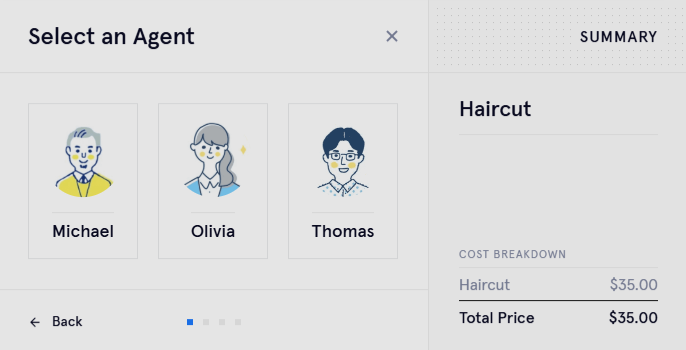
- Multi-step booking form & step-by-step wizard
- Instant booking forms
- Booking form customization
- Custom schedules, holidays & days off
- Time restrictions & timeslot logic
- Cancellation
- Clone service
Payments
- Stripe payments
- Razorpay payments
- Manual payments (Pay Later)
Notifications
- Email notifications
Management & admin
- Single location
- Customer dashboard
- Admin analytics dashboard
- Activity log
- Scheduled jobs
- Conversion tracking through tracking code configuration
- Import / export functionality
Features available with LatePoint Pro
Booking & scheduling
- Multiple locations & multi-location management
- Multiple staff & agents
- Recurring appointments
- Group bookings
- Custom service durations
- Service categories
- Service extras / add-ons
- Service packages
- Quick time blocking
- Shopping cart (book multiple appointments at once)
- Rescheduling
Payments
- PayPal, Square, Mollie, MercadoPago, Flutterwave, Braintree, PayStack, SureCart
- WooCommerce integration
- Local payment (pay later)
- Pay via a link
- Refund processing
- Invoices
- Tax support
Notifications
- SMS notifications
- WhatsApp notifications
- Email & SMS scheduled notifications
- Reminder notifications
Integrations
- Google Calendar sync
- Zoom, Google Meet, and Microsoft Teams integration
- Mailchimp integration
- Webhook functionality
Forms & customization
- Custom fields for booking forms
- Address autocomplete
- Custom roles (e.g. Manager)
- Security & spam protection
- Agent dashboard
See the Full Free vs Pro Feature Comparison
Accept payments at the time of booking
LatePoint lets you collect payment the moment a client books, no due invoices, no chasing, no unpaid appointments. Connect Stripe or Razorpay in about 10 minutes and start accepting payments on the free plan.
Choose how you get paid:
- Full payment at booking: Client pays the complete service fee upfront
- Deposit at booking: collect a fixed amount or percentage to hold the slot, balance due later
- Pay later: Send a payment link after the appointment via the invoicing feature
Payments are processed directly by your payment gateway. LatePoint never holds your funds.
Card data is handled entirely by Stripe or your chosen processor. PCI-DSS compliant by default.
Accept payments with Razorpay | Accept payments with Stripe
Why accept payments at the time of booking?
Accepting a deposit is the single most effective way to reduce no-shows. When a client has paid to hold their slot, they show up. LatePoint makes it a one-step process at checkout.
- Supported payment gateways (free plugin): Stripe and Razorpay
- Supported payment gateways (Pro): PayPal, Square, Mollie, MercadoPago, Flutterwave, Braintree, PayStack, WooCommerce Payments, Stripe, and Razorpay
Für wen ist LatePoint gedacht?
LatePoint is built for small businesses and independent professionals who run on appointments. Whether you’re a solo practitioner or managing a small team, if your business depends on clients booking time with you, LatePoint saves you the back-and-forth and gets you paid faster.
Salons & Studios
Wenn du ein Kosmetikstudio, einen Friseur- oder Nagelsalon, ein Spa, eine Massagepraxis oder ein Tattoo-Studio betreibst, weißt du, wie wichtig es ist, Nichterscheinen, Doppelbuchungen und unangenehme Zahlungssituationen zu vermeiden.
Mit LatePoint:
- Kunden können jederzeit online buchen.
- Du kannst automatische Erinnerungen verschicken, damit die Kunden auch wirklich kommen.
- Zahlungen im Voraus oder nach der Sitzung annehmen
- Synchronisiere deine Buchungen mit Google Kalender
▶️ So richtest du LatePoint für Salons ein
Coaches, Berater und Trainer
Egal, ob du Einzelgespräche, Gruppencoachings oder Online-Workshops machst – mit LatePoint bleibt dein Terminkalender immer aufgeräumt und deine Termine sind gut gefüllt.
- Lass die Kunden Zeitfenster nach Verfügbarkeit auswählen.
- Accept payments or deposits at the time of booking
- Biete persönliche Treffen oder Zoom-Sitzungen an
- Verkauf von Servicepaketen und wiederkehrenden Terminen
How to Setup LatePoint for Consultants
Kliniken, Therapeuten und Leute aus dem Gesundheitswesen
Für Arztpraxen, Wellness-Einrichtungen oder Therapiepraxen hilft dir LatePoint dabei, professionell zu bleiben und deinen Patienten gleichzeitig ein reibungsloses Erlebnis zu bieten.
- Sammle Patientendaten mit benutzerdefinierten Feldern
- Biete mehrere Dienstleistungen mit verschiedenen Spezialisten an
- Verwalte mehrere Mitarbeiterkalender und Standorte
Bildung & Kurse
Egal, ob du Nachhilfelehrer, Sprachlehrer bist oder Präsenzkurse gibst, du kannst:
- Lass die Schüler Einzel- oder Gruppensitzungen buchen.
- Handles sessions with upfront payment so you’re never chasing payments post classes
- Beschränk deine Buchungen auf deine Lieblingszeiten
- Erinnerungen und Zahlungen automatisch machen
How to Setup LatePoint for Private Tutors
Lokale Dienste und Behörden
Photographers, cleaners, auto services, pet services, repair shops, if your business depends on appointments, LatePoint makes it simple.
- Echtzeit-Verfügbarkeit anzeigen
- Verschiedene Zeitpläne je nach Dienstleistung oder Teammitglied festlegen
- Lass deine Kunden rund um die Uhr buchen, ohne dass sie anrufen oder E-Mails schreiben müssen.
Tours, Rentals & Experiences
If you run a jet ski rental, dive school, boat tour, or any activity business, LatePoint handles slot-based bookings with upfront payment so you’re never chasing deposits last minute.
- Let customers book specific time slots for activities or guided sessions
- Require full payment or a deposit at booking to confirm the reservation
- Send automatic reminders so customers show up prepared
- Set capacity limits per session for group tours
Legal & Law Firms
If you run a law firm, notary practice, or offer legal consultations, LatePoint helps you manage client appointments professionally without the back-and-forth.
- Let clients book consultations directly from your website
- Collect intake information upfront with custom booking fields
- Send automatic reminders to reduce missed appointments
- Manage schedules across multiple attorneys or staff members
Pet Services
Whether you run a grooming salon, doggy daycare, or mobile pet care service, LatePoint keeps your bookings organised and your clients coming back.
- Let pet owners book appointments online anytime
- Accept payments or deposits at the time of booking
- Set different availability for different services or staff
- Send reminders so clients never miss a grooming slot
HVAC & Home Services
For HVAC technicians, plumbers, electricians, and other trade businesses, LatePoint makes it easy for customers to book service visits without a phone call.
- Let customers request appointments directly from your website
- Set availability by service type or team member
- Send automatic confirmations and reminders before the visit
- Manage jobs across multiple technicians from one dashboard
Was macht LatePoint so besonders?
LatePoint ist nicht einfach nur ein weiteres Buchungs-Plugin, sondern wurde entwickelt, um echte Terminplanungsprobleme mit einem cleveren, flexiblen Ansatz zu lösen.
- Speziell für Dienstleister entwickelt: Von Einzelkämpfern bis hin zu Teams an verschiedenen Standorten – LatePoint passt sich deinem Unternehmen an.
- Schnell einsatzbereit, einfach zu verwalten: Der integrierte Onboarding-Assistent hilft dir bei der ganzen Einrichtung. In weniger als 10 Minuten bist du startklar und kannst Buchungen annehmen.
- Mobile-First-Buchungserlebnis: Kunden sehen übersichtliche, intuitive Formulare, die auf Handys, Tablets und Desktops super funktionieren. Weniger Klicks = weniger Abbruchrate.
- Integrierte Automatisierung: LatePoint kümmert sich um Bestätigungen, Erinnerungen, Nachfassaktionen und Zahlungen. Vergiss den Verwaltungsaufwand und konzentriere dich ganz auf deine Dienstleistungen.
- Günstig, mit einem für immer kostenlosen Tarif: Du bist nicht an teure Abos gebunden. Fang mit der kostenlosen Version an und hol dir ein Upgrade, wenn du erweiterte Funktionen brauchst.
- Eingebaut in WordPress: LatePoint ist so gemacht, dass es sich wie ein natürlicher Teil deiner Website anfühlt und mit den meisten beliebten Themes und Page Buildern sofort funktioniert.
LatePoint-Bewertung: Ist das das richtige Buchungs-Plugin für deinen Service?
Wie es funktioniert
- Plugin installieren: Hol dir LatePoint aus dem WordPress-Plugin-Repository und schalte es auf deiner Website frei.
- Complete the setup wizard: Walk through a simple onboarding process to set your services and availability.
- Customize your booking form: Add fields to collect the information you need before a session. Choose which details to make required or optional.
- Füge die Buchungsfunktion zu deiner Website hinzu: Nutze einen Shortcode oder das LatePoint-Widget, um die Buchungsschnittstelle auf einer beliebigen Seite oder in einem Beitrag einzubinden.
- Start accepting bookings: Customers can now see your real-time availability, book appointments, pay, and receive confirmation emails.
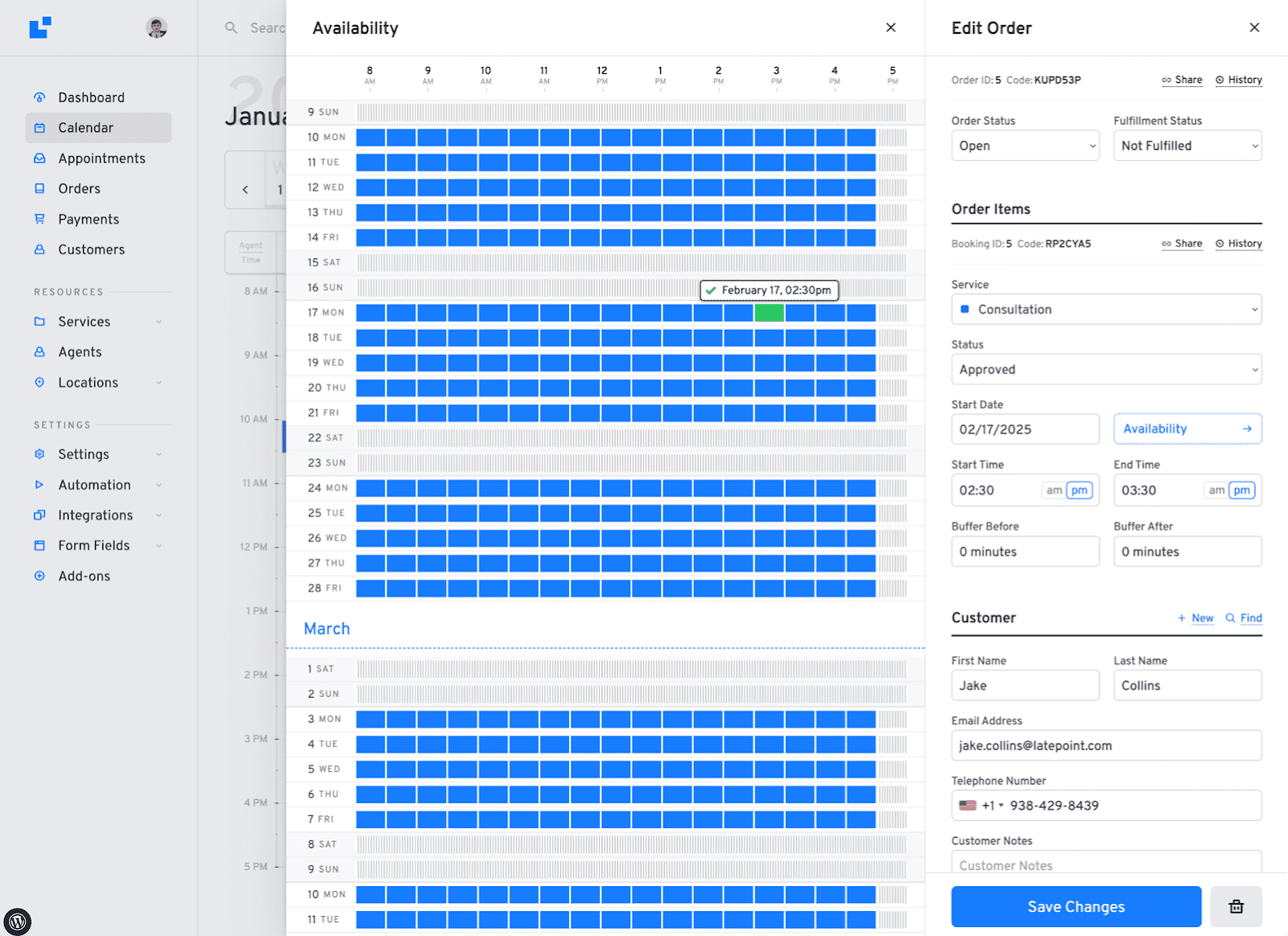
- Manage everything in your dashboard: View and manage appointments, customer information, payments, and notifications directly from your agent dashboard.
- Customer dashboard: Let customers manage their appointments through a dedicated customer dashboard.
Features You’ll Love With the Plugin
Free:
✅ Appointment booking form builder – Build the form customers will fill while scheduling their appointments.
✅ Stripe and Razorpay payments at booking – Accept a deposit the moment a client books.
✅ Admin dashboard – Full calendar view with filters for appointments and services.
✅ Multi-step booking wizard – A clean, guided booking flow that works on any device without configuration.
✅ Email notifications – Automatic confirmations sent to both you and your client at booking.
✅ Cancellation management – Let clients cancel their own appointments without emailing you.
✅ Custom schedules & holidays – Set your working hours, block off days, and manage time off without workarounds.
✅ Conversion tracking – Track how many visitors turn into bookings by configuring third-party tracking code.
✅ Import / export – Move your data in and out without needing a developer.
✅ Activity log – See a full history of every action taken on your account.
Willst du mehr freischalten?
LatePoint’s free plugin is a solid starting point – unlimited appointments, Stripe & Razorpay payments, and a full booking experience out of the box. When your business grows and you need more power, Pro has you covered.
Mit LatePoint Pro schaltest du Folgendes frei:
- Manage multiple locations, staff members, and agents
- Accept payments via PayPal, Square, Mollie, MercadoPago, Flutterwave, Braintree, PayStack, and SureCart along with Stripe and Razorpay
- Accept local payments via WooCommerce integration. If you want to use any local payments you can use LatePoint Woo
- Sync with Google Calendar, Outlook, and Apple Calendar
- Clients can view, manage, reschedule, and cancel bookings without contacting you
- Send SMS and WhatsApp notifications and scheduled reminders
- Offer recurring appointments, group bookings, and service packages
- Add custom fields, address autocomplete, and custom roles
- Connect Zoom, Google Meet, and Microsoft Teams for automatic video meeting links
- Clients book in their local time zone, no confusion on either side
- Block out time on your calendar in seconds when something comes up
- Issue invoices, send payment links, process refunds, and setup tax
- Integrate with WooCommerce and Mailchimp
Funktioniert mit deinem Stack
- Funktioniert mit den meisten beliebten WordPress-Themes (Astra, Kadence, GeneratePress und anderen)
- Voll kompatibel mit Elementor, Gutenberg und Page Buildern
- LatePoint is compatible with WooCommerce but doesn’t need it to work. To collect payments using local payment methods (pay later), you can use LatePoint Woo
- Extendable with LatePoint Pro (Calendar integrations, Zoom, WhatsApp, etc.)
Blöcke
Dieses Plugin hat 6 Blöcke.
- Kunden-Dashboard: Fügt ein Kunden-Dashboard für LatePoint hinzu.
- Buchungsbutton: Fügt einen Buchungsbutton hinzu.
- Liste der Ressourcen: Fügt eine Liste der buchbaren Ressourcen nach Typ hinzu.
- Buchungsformular: Fügt ein LatePoint-Buchungsformular hinzu.
- Kundenanmeldung: Fügt ein Formular für die Kundenanmeldung hinzu.
- Latepoint-Kalender: Fügt einen Veranstaltungskalender hinzu.
Trusted by 100,000+ Businesses
LatePoint is trusted by 100,000+ businesses worldwide, from solo freelancers and independent practitioners to fitness chains and the Nigerian Embassy. Join a growing community of service businesses that have simplified their scheduling with LatePoint.
Wenn du deinen Kunden eine moderne und einfache Möglichkeit bieten willst, online zu buchen, probier LatePoint noch heute aus.
Branding Guidelines
LatePoint® is a registered trademark. Please use the following format when mentioning LatePoint anywhere:
- LatePoint [correct]
- Late Point [incorrect]
- Latepoint [incorrect]
- Late point [incorrect]
Screenshots



Blöcke
Dieses Plugin bietet 6 Blöcke.
- Latepoint calendar Generates a calendar of events for LatePoint
- Booking Form Generates a booking form for LatePoint
- Customer Login Generates a customer login form
- List of Resources Generates a list of bookable resources by type for LatePoint
- Customer Dashboard Generates a customer dashboard for LatePoint
- Booking Button Generates a booking button for LatePoint
Installation
- Lade die Datei „latepoint.zip“ in den Ordner „/wp-content/plugins/“ hoch.
- Aktiviere das Plugin im „Plugins“-Menü in WordPress
- Stell sicher, dass du das Caching auf deiner Kundenseite deaktivierst.
FAQ
-
Funktioniert das mit Elementor oder anderen Page Buildern?
-
Ja! LatePoint funktioniert mit Elementor, Gutenberg und den meisten anderen großen Buildern.
-
Kann ich das auf Kundenwebsites verwenden?
-
Klar. Es ist super für Agenturen oder Freiberufler, die Buchungssysteme für ihre Kunden einrichten wollen.
-
Können Kunden mehrere Termine auf einmal buchen?
-
Yes, the booking cart lets users add multiple appointment bookings in one go.
-
Kann ich während der Buchung Zahlungen annehmen?
-
Yes, Stripe and Razorpay on the free plan. PayPal, Square, Mollie, MercadoPago, Flutterwave, Braintree, PayStack on paid plans. Also supports WooCommerce Payments.
-
Can I make clients pay a deposit during the appointment booking?
-
Yes. Set a fixed deposit per service. Available on all plans including free. The balance can be collected later directly through customers. With the Pro version, you can collect the remaining amount via payment link and invoice.
-
Can I issue refunds from WordPress?
-
You can refund payments directly from the LatePoint dashboard. Processes through your payment gateway automatically.Here’s documentation to help you along the way.
-
How do I reduce no-shows?
-
Enable deposits and make clients pay while they schedule their appointments. Combine with automated SMS/email reminders with the Pro version.
-
Does it sync with Google Calendar?
-
Yes, two-way sync with Google Calendar, Outlook, and Apple Calendar is available with the Pro plan.
-
Can clients reschedule or cancel themselves?
-
Yes, via their customer dashboard. You control the cancellation policy and whether deposits are refunded on cancellation. Rescheduling appointments is available with the Pro plan.
-
Does it work for group bookings?
-
Yes, you can enable group bookings for your clients with the Pro version.
-
Ist LatePoint kostenlos oder kostenpflichtig?
-
This is the free version, perfect for simple booking needs. Want advanced features like expanded payment options, Zoom integration, recurring appointments, or WhatsApp notifications? Check out LatePoint Pro
Rezensionen


Mitwirkende und Entwickler
„Appointment Booking Plugin – LatePoint | Calendar & Scheduling for WordPress“ ist Open-Source-Software. Folgende Menschen haben an diesem Plugin mitgewirkt:
Mitwirkende
„Appointment Booking Plugin – LatePoint | Calendar & Scheduling for WordPress“ wurde in 4 Sprachen übersetzt. Danke an die Übersetzer für ihre Mitwirkung.
Interessiert an der Entwicklung?
Durchstöbere den Code, sieh dir das SVN-Repository an oder abonniere das Entwicklungsprotokoll per RSS.
Änderungsprotokoll
5.6.8 – July 9, 2026
-
New
- Added MCP server support with the /wp-json/latepoint/v1/mcp endpoint, AI client integration (such as Claude), and a settings panel for easy setup. Requires WordPress 6.9+ and the MCP Adapter plugin.
- Added support for the {year} token in invoice number prefixes, automatically inserting the invoice creation year.
-
Improvements
- Added the latepoint_should_load_front_scripts filter for conditional frontend asset loading.
-
Fixes
- Invoice numbers are now generated and locked at the time of creation to ensure consistency.
-
Security
- Addressed security bugs. Props to Artus for reporting it.
5.6.7 – July 6, 2026
-
Fixes
- Fixed a „You have to select an agent“ error that occurred when choosing „Any agent.“
-
Security
- Addressed security bugs. Props to Khoa and WordFence for reporting it.
5.6.6 – July 3, 2026
- Fixes
- Fixed an inconsistent slots availability in the dashboard calendar view despite being unavailable in availability and booking interfaces.
5.6.5 – July 1, 2026
-
New
- Added maximum bookings per day feature support for an upcoming premium release, allowing you to set limits on the number of bookings a customer can make per day.
- Added cancellation and reschedule reason feature feature support for an upcoming premium release, allowing you to require customers to provide a reason when cancelling or rescheduling an appointment.
-
Improvements
- Refactored backend code to improve stability and maintainability.
-
Fixes
- Fixed revenue statistics and analytics displaying pre-discount amounts when coupons were applied. Dashboard revenue widgets and reports now correctly reflect the discounted total paid by customers.
- Fixed the Admin Notes customer field, not being saved when edited by agents or users with custom LatePoint roles.
- Fixed service extras quantity inputs not updating the cart total when values were typed manually on desktop or mobile devices.
- Fixed the Confirmation step showing a Create Account prompt to customers who were already logged in. Logged-in customers now see an Open My Cabinet link instead.
- Fixed a loading spinner issue in the Price Breakdown and Balance & Payments panels when changing the selected service while creating an order in the admin area.
5.6.4 – June 30, 2026
- Security
- Addressed security bugs. Props to WordFence for reporting it.
- Addressed security bugs. Props to Patchstack for reporting it.
5.6.3 – June 24, 2026
-
New
- Added URL pre-fill support for an upcoming premium release, allowing users to pre-fill customer fields using URL query parameters before the contact step is rendered.
- Added display price support for bundles in an upcoming premium release, allowing merchants to display prices to customers on the bundle selection step while keeping the Charge Amount as the actual billed amount.
-
Fixes
- Fixed deprecation warnings for all LatePoint Gutenberg blocks (Booking Button, Booking Form, Calendar, Customer Dashboard, Customer Login, and List of Resources).
-
Security
- Strengthened nonce validation. Props to Meher Sudhakar Abbireddi for reporting it.
- Strengthened the visibility filter that only ran on the display layer. Props to WordFence for reporting it.
5.6.2 – June 15, 2026
-
New
- Added a clear „No Availability“ message when a selected service or agent has no bookable dates, making it easier to understand why no dates are available.
- Added new options to control which services are displayed during the booking process. You can now choose to show all services, only individual services, or only bundles in booking forms and widgets.
- Added White Label support for upcoming premium release, allowing you to replace LatePoint branding throughout the admin area with your own brand identity.
-
Improvements
- Added an extra confirmation step when deleting services to help prevent accidental deletions. This is especially important because deleting a service also removes its associated appointments.
-
Fixes
- Fixed inconsistent invoice payment information. Invoice pages now show the correct remaining balance as Amount Due, and fully paid invoices are clearly marked as Paid.
- Fixed an issue where cancelled Mollie or PayPal payments could cause duplicate items to appear in the booking cart when resuming a booking.
- Fixed an issue where time slots already reserved in the cart could still appear available when booking across different calendar months, preventing accidental duplicate bookings.
- Fixed an issue where bulk actions could disappear from the Appointments list after filtering, sorting, or navigating between pages. Bulk actions now remain available consistently.
-
Security
- Sicherheit: Wir haben ein paar Sicherheitsprobleme behoben. Danke an WordFence für den Hinweis.
5.6.1 – May 29, 2026
-
New
- Added a new workflow condition „Order Item Counts“ for the Booking Created and Order Created triggers. This allows a workflow to fire (or be skipped) based on number of bookings created in the same order.
- Added bulk delete option to the Appointments list along with a confirmation prompt to prevent accidental deletions.
- Added translations for Portuguese (Brazil), Polish, Dutch, Chinese (Simplified), Turkish, Indonesian, Japanese, Arabic, Swedish, Vietnamese, Hebrew, Thai, Greek, and Czech
-
Improvements
- Updated the existing translations with corrections and added new translations for the new strings.
-
Fix:
- Missing text domains on some strings that prevented them from being translatable.
- Strengthened the nonce validation. Props to Wordfence.
5.6.0 – May 18, 2026
- New: Introduces the RazorPay payment gateway integration.
- Improvement: Added a new “Create invoices for free bookings” toggle under Settings -> Invoices, allowing admins to optionally generate invoices for free bookings.
- Improvement: Updated all LatePoint Gutenberg blocks (Booking Button, Booking Form, Calendar, Customer Dashboard, Customer Login, and List of Resources) to Block API version 3.
- Improvement: Removed source map from CSS and JS to reduce output size.
- Fix: Fixed Gutenberg block preview rendering inside the WordPress iframe editor, preventing blank booking form and calendar previews in responsive/device preview modes.
5.5.2 – May 14, 2026
- Added support for custom
.icscalendar attachment filenames in workflow email notifications, including smart variables such as{{service_name}}and{{booking_id}}for more personalized calendar invites. - Added new MCP settings in General -> MCP to enable and manage Abilities support.
- Sicherheit: Wir haben ein paar Sicherheitsprobleme behoben. Danke an WordFence für den Hinweis.
5.5.1 – May 5, 2026
- Sicherheit: Wir haben ein paar Sicherheitsprobleme behoben. Danke an WordFence für den Hinweis.
5.5.0 – April 27, 2026
- New: Added “Enable Invoices” toggle in general settings. This introduces foundational support for premium versions and allows admins to disable invoice functionality when using external invoicing tools or when invoices are not needed.
- New: Added drag-and-drop column reordering to the Appointments table. Users can customize column order via the Table Settings panel, with preferences saved across sessions.
- Improvement: Improved browser autofill support by adding proper autocomplete attributes to all customer-facing forms, resolving PCI compliance warnings.
- Fix: Fixed a crash on the dashboard and month calendar when an agent has no work schedule, preventing DivisionByZero errors.
- Fix: Resolved a WordPress 6.7+ notice related to delayed textdomain loading.
- Fix: Fixed a 500 error during password reset requests when customer lookup returned invalid data.
5.4.2 – April 24, 2026
- Sicherheit: Wir haben ein paar Sicherheitsprobleme behoben. Danke an WordFence für den Hinweis.
5.4.1 – April 18, 2026
- Sicherheit: Wir haben ein paar Sicherheitsprobleme behoben. Danke an WordFence für den Hinweis.
5.4.0 – April 13, 2026
- New: Added Assets (Shared Resources) feature support for the upcoming Pro release.
- Fix: Resolved an issue where scheduled jobs more than a month away displayed incorrect remaining time.
- Sicherheit: Wir haben ein paar Sicherheitsprobleme behoben. Danke an WordFence für den Hinweis.
5.3.2 – March 31, 2026
- New: Calendar URL now remembers your view, date, and filter selections, refresh the page and everything stays in place
- Improvement: Dates on Orders and Payments pages now use the same readable format as the rest of the plugin
- Fix: Services set to „Visible to admins and agents only“ no longer appear on the booking form for customers
- Fix: Coupon discounts now display correctly when the thousand separator is set to a space
- Fix: Fixed missing close button on the calendar day view popup
- Fix: Calendar day view popup is now wider so filter dropdowns aren’t cut off
- Fix: Fixed a fatal error on the customer dashboard when a purchased bundle has been deleted
5.3.1 – March 26, 2026
- Sicherheit: Wir haben ein paar Sicherheitsprobleme behoben. Danke an WordFence für den Hinweis.
5.3.0 – March 19, 2026
- Improvement: Added foundational support for upcoming pro features related to location based agent schedules.
- Improvements: Improved compatibility checks between Free and Pro plugins.
- Fix: Fixed SMS OTP not being sent when verifying existing customers by phone due to incorrect delivery method
- Fix: Fixed OTP verification box showing incorrect label — now displays “Verify your phone number” when SMS OTP is enabled.
5.2.11 – March 10, 2026
- Fix: Fixed calendar month names displaying duplicated characters (e.g., „Marss“, „Aprilil“) when both short and full month names are translated to the same value via Loco Translate.
- Security: Strengthen plugin security and harden against potential vulnerabilities.
5.2.10 – February 26, 2026
- New: Added „Remove all data on plugin deletion“ toggle under Settings > General > Danger Zone > Plugin Deletion to permanently delete all LatePoint data when the plugin is removed.
- Security: Strengthen plugin security and harden against potential vulnerabilities.
- Fix: Resolved the forgot-password form persisting when switching back to the New Customer tab in the Booking Form.
Die komplette Änderungsliste findest du auf unserer Website: Komplette Änderungsliste