
Your hosting company decides how fast your WordPress site loads, how often it goes down, and how much help you get when something breaks. It is also the place where the advertised price and the price you actually pay are furthest apart. This guide compares seven hosts we would recommend today. It covers what each one is good at, what it really costs over three years and what to watch for, and how to get your site running once you have signed up.
Some links on this page are affiliate links, so we may earn a commission if you sign up. It does not cost you anything extra, and it is not why a host is on this list. See our affiliate disclosure.
Quick picks
- Best overall for small sites: SiteGround, for strong support and built-in WordPress tools.
- Lowest cost: Hostinger, if you can pay for four years up front.
- Simplest start for beginners: Bluehost, with the smallest jump at renewal.
- Best managed hosting for business sites: Kinsta.
- Best for agencies: WP Engine.
- Fast managed hosting on a budget: hosting.com.
- Longest refund window: InMotion Hosting, with 90 days.
Prices compared, including renewals
Hosting prices are advertised per month, but the low price usually requires paying for one to four years in advance, and it rises when that term ends. The table shows each host’s entry-level WordPress plan as listed on October 23, 2026, in US dollars and before tax.
| Host and entry plan | Advertised price | To get that price | Renews at | First 3 years* | Money back |
|---|---|---|---|---|---|
| SiteGround StartUp | $2.99/mo | Pay 12 months | $17.99/mo | $468 | 30 days |
| Hostinger Premium | $2.49/mo | Pay 48 months ($119.52) | $10.99/mo | $120 (covers 4 years) | 30 days |
| Bluehost Starter | $3.99/mo | Pay 36 months | $9.99/mo | $144 | 30 days |
| hosting.com Small | $4.49/mo | Pay 12 months ($53.87) | $9.99/mo | $294 | 30 days |
| WP Engine Essential | $28/mo | Pay 12 months ($336) | Same price | $1,008 | 60 days |
| Kinsta Single 20GB | $30/mo | Monthly, first month free | Same price | $1,050 | 30 days |
| InMotion WordPress | Prices vary by region; check the current offer on InMotion’s site | 90 days | |||
*Our calculation for the entry plan: the introductory term plus renewals at the listed rate, before tax and without add-ons. Prices change often, especially around sales, so check the host’s site before you buy.
What the table shows: SiteGround is the cheapest to start but one of the more expensive after the first year, while Bluehost and Hostinger stay cheap for longer if you commit for three or four years. Kinsta and WP Engine cost more from day one, but their price does not jump, and you get fully managed hosting.
Types of hosting explained
Shared hosting
Your site shares a server with many others. It is the cheapest option and fine for new blogs, portfolios and small business sites. Hostinger, Bluehost, SiteGround and InMotion all start here.
Managed WordPress hosting
The host looks after WordPress for you: updates, backups, caching, security and expert support. It costs more, but it is worth it for sites that earn money. Kinsta, WP Engine and hosting.com are fully managed.
Cloud and VPS hosting
You get dedicated resources that you can scale up. It is good for busy sites and online stores, but some plans need technical skills. Hostinger Cloud and InMotion’s VPS plans are examples.
Our picks in detail
1. SiteGround
Best for: small business sites that need reliable support
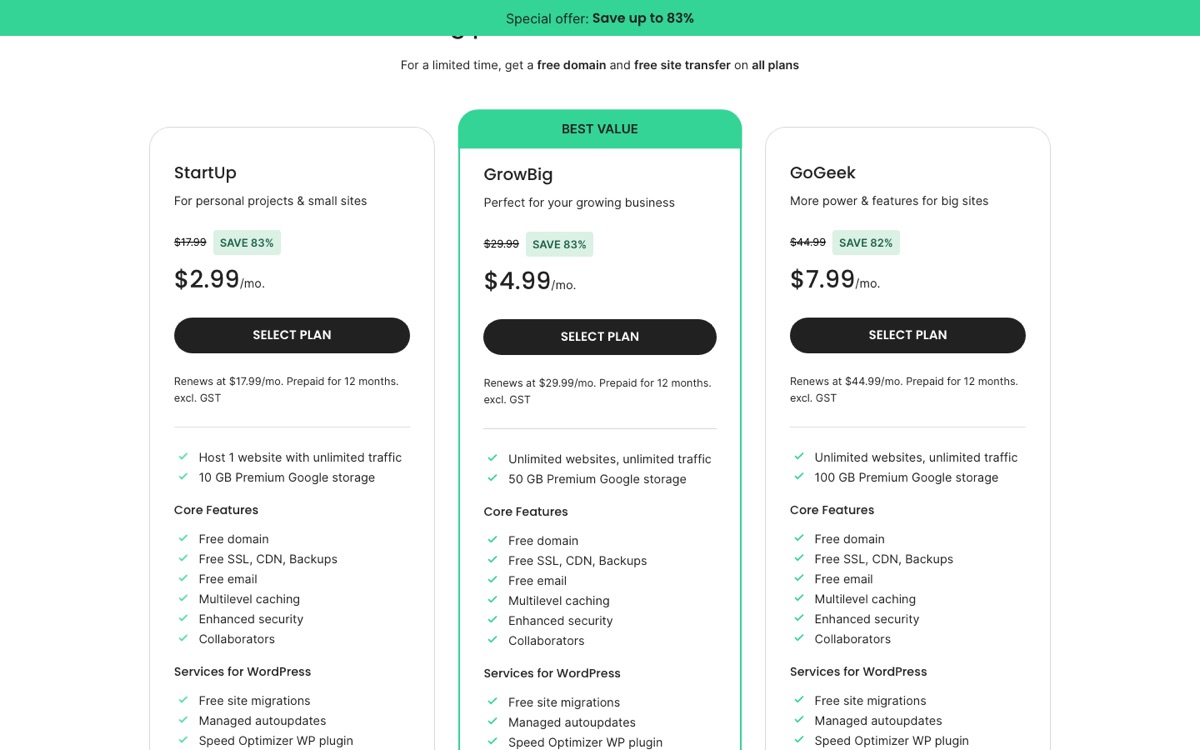
SiteGround runs on Google Cloud and includes the things most WordPress sites need: a free domain and site transfer (a limited-time offer at the time of writing), free SSL, a CDN, backups, email and multi-level caching. StartUp hosts one website with 10 GB of storage. GrowBig and GoGeek allow unlimited websites with 50 GB and 100 GB, and add features such as staging and on-demand backups.
What we like
- Fast, knowledgeable support
- Backups, caching and a CDN on every plan
- Its own Speed Optimizer plugin and automatic WordPress updates
Watch out for
- The steepest renewal jump here, from $2.99 to $17.99 a month
- StartUp allows only one website
- Storage limits are tighter than at budget hosts
2. Hostinger
Best for: the lowest cost to get started
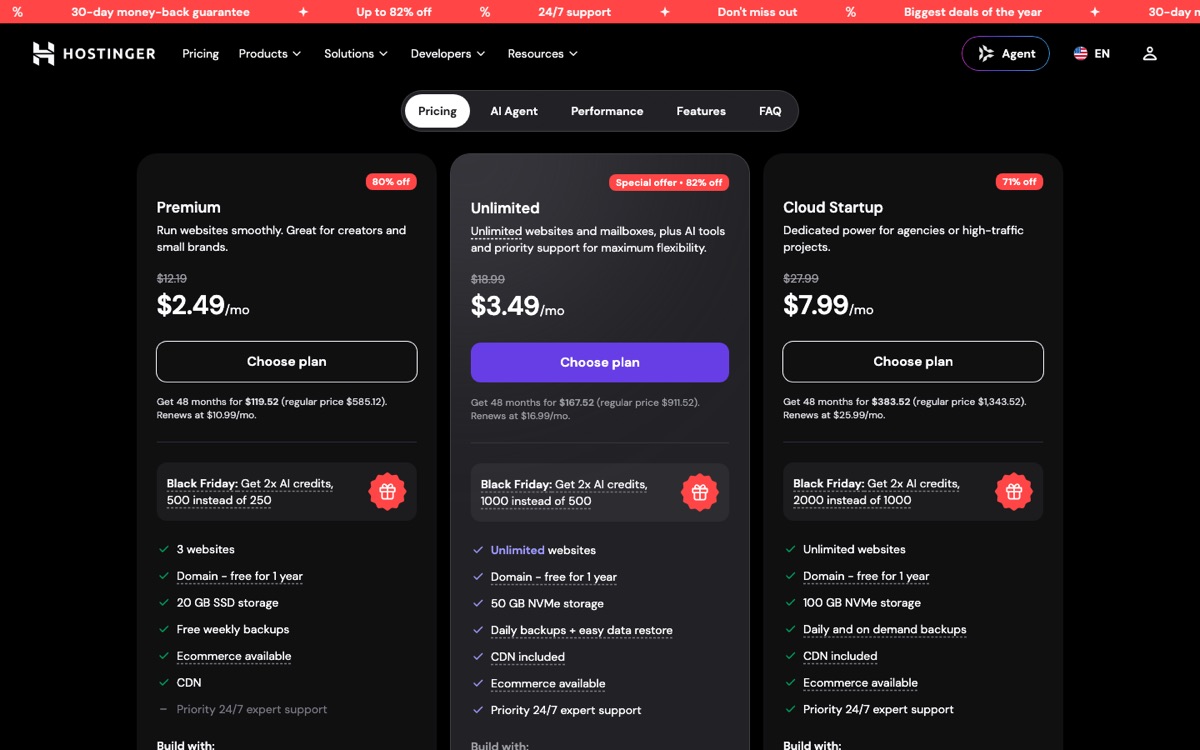
Hostinger is one of the hosts recommended on WordPress.org and has some of the lowest prices for WordPress hosting. Premium covers three websites with 20 GB of storage, weekly backups, a CDN and a free domain for the first year. Unlimited ($3.49/mo, renewing at $16.99) adds unlimited websites, 50 GB of NVMe storage, daily backups and priority support. Cloud Startup ($7.99/mo, renewing at $25.99) gives dedicated resources for busier sites. Hostinger uses its own control panel, hPanel, which is easy to learn, and includes AI tools for building and troubleshooting sites.
What we like
- The lowest total cost over three to four years
- Free domain and CDN even on the entry plan
- A simple control panel and data centres on several continents
Watch out for
- The headline price needs a 48-month prepayment
- Premium only has weekly backups, not daily
- Busy sites will outgrow the entry plan quickly
3. Bluehost
Best for: beginners who want a simple start
| Plan | Price (36-month term) | Renews at | Websites | Storage |
|---|---|---|---|---|
| Starter | $3.99/mo | $9.99/mo | 10 | 10 GB NVMe |
| Business | $6.99/mo | $13.99/mo | 50 | 50 GB NVMe |
| eCommerce Essentials | $14.99/mo | $21.99/mo | 100 | 100 GB NVMe |
Bluehost’s shared plans as listed on October 23, 2026. All plans include a free domain for the first year and weekly backups.
Bluehost has been recommended on WordPress.org for many years and sets up WordPress for you when you sign up. Even the Starter plan allows 10 websites, and its renewal price is the lowest of the budget hosts here, so it stays affordable after the introductory term.
What we like
- Very easy start with WordPress pre-installed
- The smallest renewal increase among budget hosts
- 10 websites even on the cheapest plan
Watch out for
- The best price needs a 36-month commitment
- Backups are weekly, not daily
- Paid extras are offered at checkout, so skip what you do not need
4. Kinsta
Best for: busy business sites and online stores
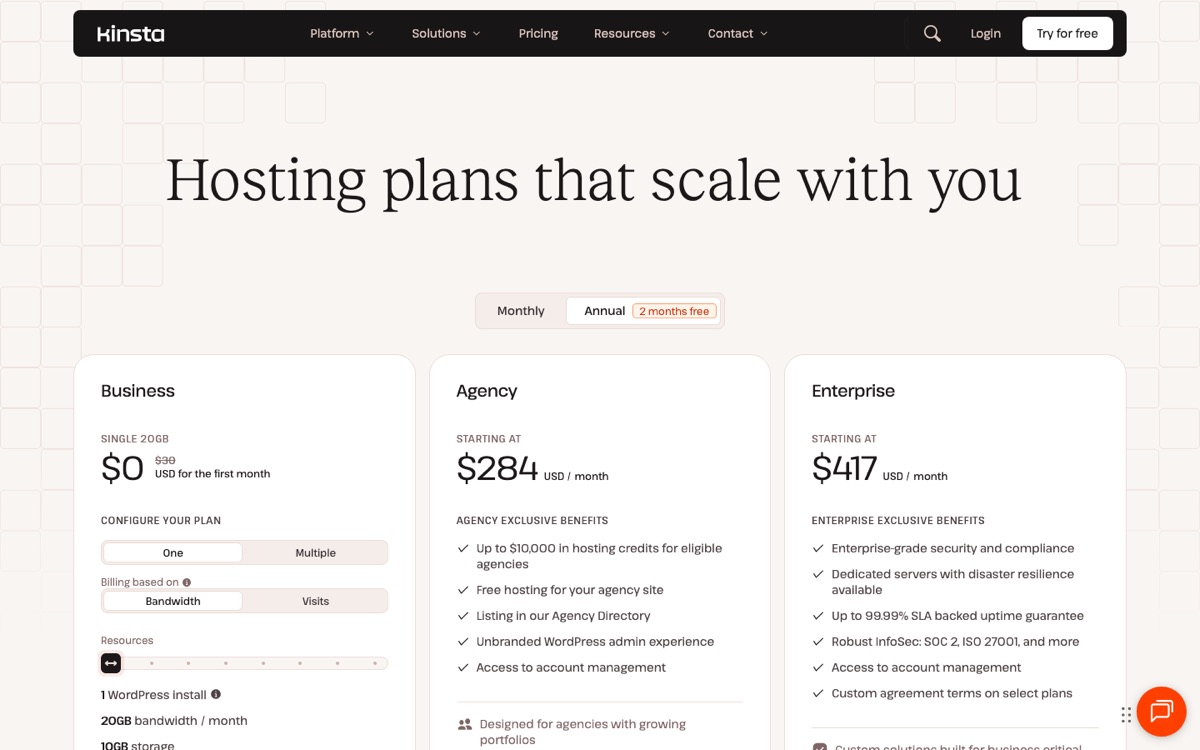
Kinsta is fully managed WordPress hosting on Google Cloud, with Cloudflare Enterprise included. The entry plan covers one WordPress site with 20 GB of server bandwidth, 10 GB of storage, 125 GB of CDN bandwidth, 14 days of backups, unlimited free migrations and round-the-clock support in eight languages. Multi-site plans start at $70 a month for two sites, and paying yearly gets you two months free. Its MyKinsta dashboard handles staging, backups and performance monitoring.
What we like
- Excellent performance and expert WordPress support
- No introductory price trap: you pay the same every month
- Unlimited free migrations from your current host
Watch out for
- About ten times the cost of shared hosting
- Plans are limited by bandwidth or visits, and overages cost extra
- Email hosting is not included
5. WP Engine
Best for: agencies managing many client sites

WP Engine is one of the longest-running managed WordPress hosts. Essential includes daily automated backups, 24/7 chat support, managed WordPress, PHP and MySQL updates, free SSL and SSH access. Business ($400 a month) adds isolated resources, phone support, managed migrations and a 99.99% uptime guarantee. For agencies, it offers development and staging environments and lets you transfer a finished site to a client’s own account.
What we like
- Mature tools for developers and agencies
- A 60-day money-back guarantee, twice the usual
- No renewal price jump
Watch out for
- A big price gap between Essential and Business
- Some plugins are not allowed on its platform
- Email hosting is not included
6. hosting.com (formerly A2 Hosting)
Best for: fast managed hosting on a budget
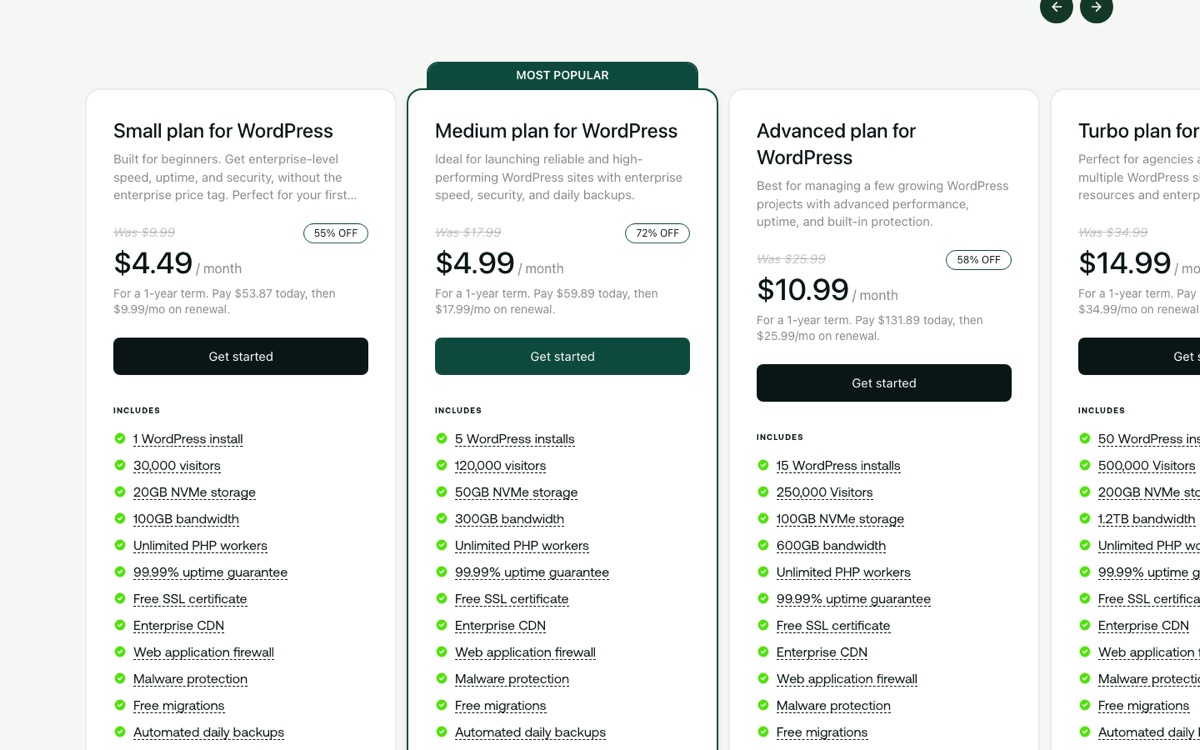
A2 Hosting became hosting.com in 2025, and its WordPress hosting is now fully managed, built in partnership with Rocket.net. Even the Small plan includes Cloudflare Enterprise CDN with full-page caching, a web application firewall, malware protection, daily backups kept for 14 days, staging, and WP Rocket and Object Cache Pro at no extra cost. Small covers one site and 30,000 visitors a month with 20 GB of NVMe storage. Medium ($4.99/mo, renewing at $17.99) covers five sites and 120,000 visitors.
What we like
- Managed hosting features at shared-hosting prices
- Premium caching plugins included for free
- Only a one-year commitment for the introductory price
Watch out for
- Plans are capped by monthly visitors
- The managed platform is new since the rebrand, so it has a shorter track record
- Medium renews at more than three times its first-year price
7. InMotion Hosting
Best for: trying a host with the longest refund window
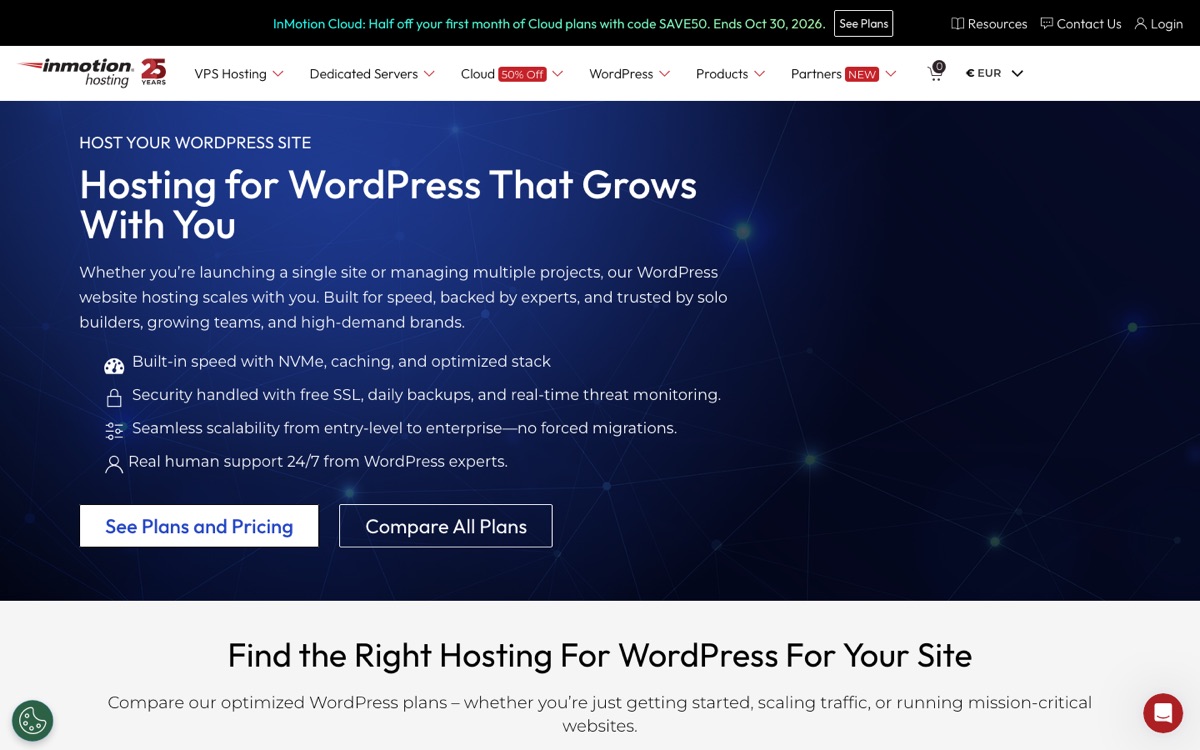
InMotion has been in business for 25 years. Its WordPress plans include NVMe storage, caching, free SSL, daily backups and real-time threat monitoring, and you can move up to VPS or dedicated servers without changing host. Its 90-day money-back guarantee on shared and WordPress hosting is three times the industry norm, which makes it a low-risk way to try a host.
What we like
- A 90-day money-back guarantee
- cPanel, which many developers already know
- A clear path from shared hosting to dedicated servers
Watch out for
- Most data centres are in the United States
- The domain fee is deducted if you cancel within the guarantee period
- Promotional prices apply to new customers only
Setting up WordPress on your new host
Once you have picked a host, getting a site online usually takes less than an hour:
- Choose a plan and term. Pick the shortest term you are comfortable with, or the longest if you are sure about the host, because that is where the price difference is biggest. Untick add-ons you do not need, such as paid SEO tools or site scanners.
- Register or connect your domain. Most plans include a free domain for the first year. If you already own one, point it to the host by changing its nameservers at your registrar.
- Install WordPress. Every host on this list installs WordPress for you, either during sign-up or with one click from the dashboard. Note the admin username and password it gives you.
- Turn on SSL. Check that your site loads at https://. All of these hosts include free SSL certificates, but some need you to switch them on.
- Choose a theme. Start with a free theme such as one of our WordPress themes, or a design from our website templates.
- Check backups and caching. Confirm that automatic backups are running and that caching is on. If your host does not include caching, add a caching plugin.
Checklist before you buy
- Compare the renewal price, not only the first term.
- Check how long you must prepay to get the advertised price.
- Make sure backups are daily and that you can download them.
- Look at where the data centres are compared with your visitors.
- Check the limits that matter for your site: websites, storage, visitors or bandwidth.
- Find out whether email is included or must be bought separately.
- Read the refund terms, including what happens to domain fees.
- Confirm that migration is free if you are moving an existing site.
How we picked
We have built and run WordPress sites since 2013. For this guide we compared each host’s current plans, prices, renewal rates and refund terms directly on its website on October 23, 2026, and took the screenshots on this page the same day. We also looked at what each host manages for you (updates, backups, caching, security), its support, and its reputation among WordPress developers. We have not run our own speed benchmarks for this page.
Colorlib itself runs on a dedicated server that our team manages. That suits a large site with technical staff, but it is not what we would recommend for a new website.
WordPress.org currently recommends three hosts: Pressable, Bluehost and Hostinger. Two of them are in this guide.
Frequently asked questions
What is the best web hosting for WordPress?
For most new sites, SiteGround if support matters most, Hostinger if price matters most, or Bluehost if you want the simplest start and a small renewal increase. For a busy business site or online store, managed hosting from Kinsta or WP Engine is worth the extra cost.
Why does hosting cost more after the first year?
Hosts advertise an introductory price that only applies to your first term, which is often paid up front for one to four years. After that, the plan renews at the regular price, which can be two to six times higher. Compare renewal prices and the total cost over several years, as in our price table.
Is cheap shared hosting good enough for WordPress?
For a new site with modest traffic, yes. The difference appears as your site grows: cheaper plans have tighter limits on resources, weekly rather than daily backups, and slower support. You can upgrade or move later.
What is managed WordPress hosting?
Managed WordPress hosting means the host takes care of WordPress for you: core updates, daily backups, caching, security and expert support. It costs more than shared hosting, but it saves time and reduces risk for sites that earn money.
Can I move my site to another host later?
Yes. Most hosts offer free migration or a migration plugin, and you keep your domain name. Kinsta, SiteGround and hosting.com, for example, include free migrations.
Which host does Colorlib use?
Colorlib runs on its own dedicated server, which our team manages. That works for a large site with technical staff, but we would not recommend it for a new website.