
Ultimate Asset Placer Godot 4.5+ (GD Script)
Check out my recent projects:
Ultimate Asset Placer for Godot 4.5+
After hours of repetitive level design, a new workflow has arrived.
More than just a layout tool, this plugin will provide you with everything you need to populate your 3D environments rapidly.
____________________________________________________________________________
Some of the Features:
- 5 unique placement modes: Free, Grid, Surface, Vertex, and Spline.
- Volumetric Brush and MultiMesh support for massive performance.
- Advanced Spline System: Deform meshes for roads and fences, or scatter props along curves. Conforms to uneven terrain!
- Material Overrides: Replace materials instantly, or layer effects like snow, wetness, and glow using the "Next Pass" mode.
- Asset Zoo: Instantly spawn every loaded asset into a neat 3D grid for quick visual browsing.
- Asset Groups & Random Placer: Organize assets into custom folders and randomly paint between them.
- Auto-generate physics collisions on placement (Static, Rigid, Area, etc.).
- Randomize rotation, tilt, and scale for organic environments.
- Fully customizable keyboard and scroll wheel shortcuts.




The UAP Asset Browser:
- Auto-scans your asset folders on startup.
- Real-time search filtering and resizable thumbnail cards.
- Multi-select assets to paint them randomly.
- Drag and drop 3D files directly from the Godot FileSystem.
The UAP Settings Panel:
- Keep your scene organized with Parent Node overrides.
- Snap to XZ grids or conform to uneven terrain normals.
- Full Transform controls for precise offset, pitch, yaw, and roll adjustments.
____________________________________________________________________________
LICENSE:
If you purchase this tool, you can:
- Use the plugin in any commercial or non-commercial project.
- Modify the plugin for your own personal use.
You CAN'T:
- Resell or distribute the plugin to others.
- Edit and resell the plugin to others.
____________________________________________________________________________
- For anything, post a comment below -
Contact & Support:
Discord: https://discord.gg/mmrWW7bHd
Email: pixelvoxelartist@gmail.com
Purchase
In order to download this tool you must purchase it at or above the minimum price of $5 USD. You will get access to the following files:
Development log
- New update for Ultimate Asset Placer v1.520 days ago
- New Major Update for Ultimate Asset placer is here v1.284 days ago
- New update for Ultimate Asset Placer v1.190 days ago


Comments
Log in with itch.io to leave a comment.
how do i find out how to use and navigate this
When you enable the plugin look at the output tab of Godot there will be few instructions highlighted in yellow. And on the right side next to inspector you will find a new tab called uap settings and in that there are few groups, you can swipe right to reveal a docs group. In the docs you will find everything about this plugin.
is there a way to get tscn placing to actually place the scene, instead of unpacking that scene into seperate nodes? This makes it hard to update objects and have them update in a main level.
Is there is a toggle buttons for this. Just toggle off the unpack scenes and the tscn files will remain packed
Thanks for the reply, i will look into this
where is this toggle?
Interesting, maybe i have an older version
Just bought the asset but my .tscn files aren't showing any icon in the asset browser.. How can I get the thumbnails to show on them?
And also, how do I remove assets from a group? I can add them, but I can't remove single assets from it it seems.. Plus the UI has a ton of scaling issues for me as well
A bunch of labels are cutoff too early and negative numbers beyond -10 can't even get displayed properly. Also, when scrolling down the list with my scrollwheel it often scrolls on the Sliders themselves which then unintentionally changed the values within them. Note that I'm on a 4K monitor and use 150% display scaling inside the editor settings
For the tscn file they are very hard to optimise on the thumbnail side. And for the negative numbers it can't go beyond -10 because I just recently switched from number based to slider based control so if you have to go beyond -10 you have to set it in code. And for the scaling issue part I did fix most issues but some of the issue remained. I am not using a 4k monitor so if you share some more screenshot of the issue that would help me a lot. I will try to fix most of the issues you are having by the next update.
For the negative numbers, for the Grid Y I can definitely go beyond -10 with the slider, all the way down to -100 it seems (displayed as -1 before being cut off)
But without .tscn support for the thumbnails this tool doesn't have any use to me. A lot of my objects have other stuff setup in them to make them intractable and/or have other gameplay features so if I can't place them with through this tool than that's kind of a waste. Are you planning on adding support for this in the near future anyways? If not them I'd like to request a refund instead as this tool simply won't work for me.Regarding the .tscn files, thumbnail support is actually available right now! Currently, the tool only attempts to load the thumbnail three times before skipping it, so if a scene is particularly big, it might fail within that window. As a quick workaround, you can set the number of retries to -1, which will allow for unlimited retries.
If it still doesn't load after doing that, please don't worry. I am working on figuring out a way to properly load thumbnails for large scenes with full optimization, ensuring the tool doesn't crash even when handling 1000+ scenes at once.
I will be fixing all the issues you mentioned in your feedback by the next update. Thank you for your patience, and I hope this helps!
Where would that setting be? I don't see anything related to the thumbnail generation in the UAP Settings tab nor the Editor/Project settings themselves. Also, how would I force it to re-try the thumbnail generation for the tscn files? Just refreshing the assets doesn't seem to do anything
It's not in the editor panel it's inside the code. You will find that settings in top of the code in the ultimate panel script.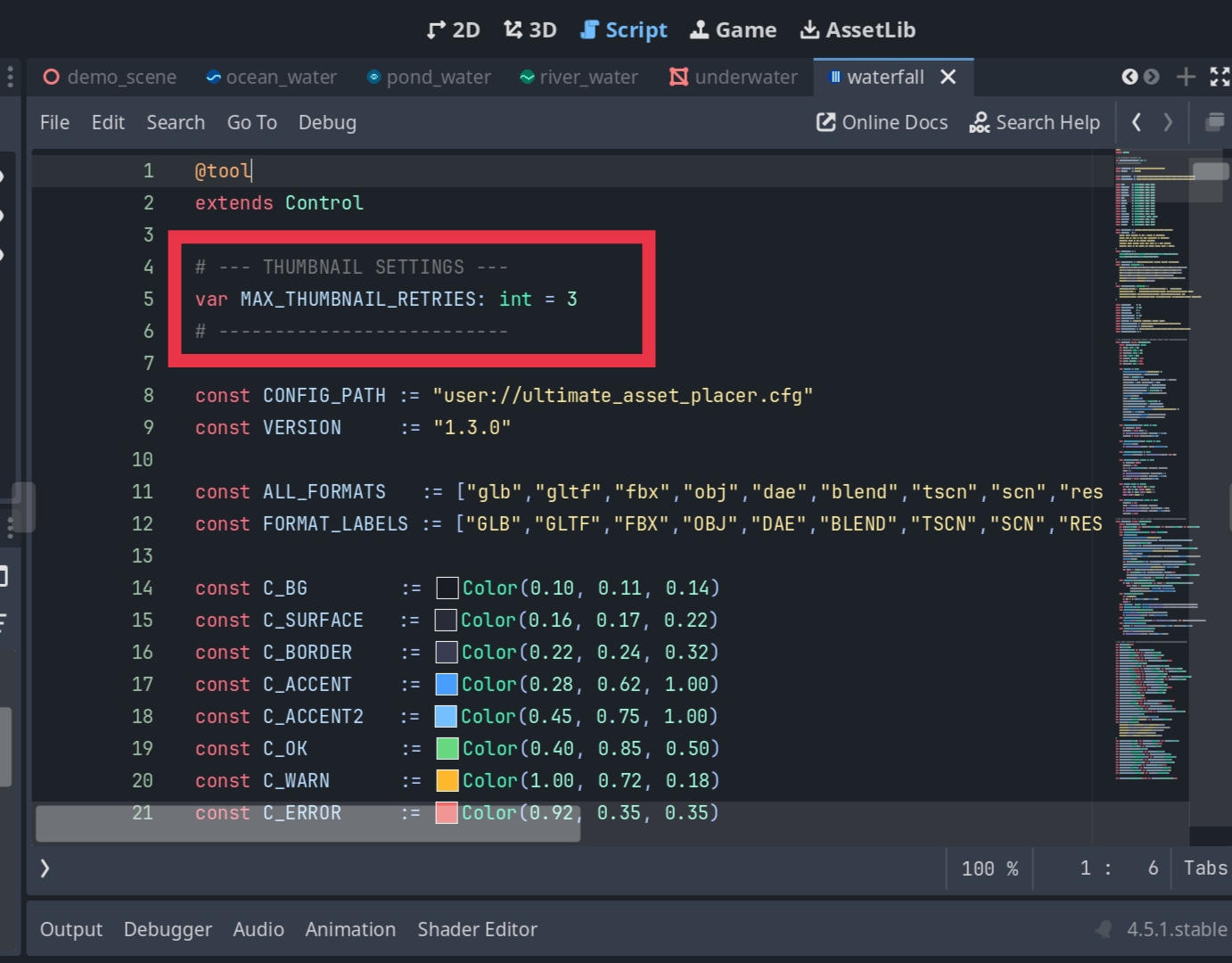
With auto-collision enabled, whenever I Ctrl+Z undo the collision block remains in the scene
for all objects or just for the rigid body ? can you please explain more about the bug ?
to reproduce:
Drag an asset into the scene with the collision checkbox enabled
CTRL+Z
Mesh is removed but the collision geometry remains
Purchased, this plugin has real potential!
Some questions--
1. Is it possible to view the files that appear in the asset browser as a list instead of thumbnail?
2. Also what determines if a thumbnail is visible in the asset browser? Some of my assets display one, and others do not. Does have to do with if an asset is nested within a scene or something?
3. For some reason when placing assets, sometimes they are much smaller than they are in their original scene, and much smaller than they appear as ghosts when placing them using the plug-in? I've tried setting the transform scale to 1x or higher, which increases the scale of the ghost, but the size of the actual asset is still tiny and does not appear to change in size.
Thanks!
i will be adding a toggle feature to switch between thumbnail and list. some assets appears small when pasting? i did not knew about this bug before. did you double check that your random scale option is not enabled ? i am using this plugin and never encountered this bug once so i might have to dig deep to fin this bug.
The editor panel is there, but it will not load any assets.
EDIT: Figured it out. Would be nice if the format menu was more obvious.
Awesome stuff! Any chance to add support for Terrain3D placement similar to AssetPlacer?
heya I'm helping a buddy who picked this up for their project. it seems super cool! but we can't get it to work for them. it doesn't seem to *ever* find any assets with the current version (1.2). plugin is enabled, we set the models folder, hit the refresh button, even tried reloading the project. nothing is ever detected, and there are hundreds of models in that folder + subfolders.
also, sidenote, the UI is tiny and hard to read. seems to ignore Godot's editor scaling setting. it's pretty but I wish it was readable 😅
Make sure that you select a format type in the "format filter", that's what did it for me! Version 1.2, Godot 4.6.1
ah thank you! yeah very non obvious. probably should default to "all on" 🙃
It was default to all on but it was giving some performance issue that's why I switched it to all off. I introduced a new optimisation system so now it will be all on but default from the next update.
Hi,
I couldn't find your email to give you feedback.
Anyway promising looking plugin. It has some improvements if comparing to some alternatives (one I was using doesn't support Godot 4.6 currently, which is why I wanted to try yours).
I got one issue currently which holds me using the plugin in production. Firstly, all of the prefabs instantiated using the plugin seems to have like the option "editable children" enabled.
(in the picture one that is highlighted green was placed without the plugin, no "editable children")
Which I mean that If I get the prefab into the scene, it has all of its child's visible (colliders, meshes etc). If I drag manually the same object from the inspector, it only has the "parent" object visible in the hierarchy.
All that is fine, but after getting this error, every prefab in the scene has doubled its meshes. And I mean every prefab in the scene (in this example just the tire)
Pic of the mesh issue:
Pic of the error:
Btw I think forum type discussion would be better fit for your plugin. Easier to report issues. I hope you can find solution for this, because without it, I could totally use this building my game.
You can turn off the editable children from collision group settings of the plugin which open all glb or fbx like meshes. But i don't know how the double issue appears. Can you tell me briefly how all the meshes get doubled ? About the process
I'm sorry I didn't find this option you mentioned about "Editable children from collision group".
I did check all of the options in the plugin docker. Do I have to disable that option in the .gd script?
Im pretty my issue is caused because of that. Somehow if the child (ex; the mesh) has same name as other prefab with the same name of the child, it causes that error. It gave error for another object with same name for AudioStreamPlayer3D.
Which is strange, because they have their unique parent name and somehow this causes the error.
How I reproduce this is just use the plugin with .tscn files to place assets. It works fine at first. I might even try the game and everything is fine. After a while that error pops up, usually when reopening the scene that I am working, those meshes are doubled. I use Godot 4.6.
It seems like the "mesh" itself is one and another duplicate is in the parent. Because If I move the parent/root node, I can see only one, but if I take the mesh node, it moves away but there is duplicate at the root. (this shows in the game too and both will "work" in the scene as unique rigidbodies).
If I try make this before the error and I move only the mesh, the root does not have another mesh and works correctly.
If I just could find the option to disable "editable children", It would most likely fix the issue. Thank you for your help!
I'm having the same issue, it seems to be duplicating any scenes placed with the tool once you save and reload the scene you've been working on.


The only thing that seems to fix it is to turn on both auto-collisions and the FBX/GLTF auto-unpack option both under the collide tab in UAP. Note that auto-collisions alone doesn't fix it and auto-unpack doesn't work without auto-collisions enabled.
Scene I'm placing:
Placed by UAP:
After reloading the scene and clearing the error messages:
After making the children editable with the dupes circled:
Okk thank you for the details I will check it and try to fix it by the next update. Sorry for the inconvenience.
Hi; I see that the addon look great for placing models into a scene. Can it also place scene instances as well? Say, things like enemies or other complex scenes?
Yes it can
Thanks, I've been using the addon a bit. Really great so far! I noticed though, that scenes placed through the addon act like they have editable children active, and trying to disable it crashes my editor. Any idea why this happens?
Hello,
I purchased this morning, and it seems when I enable the plugin in project settings, I can see the Panel appear briefly in the top right but then Godot freezes. This occurs in an existing project and in completely new projects. Running 4.6.1 stable.
Try the new update, now I fixed the majority of the crash and bugs with some additional new features. If you stiff encounters any issues please let me know.
I bought this it works in a new empty project, but when I toggle the plugin in a exsisting large project it freeze the editor forever forcing me to close. I get no error message. Im using 4.6.1 stable
I'm getting this same issue, it seems to scan the entire project and automatically add everything to it on ready, it definitely shouldn't do that.
Even on small projects that's alot of files being registered on the plugin being enabled.
Managed to get it working by removing the scan_folder() in the ready call inside ultimate_panel.gd
New update is now out with lot of bug fixes with the crash fix included and some new features.
New update is now available with all the crash and bug fixes with some additional new features
How does this compare to AssetPlacer by CookieBadger (available here on itch) and Godot Asset Placer in the official Godot asset library?
Please don't compare this to any other tools everyone put lot of efforts in their tools. But I think my plugin does have a lot of handy easy to use feature that other plugins didn't have. You can check the full features list and check the video for a demonstration. Thank you ♥️