

ArkDeploy Toolkit
Deploy and capture Windows images from WinPE using DISM.
ArkDeploy Toolkit is a free, open-source deployment toolkit for IT professionals who want complete control over Windows image deployment without the complexity of MDT or Configuration Manager.
It provides a minimal Windows PE environment that deploys and captures Windows images directly using readable, extensible PowerShell workflows.
See the Toolkit in Action
Boot Media Builder
Create bootable WinPE WIMs for USB boot, ISO or PXE deployment in minutes. The toolkit automatically builds and prepares your Windows PE deployment environment, ready to boot and start deploying or capturing Windows images.

Boot into the Deployment Environment
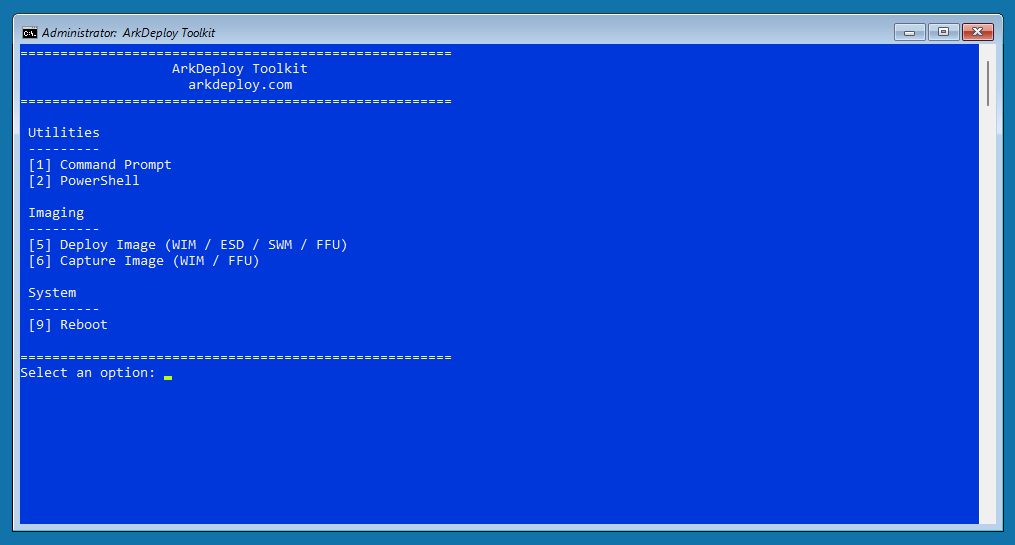
After creating your boot media, boot any UEFI-compatible device into ArkDeploy Toolkit. The same Toolkit-generated Windows PE environment can boot from USB/ISO or over the network using ArkDeploy PXE, a separate complementary project. The lightweight Windows PE environment provides everything needed to deploy or capture Windows images, whether you’re working from a local drive, USB storage, or an SMB network share.
Deploy Windows Image
Use the Deploy Image option to select the target drive and choose a Windows image in WIM, ESD, SWM (split WIM) or FFU format. WIM, ESD and SWM deployments prepare and format the target partitions before applying Windows, while FFU deployment restores a whole-disk image, including its partition layout. Optional support for a custom unattend.xml file lets you automate Windows configuration.

Capture Windows Image
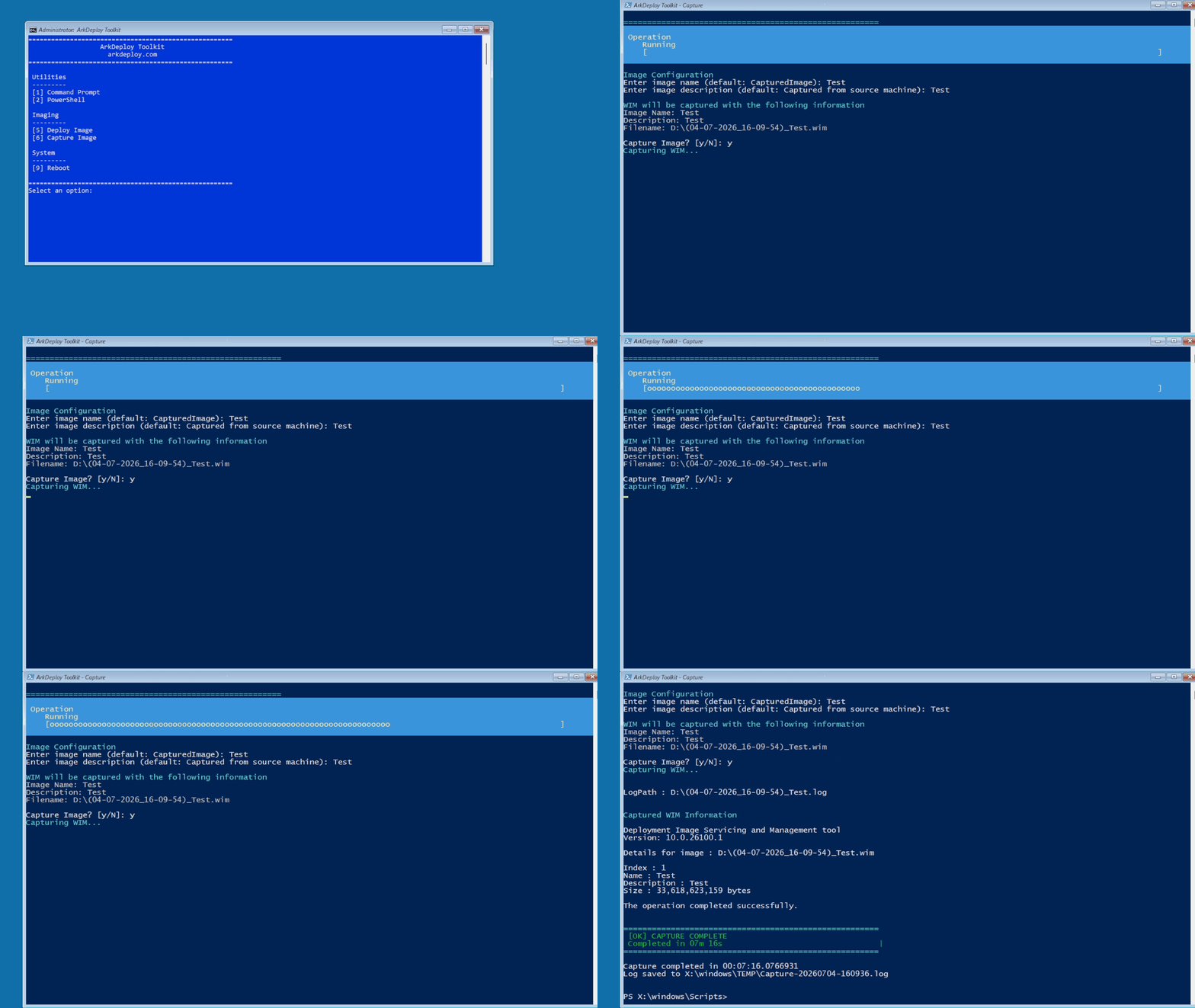
Use the Capture Image option to capture an existing Windows partition as a WIM image or an entire physical disk as an FFU image, including its partition layout. Follow the prompts to name and save your image for future deployments, creating consistent, reusable Windows builds for testing, rebuilding or large-scale deployment.
Why ArkDeploy Toolkit Exists
Most Windows deployment solutions fall into one of two extremes:
ArkDeploy Toolkit was created to bridge a gap.
After years of building and maintaining Windows images in OEM manufacturing environments, I wanted a deployment toolkit that focused on the fundamentals: capture, deploy, and automate, without unnecessary layers of complexity.
Built on proven Windows technologies
The result is a lightweight, script-driven toolkit built around technologies every Windows engineer already trusts, including WinPE, DISM, and optional unattend.xml automation.
Transparent by design
Every deployment step is visible, predictable, and fully under your control. There are no hidden workflows, proprietary image formats, or setup engines making decisions behind the scenes.
Instead of abstracting the deployment process, ArkDeploy Toolkit exposes it, making it easier to understand, customise, troubleshoot, and integrate into your own deployment workflow.
No setup.exe automation layers. No opaque wizards. Just Windows deployment, engineered to be simple, repeatable, and reliable.
Built from real-world OEM experience
Developed alongside the Windows image engineering processes used for professional OEM deployments.
What the Toolkit Does
The ArkDeploy Toolkit creates a bootable Windows PE deployment environment that can:
- Create bootable USB or ISO deployment media
- Boot over the network using the optional, separate ArkDeploy PXE project
- Deploy Windows images in WIM or ESD format
- Apply optional unattend.xml files during deployment
- Capture existing Windows installations as .wim images
- Deploy and capture images from USB storage or SMB network shares
- Deploy Windows without Windows Setup using DISM
Network Boot with ArkDeploy PXE
ArkDeploy PXE is a lightweight PXE/TFTP server designed to work with ArkDeploy Toolkit. It is a separate, complementary project that allows Toolkit-generated Windows PE boot.wim environments to boot over the network instead of USB.
PXE → iPXE → Windows PE → ArkDeploy Toolkit
Create your Windows PE environment using the normal Boot Media Builder workflow. You can then boot from USB/ISO as usual, or use the generated boot.wim with ArkDeploy PXE for network boot.
ArkDeploy PXE provides the network boot service. Once Windows PE has loaded, ArkDeploy Toolkit handles the familiar deployment and capture workflow.
Designed to work without USB media
ArkDeploy Toolkit v1.1.1 introduced embedded configuration fallback. In v1.1.1 and later, this allows the WinPE environment to operate when PXE booted without the configuration normally stored at the root of the USB media.
Get started
Visit the ArkDeploy PXE project on GitHub for downloads and setup instructions.
ArkDeploy Toolkit
What it is and is not
It is:
It is not:
Need professionally engineered Windows images?
ArkDeploy Toolkit helps you deploy Windows. ArkDeploy Image Services help you build and maintain Windows images engineered for reliability.
You can use the toolkit independently, or engage ArkDeploy if you need:
- A fully serviced custom Windows image
- A repeatable deployment workflow built for your environment
- Help integrating the toolkit into production use