I don’t normally review operating systems – I’m not that much of a geek – but I’ve decided to make an except for Windows 10. In a series of posts aimed at the ordinary user, I hope to answer the question – is this free upgrade worth it?
In my first post I ranted about the data-mining options I switched off during the initial setup of Windows 10. I wasn’t happy about those, but I thought that would be the worst of it. Wrong. In this second post, I’m going to talk about the lamentable Privacy options of Windows 10.
So, to begin. After finally getting Office 16 downloaded and setup on the new laptop, I decided to customise a few things, such as the display. It was while I was exploring the Windows 10 Settings that I took a good look at the Privacy options…and was shocked by what I found. By default, all the Privacy options are set to enable the Windows 10 apps to access all sorts of private information…to provide a better experience for the user.
Nothing wrong with that, right?
The answer depends a lot upon your age, memory and level of trust. I’m old enough to remember the spate of global computer virus epidemics of the early 2000s, most of which involved Microsoft Windows and Office products so I have no trust to spare.
To see what I’m talking about, check out the wikipedia link below. It details a timeline of computer viruses from the earliest to those happening right now. In particular, have a look at 2003-2004.
https://en.wikipedia.org/wiki/Timeline_of_computer_viruses_and_worms
The reason there were so many infections during that period was because hackers discovered the backdoors and sloppy code behind the pretty Windows GUI. If you’re my vintage, you probably remember what a thrashing Microsoft received for its poor design back then.
Given the speed, and dare I say it, desperation with which Microsoft threw Windows 10 together, I fear that sloppy code is once again a genuine possibility. Now, if you add to that the design of Windows 10 itself, the potential for security meltdowns increases exponentially.
Why? Because Windows 10 comes pre-loaded with ‘apps’ which are ALL given blanket security permissions…by default. The reason for this is that Microsoft is trying to position itself as the go-to place for all your internet needs. For those who don’t know their way around a computer, there are all these convenient apps that allow them to do pretty much whatever they want to do…from within Windows 10.
Need an email application? Forget about checking out Gmail or other webmail clients, just go with whatever Windows provides. Want to keep track of your Contacts? Again, there’s an app for that too, right there behind the Start button. And so on ad nauseum.
Meanwhile, for those who do know their way around, there’s a new browser and a new search wizard [make no mistake, Cortana is just a search bot].
Unfortunately, the price users pay for all this convenience is that Microsoft and its apps can monitor just about everything they do. More importantly, they have access to the internet so if Microsoft’s security is not as good as it should be, each app. is a potential entry point for some form of hacking.
But wait, there’s more. Even if nothing can access users’ data from the outside, that data is still available to Microsoft, and Microsoft makes no attempt to hide that it shares that data with other third parties. Don’t believe me? The following screenshot is taken from their own website:
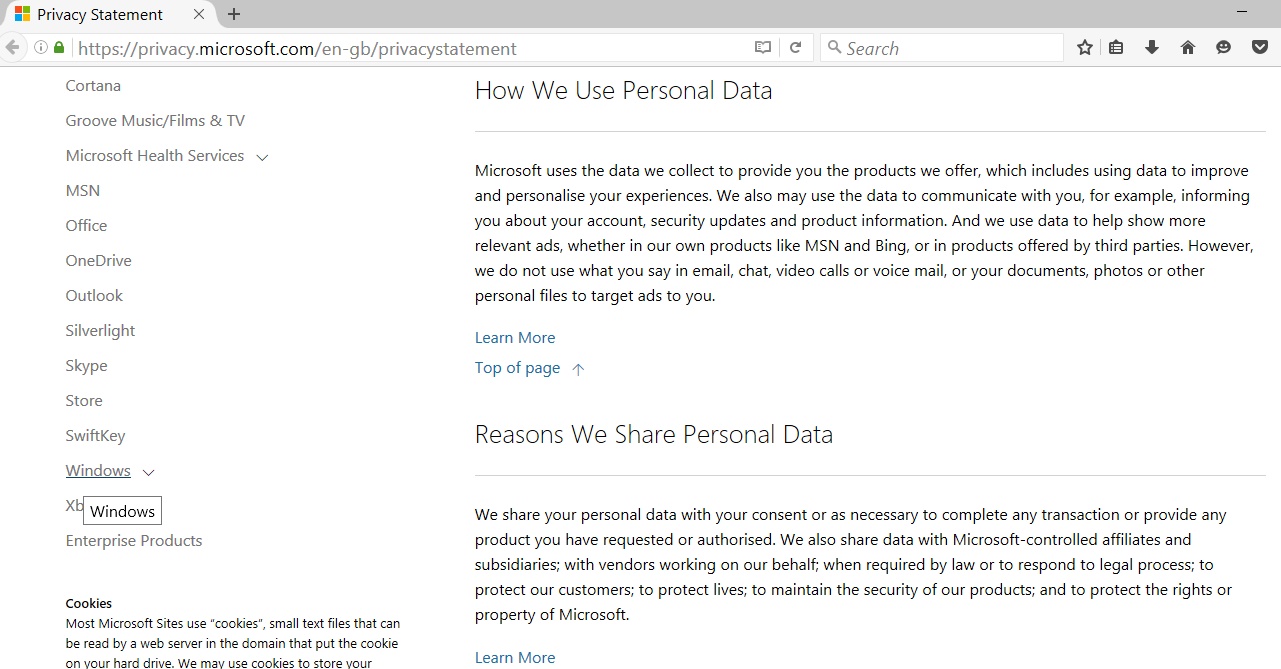
Or read it for yourself here:

Now, let’s have a look at what kind of data is collected and used by Microsoft:
- Click the Start button in the bottom left hand corner of your Windows 10 task bar,
- Click the option called ‘Settings’,
- Select the option called ‘Privacy’.
Please note that in the following screenshots, I have changed ALL the options to off. The default mode for every option, bar one, is ‘on’. If you have not looked at the Privacy section before, all of your options will be set to ‘on’ as well.
The first screen you will see under Privacy is ‘General’ but I want to skip ahead to camera:
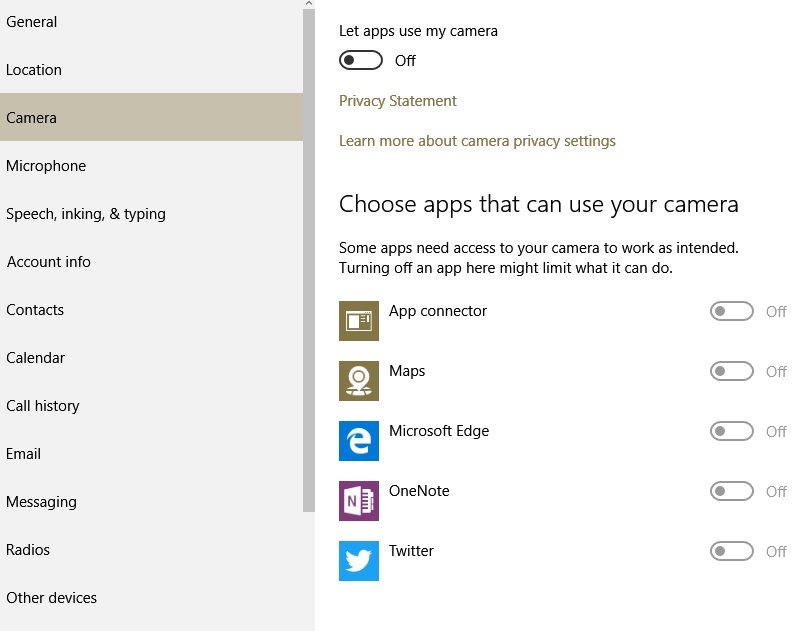
My new laptop is the first [and only] pc I have owned with an inbuilt camera. I almost didn’t notice it until the Offspring pointed it out. That camera is handy if you want to make a video conferencing type call, and if I were into that sort of thing, I might be pleased to have that camera ready to go. But look at all the apps that can use that camera. I assume the apps would not use the camera without my knowledge, but what if someone with malicious intent hacks one of the apps with access to that camera? ‘Nough said.
Next up is account info.:
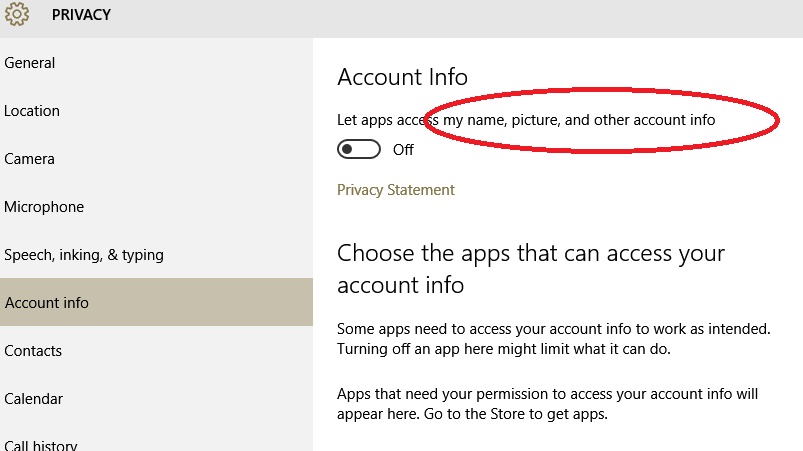
Call me a conspiracy theorist but wouldn’t this make life just so much easier for those who make a living from identity theft?
There are far too many Privacy options to go through each one individually, but in each one, apps are given access to personal and private information as well as the means to report on it. To whom? when? I don’t know, but if you look carefully, some of the options include warnings about broadband use. To me that means the apps are accessing the internet to talk to…who knows?
I can’t leave the topic of Privacy without looking at something Microsoft euphemistically terms ‘Feedback’. By definition, feedback is something I give. In Windows 10, Microsoft redefines feedback as ‘take‘ without choice:
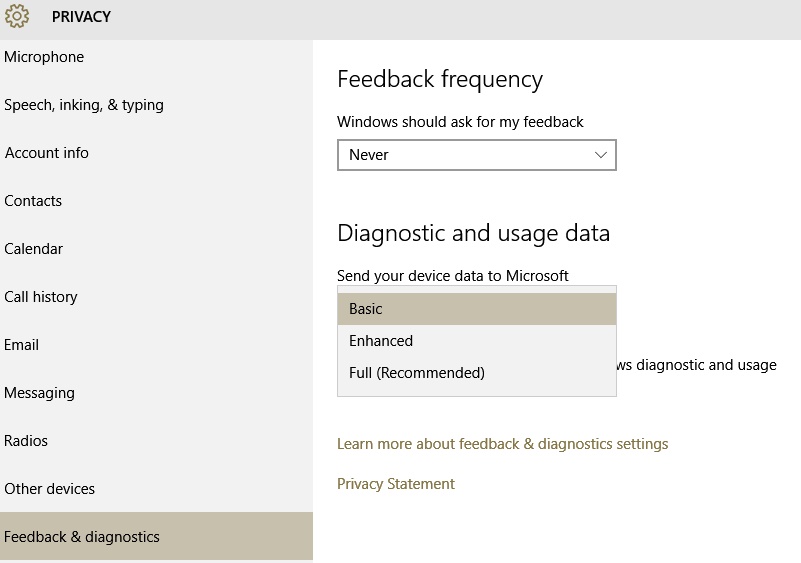
Please note that even with the ‘Feedback’ option set as ‘never’, there are only 3 options under ‘diagnostic and usage data’, and not one of them equals ‘none’ or ‘off’.
In earlier versions of Windows, when some glitch occurred, you would get a message asking if you wanted to send details of the error to Microsoft. Given the extent of the data included in those details, I’ve always said ‘no’. Now, apparently, that choice is no longer mine. Moreover, even the most ‘basic’ of data is more than you would think.
Adding insult to injury is the fact that Microsoft uses our own internet connections to send itself the data it has taken from our computers without asking. In the US, data is not an issue. Here in Australia, we have to pay for every KB of data we use.
I know that last point was petty, but I’m feeling vindictive and outraged, the more so because I know that millenials will find no problem with any of this. They are so used to handing over their privacy via their mobile phones, they won’t think twice about doing the same with Windows 10. Yet the security issues are just a hack waiting to happen, and I suspect Microsoft is aware of that.
When I bought my laptop, it came with Windows 10 pre-loaded. The box also came with a great big yellow and black warning sign to the effect that ‘this computer is not protected by anti virus security’ or something to that effect.
I raised an eyebrow at the ‘overkill’ represented by that warning, but now I’m not so sure. Could it be that Microsoft is relying on third party anti-virus software to stop its OS from leaking like a sieve?
Not happy Jan,
Meeks
p.s. UPDATE: For those who do want to use some of the Windows 10 apps, here’s a video that shows which Privacy options are the most critical to turn off.
http://www.pcworld.com/article/2971725/windows/how-to-reclaim-your-privacy-in-windows-10-piece-by-piece.html
It’s a short video and includes what I would consider the bare minimum for safety.






 Meeka's Mind