Category Archives: SCAMS!

AI agent: ‘Lethal Trifecta’

In a nutshell, the first of the three fundamental flaws of AI agents and assistants – the lethal trifecta – is that ‘text in, is text believed’. In essence, text is the prompt or command you, the user, give your AI agent/assistant. BUT, the agent/assistant can’t tell the difference between a prompt you type in, and a text prompt that someone else gives it.

Someone else?

The someone else could be a hacker on the outside who plants a Trojan horse in an innocent looking email, probably a spam email that the user never even reads. And this is the second fundamental flaw. To be useful your AI agent/assistant has to have access to all the data on your computer. But that data includes everything in your inbox, and that could include a spam email with a malicious text prompt embedded in it. And once the AI agent/assistant ‘reads’ that malicious prompt, that text will take precedence over any text prompts you may have given it.

The third fundamental flaw is that again, to be useful, your AI agent/assistant ‘needs’ access to the outside world. So, assuming that flaws 1 and 2 have been activated, the hacker prompt could tell your AI agent to send your banking password back to the hacker to be exploited. Or the AI agent could be told to make your internet connection part of a phishing farm – i.e. distributed processing that sends phishing emails to others, starting with the people on your own contact list. The possibilities are endless, and all are potentially harmful.

So this is the ‘lethal trifecta’, and the companies selling these AI agents/assistants have publicly admitted that the flaws probably can’t be fixed.

I know that most of you wouldn’t dream of using an AI agent/assistant but…even if you’re not a techie nerd, the video below should be compulsory viewing for anyone who uses a computer connected to the internet. Why? Because at the end, the presenter details how you can mitigate the danger of AI agents. And you may know someone – a friend? a family member? – who is really into AI but is completely unaware of the security dangers.

Stay safe everyone.

Meeks


Paypal email scam, 2024

I just received an email, purportedly a ‘receipt’, that referenced Paypal AND addressed me by my full name. This is a screenshot of the body of the email:

I knew I hadn’t bought the ridiculous item shown on the ‘receipt’, but as I do have a Paypal account, even though I don’t use it, I was worried enough to login to Paypal [NOT from the email] to check that there was no such transaction.

The good news is that there was no transaction. The bad news is that my email and full name is known to hackers who create these email phishing scams. It is possible that someone reading my blog would work out my full name, but what is more likely is that my contact details have been hacked as part of some major data breaches that occurred recently. And that’s a problem many of us may share.

As large corporations have our data, and appear incapable of keeping it secure, the onus falls on us not to be caught out when these bloody hackers strike.

Phishing emails work exactly as the name implies: hackers ‘fish’ for information they can use to steal our money. Or our identities. They do this by buying a database of email addresses from the Dark Web, or in my case, email addresses and names. Then they create an email that pretends to be from a large institution.

That institution could be a bank, or Paypal, or the electricity company! The point is that the email tries to frighten you into following a link and giving the hackers more information, like your bank account details. They then use those details to take your money.

Millions of these phishing emails are sent out and most don’t catch any ‘fish’ because the details are so obviously wrong. For example, if I did not have a Paypal account, I would have deleted the email without even bothering to log in to Paypal. But I did have a Paypal account so my first reaction was fear.

And that’s the whole point! The hackers know that when people first get a fright, they don’t act logically, and they may click the link that’s supposed to stop whatever it is from happening.

It’s a clever psychological manipulation, and now that the hackers can call us by name, the fear factor is even greater. But there are some things we can do – ALWAYS – to get past the fear and keep ourselves safe:

  1. DO NOT FOLLOW ANY LINKS IN THE EMAIL. This is probably the single most protective thing we can do.
  2. If the information in the email looks as if it might apply to us – e.g. a bank or Paypal etc., – we should contact the institution directly. Ring them up and ask, or type the name of the institution in the address bar of your browser and login from there.
  3. And last but not least, recognize that these scams are not personal. The hackers may know your email address, and nowadays they may know your name, but they don’t actually know YOU. They are just pretending.

I wish all large institutions were banned from putting legitimate links in emails. Yes, those links may be convenient, but they create a mindset where we assume that all links in emails are ‘safe’. And they are not. Unfortunately, regulations always lag behind reality, and the reality is that emails are not safe. Please remember that the next time you receive an email that makes you gasp in shock.

Take care,
Meeks


New scam – UPDATE!

My thanks to Anonymous who left the following comment:

sorry to say that email is not a scam email@mail.onedrive.com is a legitimate email address from one drive. Alot of people have one drive accounts as part of their ms products but have never used it. this email lets you know your account has been inactive for 2 years so they are going to delete it. if you have never used one drive it will be empty anyway

This is the link to a Microsoft article about it: https://support.microsoft.com/en-us/office/why-did-i-get-an-email-saying-your-account-will-be-deleted-5ee83d1a-28da-4d05-a1ca-46a522919e45

From the Microsoft website

The screenshot above is taken from the Microsoft article referenced by the link. As you can see by the URL in the address bar, it’s a genuine Microsoft article and confirms that ’email@mail.onedrive.com’ is also genuine.

Last but not least, Microsoft advises that if you have any doubts about the email:

DO. NOT. CLICK. ANY. LINK. IN. AN. EMAIL

The hard part is knowing which email is a scam and which is not. For that reason, I stand by what I wrote in the original version of this post – don’t click ANY links in any email. It’s just not worth the pain if you get it wrong. Go to the website from your own address bar. That way you will know that you are not being sent to a scam website.

cheers
Meeks

x x x x x x x x x x x x x x x x x x x x x x x

I found this email in my inbox last night:

I took a screenshot and deleted personal stuff so you could see what it looks like.

Firstly, how did I know this was a scam? Simple – I don’t use Microsoft OneDrive. I have NEVER used OneDrive.

Next, if you look at the email sender it says:

’email@mail.onedrive.com’

Not even a hint of Microsoft anywhere. ‘mail.onedrive’ is a domain that has nothing to do with Microsoft. [When you register a domain, no one else can use it. But there is nothing to stop someone from registering a domain that ‘hints’ at belonging to a well known company].

And finally, do you see the big, red ‘YOU’? I put that in to highlight the poor grammar used in the body of the email. You won’t always find poor grammar, but when you do, it’s a dead giveaway. Whoever set up this scam copied trademarked elements of the Microsoft brand and cobbled them together along with a few bits of their own.

So, what’s the point of this scam email?

The point is to get you to click any one of the links in the email. Those links will not take you to a genuine Microsoft web page. If the scammers are better than most, they will fake up a second page to soothe any lingering suspicions. Otherwise they may just give you some kind of error message. But while you’re staring at the message and wondering what to do, you could be downloading a virus or a worm or a trojan or a keylogger onto your computer.

Why is that bad? It’s bad because you could lose your privacy, your internet banking password, or find your computer is being used in a network to scam yet more people. And those are just three things off the top of my head.

Given how many people use Microsoft products, this scam could cause a hell of a lot of damage.

DO. NOT. CLICK. ANY. LINKS. IN. AN. EMAIL….especially this one.

Take care and stay well,
Meeks


Beware! Origin Energy email scam

I just received a warning from the government website – Stay Smart Online:

https://www.staysmartonline.gov.au/alert-service/malicious-emails-impersonate-origin-energy

It’s free to register and the warnings can save you from malicious attack. Anyway, this particular warning referred to a new email scam that was reported by the Herald Sun newspaper on the 19th of July, 2017. You can read it here:

http://www.heraldsun.com.au/technology/origin-energy-scam-emails-new-malware-attack-hits-australians/news-story/9d5bd312efa909a548fb9e9e3ac00e23

Basically, the scammers have copied the Origin Energy bill payment email format to trick customers into clicking on fake links that will expose them to malware or worse. Sadly, this is an eventuality I predicted over a year ago when I wrote a post about this very issue:

‘What’s wrong [with email bills] is that each link is a potential opening for scammers to steal your information, especially that big, orange ‘Pay now’ button. You see, these days, the really good scammers can reproduce the Origin Energy logo, its fonts, the colours, even the text…PERFECTLY. If you were to receive one of these reproductions, you would need to look very, very carefully to pick the fake from the original. And let’s face it, how many of us scrutinise each email we receive, especially when we are expecting to receive it?’

You can read the full post here:

#Email bills – Christmas for #scammers?

The Origin Energy response has been to ‘teach’ customers how to spot a fake email. Not good enough. Here’s what I wrote in that same post from June last year:

‘And what do you think the big corporations are going to do about the theft of all my money? Will they pull their hair out by the roots and cry ‘mea culpa, mea culpa’? Not on your life. They’ll say that the fault was all mine. They’ll say that they warn customers about ‘scammers’ so it’s a case of ‘buyer beware’.

Having our accounts hacked is too high a price to pay for the convenience on offer. NEVER pay your Origin Energy bills via their emails. Pretend they’re just paper bills and go into your internet banking to pay them safely. Origin Energy created an opening for scammers and you didn’t have to be a psychic to know this would be the result. 😦

Meeks


Possible new #email #scam ?

I’m not a programmer so I’m just guessing that the two emails below are scams, but whatever they are, any change of pattern deserves caution.

So what are these changes of pattern?

I’ve noticed two, and they both involve the email address of the sender. Before I show you what I mean, it’s worth having a quick look at the standard parts or components of an email address. I’ll use my gmail address [this is my public email only] to illustrate:

meekasmind@gmail.com

The components are as follows:

  1. the username – i.e. meekasmind
  2. the @ symbol
  3. the mail server – i.e. gmail
  4. the top level doman or extension – i.e.  .com

The @ symbol never varies but the username could be just about anything, same with the mail server, however the top level doman is usually restricted to a few familiar extensions. These include:

  • .com
  • .org
  • .net
  • .info

I’m sure there are more, but those are the main ones, off the top of my head. Outside of the US, these extensions often include the country code – e.g. .com.au for Australia.

Now have a look at the screenshots of emails I received just this week:

security scam concert-tickets

This is the first one I received. Note the .stream extension. Now it is possible that new extensions were approved while I wasn’t looking, but when I searched for the ‘concert-tickets‘ mail server from which the email supposedly came, I found nothing. Zip, zero, nada.

The next day I received three more emails with the hypenated mail server name and the .stream extension. Hmm..a pattern emerging here.

Then today a variation on the theme:

security scam or hack 2

Instead of a .stream extension on the email address, we now have a .download. Assuming the .download and .stream extensions are legitimate, just exactly how many of these extensions are there?

Note something else as well. Under ‘Improve Your Vision’ [which is a link to another web location] there is vertical line. That line is not a truncated picture holder [given that Firefox blocked the images embedded in the body of the email*]. Nor is it an error. That line is another link.

Why is that line potentially significant?

Because even people who know to be wary of links in emails might click it just to find out what it is.

For me, another suspicious thing is the lack of ‘other’ information in any of these emails. Now it’s possible that the blocked images contain more information – i.e. text – but as a form of marketing, this doesn’t seem to be very smart. Which leads me to suspect that it’s not really marketing at all.

If anyone knows anything about these ‘new’ extensions – i.e. whether they are legitimate or not – please reply in comments. Until we know for sure, however, please treat these kinds of emails as potentially dangerous.

cheers

Meeks

*The reason Firefox blocks at least some images in emails is that certain images ‘can’ contain malicious code. I’m not sure how that works, and I’m not sure how often it happens, but I know it’s a possibility.


#Email bills – Christmas for #scammers?

Here in Australia, Origin Energy [one of the big utilities companies] recently introduced gas and electricity accounts sent via email. Good idea? Not so, and here’s a picture of why:

email bills

The screenshot above is a picture of my new, email electricity bill. Notice all the red? Each one of those circles denotes a link to some address on the internet. Click on that link and you are automatically taken to that address.

So what’s wrong with that, you ask? We all use the internet a million times a day.

What’s wrong is that each link is a potential opening for scammers to steal your information, especially that big, orange ‘Pay now’ button. You see, these days, the really good scammers can reproduce the Origin Energy logo, its fonts, the colours, even the text…PERFECTLY. If you were to receive one of these reproductions, you would need to look very, very carefully to pick the fake from the original. And let’s face it, how many of us scrutinise each email we receive, especially when we are expecting to receive it?

Expectation lowers our defences.

I already expect to receive a mobile phone account [via email], and now I will also expect to receive gas and electricity bills, via email. I may scrutinise the first five, ten, 25 emails but after that? I’ll get complacent.

One day, I’ll be in a hurry and I’ll forget to check all the tell tale signs of a forgery. I’ll click on that big orange ‘Pay now‘ button in the email, and it’ll take me…somewhere. That somewhere will look like the  real deal as well so, still in a hurry, I’ll enter my banking details, pay the ‘bill’ and get on with my life. But one day in the not too distant future I’ll realise my bank account has been hacked. And in that moment of disbelief and horror, I’ll remember the day convenience, and a busy life style, made me follow a link in an email.

And what do you think the big corporations are going to do about the theft of all my money? Will they pull their hair out by the roots and cry ‘mea culpa, mea culpa’? Not on your life. They’ll say that the fault was all mine. They’ll say that they warn customers about ‘scammers’ so it’s a case of ‘buyer beware’.

But the truth is that the big corporations will NOT warn you about this particular type of scam because they do not want to put you off their new, much-cheaper-to-run email billing service. Origin intends to charge $2 for each paper bill from now on. I’m pretty sure the real cost of sending out a paper bill is nowhere near that much, so they won’t be saving $2 for every bill to every customer, but they will be saving something. Multiply ‘something’ by hundreds of thousands of customers and the bottom line starts to look a whole lot better.

So what’s the solution?

The solution is to print the bills off and pay them as you would a paper bill – by going directly to your internet banking and using BPay to pay the bills from there.

As a caveat, I have to say that I can’t guarantee that internet banking is 100% safe. I believe it is, but I can’t guarantee it. However…if the banks mess up with your money, they have to pay you back. If you mess up with your money, that’s it, it’s gone. You might try a class action suit against the corporation in question, perhaps citing negligence, but going through the courts could take years and may still not succeed.

Why not? Because no one held a gun to your head and made you click that ‘Pay now’ button.

This is the reason I keep bleating on about not clicking on links in emails. That little bit of extra convenience is just not worth it. And yes, it could happen to you.

Take care and stay safe,

Meeks


Australia Post #scam email

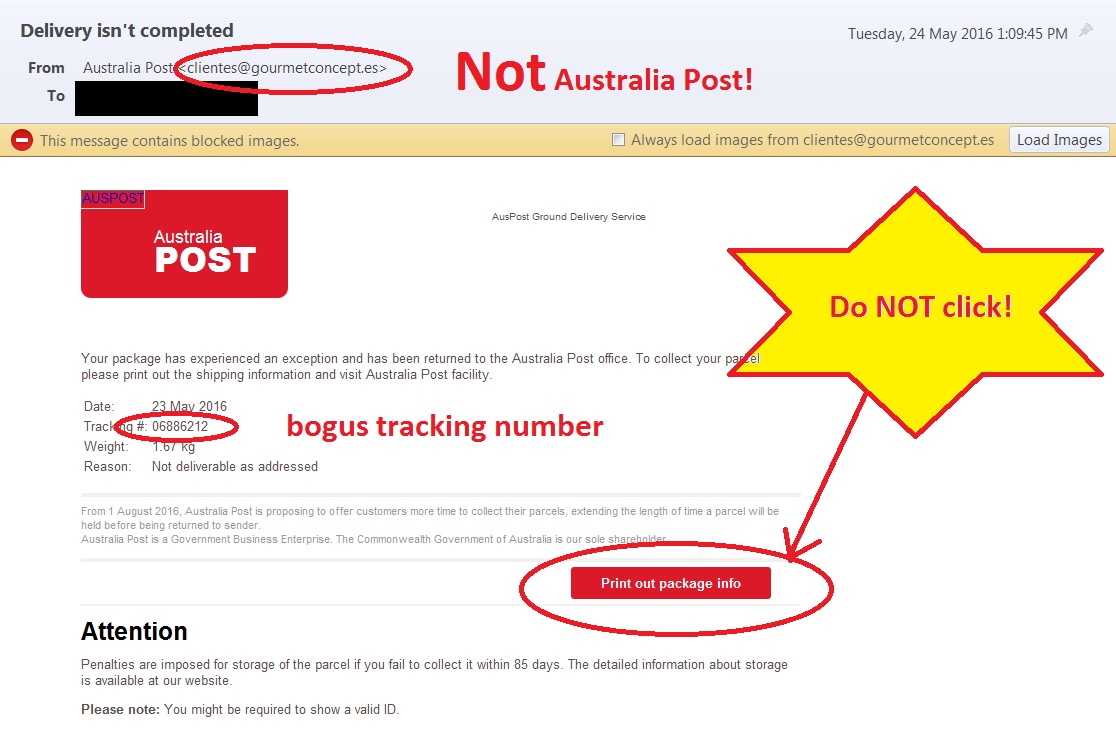
This one really had me going for a sec. Have a look:

Australia Post scam

We’ve been getting a lot of parcels lately, the Offspring and I, so when I saw this email, my first thought was that it was genuine. Luckily the weight shown below the bogus tracking number – 1.67 kg – made me suspicious as nothing we’ve bought has been heavy.

The very next thing I looked at was the ‘From’ line which reads:

Australia Post <clientes@gourmetconcept.es>

Quite apart from the weird email address for a supposed national postal service, the country code is ‘.es’ and that stands for Spain, not Australia. So I think I can safely say this was not from my friendly post office.

I can also say that as a scam, this looks bloody good. The graphics are all correct. I couldn’t see an obvious typo or poor grammar. No attachment to be wary of, and no obvious links taking you god knows where… BUT…have a look at that big red ‘Print out package info’ button. It doesn’t look like a link, but I’ll bet that it takes you somewhere that requires some kind of ID to be entered [I didn’t click so I don’t know for sure but I’m pretty confident].

So…a very clever scam email. If any of my aussie friends get one – delete, delete, delete!

cheers

Meeks


How to fix the scamming of #Kindle Unlimited

Since I first read about the scammers undermining the Amazon Kindle Unlimited subscription service, [here] I’ve read a lot of comments about what’s wrong with the system and how it should be fixed.

Some people think Kindle Unlimited was broken from the start and should be killed off entirely. Others believe Amazon will make incremental changes to the system until it finally gets things right.

I believe the ‘system’ cannot be fixed until the Kindle itself is changed. So yes, I see this as mostly a hardware problem. At the moment, Amazon cannot gauge page reads by page ‘turns’ – i.e. that moment when a real reader flips the page over. Because of that hardware limitation, Amazon has to fudge page reads and that allows scammers to game the system as well.

Imagine, however, if Amazon could detect actual page turns, and only counted them when it came to payments…

-imagines a scammer sitting there, manually turning page after page after page after page after page after page after page after page….-

My Kinde Fire sometimes ‘loses’ my place in a novel, forcing me to manually page through until I find my spot again. It’s cruel and unusual punishment, so anyone desperate enough to do that for a living deserves every cent they get.

So my solution? Innovate the hardware. Make it possible for Amazon’s gremlins to count actual page turns, and pay on the basis of those ‘pages read’.

No system is perfect, and there will always be what we gamers call gold farmers – players paid to farm terribly boring things over and over again so their employers can sell said things to real players too lazy to farm for themselves. But in the case of the Kindle Unlimited subscription service, scammers want to make big money in the fastest, easiest way possible. They don’t want to become readers, they just want to simulate reading, so let’s not make things too easy for them.

Unfortunately, the rankings scam cannot be fixed by hardware. You can read about how the Amazon rankings and bestseller lists have been scammed here. Even if Amazon managed to create a software algorithm that scanned each and every sentence of a book for grammatical errors, for example, I doubt that any algorithm could scan for ‘sense’ so the scammers could still fill these books with perfectly grammatical nonsense.

The problem with Amazon rankings is that they are determined by software, and anything one software program can do, another software program, or a clever human, can scam. It’s as simple as that.

But if you take away the automation you’re left with just humans, and how would that work?

Amazon’s review system is already notorious for being gamed by account holders with an axe to grin, or who just enjoy being trolls. They may not be gaming the system for profit, but they are ruining it for normal customers, so basing rankings, bestseller lists, and most importantly recommendations on reviews won’t work, unless…those reviewers are vetted somehow.

Unfortunately, if you vet reviewers then you are simply returning to the old system of so-called professionals gatekeeping the system.

The worst consequence of having professional reviewers, however, would be in the backlash from normal customers. I enjoy having my say when a book or some other product is either very good or very bad, and I’m pretty sure I’m not alone in that. I would not be happy if I could not read genuine reviews of the books I want to read.

-throws hands up in the air-

So…I haven’t got a clue how to fix the bigger problem of rankings, but I do believe the page turn idea will happen, one day. Until then, we’ll just have to sit back and watch this grand experiment in democracy unfold.

cheers

Meeks